Passkeys are quickly becoming the future of secure authentication, and Windows 11 users just received a major upgrade that makes the transition to a passwordless world easier than ever. A new API introduced by Microsoft now allows third-party apps to take full control of passkey management, and 1Password is officially the first service to support this functionality.
This update represents a significant step forward for Windows users who rely on tools outside of Microsoft’s ecosystem and prefer a centralized place to store their credentials.
For readers unfamiliar with the concept, passkeys rely on cryptographic keys, biometric authentication, and open standards such as FIDO2 and WebAuthn. While the underlying technology is complex, the actual user experience is designed to be simple, fast, and far more secure than traditional passwords.
Why This Upgrade Matters
Instead of letting Windows Hello automatically store your passkeys, users can now select a preferred credential manager. This flexibility matters because:
- Many users rely heavily on cross-platform tools like 1Password.
- Syncing passkeys across devices becomes faster and more consistent.
- Passkeys stored in third-party apps can be used on Windows, macOS, Android, and iOS.
With this integration, Windows effectively hands over the steering wheel to your chosen passkey provider.
Further explanation on passkeys can be found on the official FIDO Alliance website:
https://fidoalliance.org/passkeys
How the New System Works in Practice
Previously, testing this feature required a Windows Insider Dev build. Today, anyone running the most recent stable version of Windows 11, along with the new MSIX-packaged version of 1Password, can enable full passkey integration.
What is MSIX?
MSIX is Microsoft’s modern packaging system that:
- Sandboxes apps for greater security
- Simplifies updates
- Ensures apps don’t leave leftover registry or file clutter
More details:
https://learn.microsoft.com/en-us/windows/msix/overview
Once the latest build is installed, 1Password displays a prompt recommending the user activate passkey support. You can also turn it on manually:
1Password App → Settings → Autofill → Show passkey suggestions
After that, Windows automatically opens:
Windows Settings → Accounts → Passkeys → Advanced options
Here, users can choose the system’s default passkey manager. When 1Password is selected, Windows Hello becomes the biometric authenticator (face/fingerprint/PIN), but all passkeys are managed and synced through 1Password.
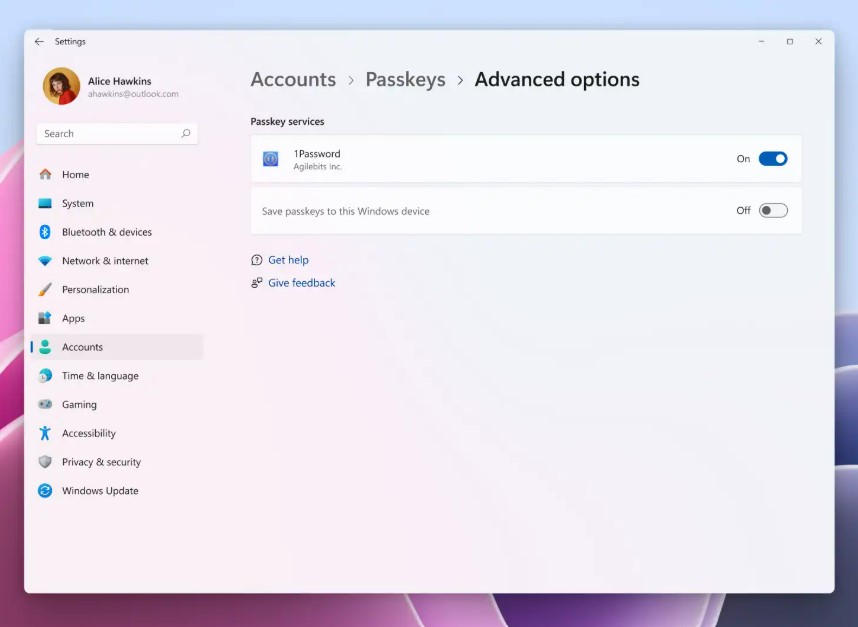
A Streamlined Setup Experience
After enabling the toggle, Windows displays a new dialog every time you create a passkey. Instead of offering to store it in Windows Hello, the system now asks whether you want to save it directly into 1Password.
This small change removes confusion—especially for users juggling multiple devices or trying to keep all their security credentials in one place.
What This Means for Windows 11 Users
This update does not automatically replace your passwords. Instead, it introduces a faster, safer alternative whenever a website supports passkeys.
Some major services allow users to go fully passwordless, including:
- Microsoft accounts
- Google accounts
- Apple ID
- GitHub
However, full passwordless adoption requires careful planning to avoid account lockouts, especially when losing devices.
As passkeys become mainstream, the goal is to make login experiences frictionless, secure, and universal, regardless of the platform you’re using.
What’s Coming Next?
1Password may be the first to support the new API, but Microsoft expects competitors like Bitwarden and Dashlane to add support soon. Users who prefer Microsoft’s own tools will be able to take advantage of the built-in passkey sync system via Edge and the Microsoft Password Manager.
Meanwhile, developers continue adopting FIDO2 and WebAuthn as passwordless standards. With broader industry adoption, passkeys will likely replace passwords entirely in the next several years.
For further reading, see Microsoft’s documentation on passkeys:
https://support.microsoft.com/en-gb/windows/passkeys-overview-301c8944-5ea2-452b-9886-97e4d2ef4422
Expert Perspective: Why This Update Matters
From a security standpoint, this change reduces:
- The risk of phishing
- Password reuse
- Credential stuffing attacks
Meanwhile, it improves:
- Biometric security integration
- Cross-platform login consistency
- User control over where keys are stored
Cybersecurity experts have long argued that the password system is outdated. With Windows 11 finally embracing third-party passkey management at a system level, the transition away from passwords is accelerating more quickly than ever.
Conclusion
The introduction of a passkey plugin API in Windows 11 marks an important milestone for both everyday users and IT professionals. By allowing apps like 1Password to manage passkeys natively, Microsoft is giving users more freedom, more security, and a smoother experience overall.
As more password managers adopt this integration, Windows 11 users will benefit from a future that is easier, faster, and far more secure than anything passwords could ever offer.
