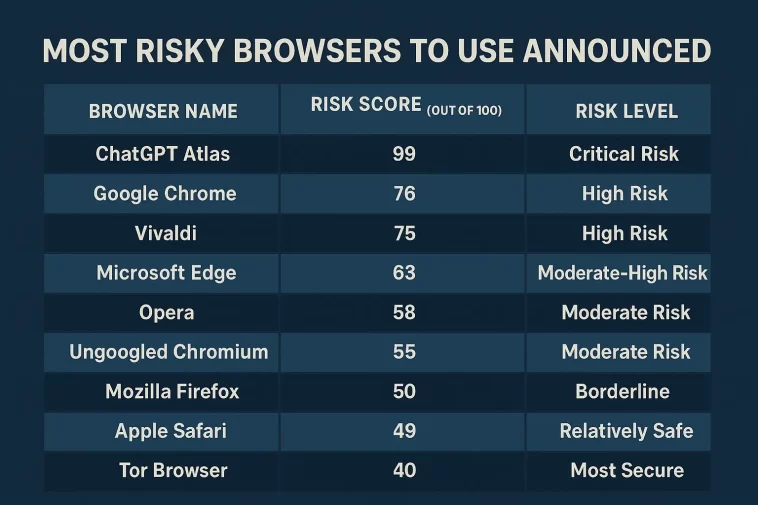
Most risky browsers to use announced and the results are quite alarming for anyone who values their online privacy. According to a new report published by Digitain, the internet browsers we rely on every day might be doing more harm than good when it comes to protecting our personal data. While we often choose our web tools based on speed or cool AI features, this latest data suggests we should be looking much closer at the “privacy tax” we are paying.
In this post, we’ll dive deep into the Digitain report, look at why some of the most popular names in tech are failing privacy tests, and rank the browsers you should probably avoid if you want to keep your data to yourself.
The Digitain Report: A Wake-Up Call for 2025
The U.S.-based market analysis firm Digitain recently conducted a comprehensive study on browser privacy. They didn’t just look at how fast a page loads; they analyzed cross-site tracking protection, tracker blocking, extension security, and connection encryption.
They assigned a “Risk Score” out of 100. In this ranking, a higher score means a higher risk to your privacy. If a browser scores a 99, it is essentially a privacy nightmare.
ChatGPT Atlas: The New King of High Risk
Perhaps the most shocking revelation in the report is that OpenAI’s new browser, ChatGPT Atlas, took the top spot for the wrong reasons. It earned a staggering 99 out of 100 risk points. As a browser powered by artificial intelligence, ChatGPT Atlas is designed to learn from your behavior to provide a better experience. However, the report indicates that:
- It failed to stop websites from tracking users across different sessions.
- It does not properly encrypt user data.
- It lacks basic defenses against malicious websites.
Essentially, because the AI needs to “see” what you are doing to be helpful, it ends up collecting far more personal information than a traditional browser ever would.
Google Chrome: Popularity vs. Privacy
It might not surprise you to see Google Chrome near the top of the list. Despite being the most used browser globally, it scored 76 risk points. Chrome’s business model is built on advertising, which means it has a built-in incentive to allow certain types of tracking. Even with Google’s recent attempts to update its privacy tools, analysts suggest they simply aren’t enough for the sophisticated threats of 2025.
Full Ranking: Most Risky Browsers to Use (2025)
Based on the Digitain analysis, here is the list of browsers ranked from the highest risk to the lowest. If you see your current browser at the top of this list, you might want to reconsider your choices.
| Browser Name | Risk Score (Out of 100) | Risk Level |
| ChatGPT Atlas | 99 | Critical Risk |
| Google Chrome | 76 | High Risk |
| Vivaldi | 75 | High Risk |
| Microsoft Edge | 63 | Moderate-High Risk |
| Opera | 58 | Moderate Risk |
| Ungoogled Chromium | 55 | Moderate Risk |
| Mozilla Firefox | 50 | Borderline |
| Apple Safari | 49 | Relatively Safe |
| DuckDuckGo | 44 | Safe |
| Tor Browser | 40 | Most Secure |
Why Are These Browsers Considered “Riskier”?
When we say most risky browsers to use announced, we aren’t just talking about getting a virus. We are talking about the invisible ways your identity is harvested online. There are three main factors that contributed to these high risk scores:
1. Cross-Site Tracking
This is when a browser allows a third party (like an ad network) to follow you from one website to another. If you look at a pair of shoes on a shopping site and then see ads for those same shoes on a news site five minutes later, your browser has failed to protect your privacy.
2. Browser Fingerprinting
Even if you clear your cookies, many browsers allow websites to see your screen resolution, battery level, and installed fonts. These small details create a “fingerprint” that is unique to you. The high-risk browsers on this list do very little to mask this fingerprint.
3. AI Data Harvesting
Newer browsers like ChatGPT Atlas and Perplexity’s Comet use AI to summarize web pages. To do this, they often send your active browsing data back to their servers to “process” the information. Digitain’s Digital Marketing Manager, Paruyr Harutyunyan, warned that just because a browser uses AI doesn’t mean it’s secure. In many cases, the AI is actually the one collecting the data.
The “Safe” Side of the List
It’s not all bad news. The report also highlighted browsers that are actually doing a great job. Brave and the Mullvad Browser were praised for their “privacy-first” approach.
Mullvad, in particular, was developed in collaboration with the Tor Project. It is designed to provide the security of the Tor network but with the speed of a regular browser. It doesn’t track your clicks, and it resets your “fingerprint” every time you close the window.
How to Protect Yourself in 2025
Regardless of which browser you use, you can take steps to reclaim some of your privacy:
- Audit Your Extensions: Remove any browser extensions you don’t use. Many are secretly selling your browsing history to data brokers.
- Use a Privacy-First Search Engine: Even on Chrome, using a search engine like DuckDuckGo or Brave Search can reduce the amount of data being tied to your profile.
- Check Your Permissions: Periodically go into your settings and see which websites have permission to use your camera, microphone, or location.
- Don’t Rely Solely on “Incognito”: Private mode usually only stops your family members from seeing your history on that specific computer. It does nothing to stop Google, your ISP, or the websites themselves from tracking you.
Final Thoughts
The digital landscape is becoming more complex. As we integrate more AI into our lives, the line between “convenience” and “surveillance” becomes thinner. The fact that the most risky browsers to use announced include the most popular ones shows that as users, we need to be more proactive.
Speed is great, and AI summaries are helpful, but they shouldn’t come at the cost of your digital identity. If you are using ChatGPT Atlas or Google Chrome, it might be time to look into more secure alternatives like Mullvad, Tor, or Brave.
