Windows Run Dialog Update begins the content — and it’s the central focus of this entire article. Microsoft is working on one of the most surprising interface changes in recent memory: a complete visual redesign of the classic Run dialog after nearly 30 years. While its functionality stays the same, the Run window is being updated to match the clean and modern aesthetic of Windows 11, marking its biggest refresh since the Windows 95 era.
A 30-Year-Old Windows Tool Finally Gets a New Look
For decades, the Run dialog has been one of the simplest but most essential tools inside Windows. Whether you are opening mspaint, calc, dxdiag, or other system utilities, the Run window has always served as a quick launcher for power users. Yet despite its importance, its appearance has remained almost unchanged for nearly three decades.
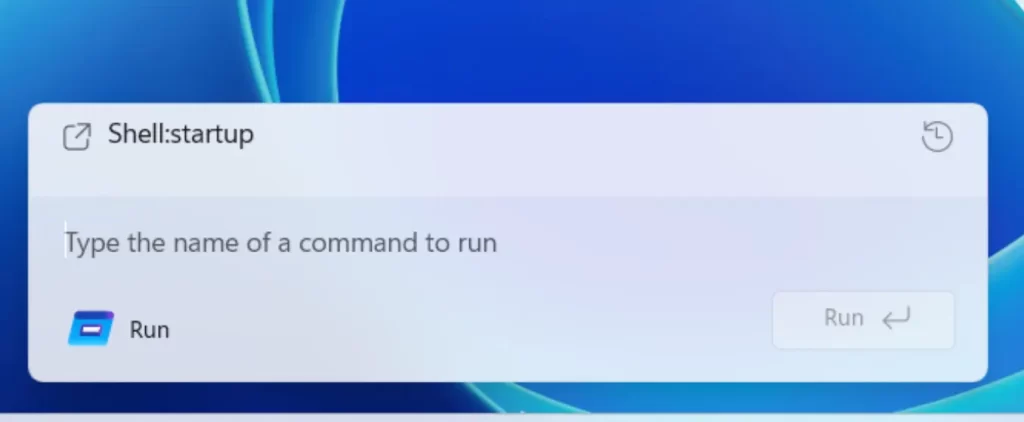
Now, with recent Windows 11 Insider Preview builds, Microsoft has started rolling out the first major visual update to this small but iconic tool. Rounded corners, improved spacing, modern UI elements, and full dark mode support give the Run dialog a polished look consistent with the rest of Windows 11.
The Run Dialog Update Modernizes Without Changing the Core
One of the most interesting aspects of the Windows Run Dialog Update is that Microsoft has deliberately kept its original functionality untouched. The company understands how deeply integrated this tool is in users’ workflows, so the update focuses on appearance rather than behavior.
You will still be able to type the same commands you’ve used since the late 90s. The redesign simply makes the window look smoother, cleaner, and more aligned with Windows 11’s Fluent Design.
A Reversible Design for Traditional Users
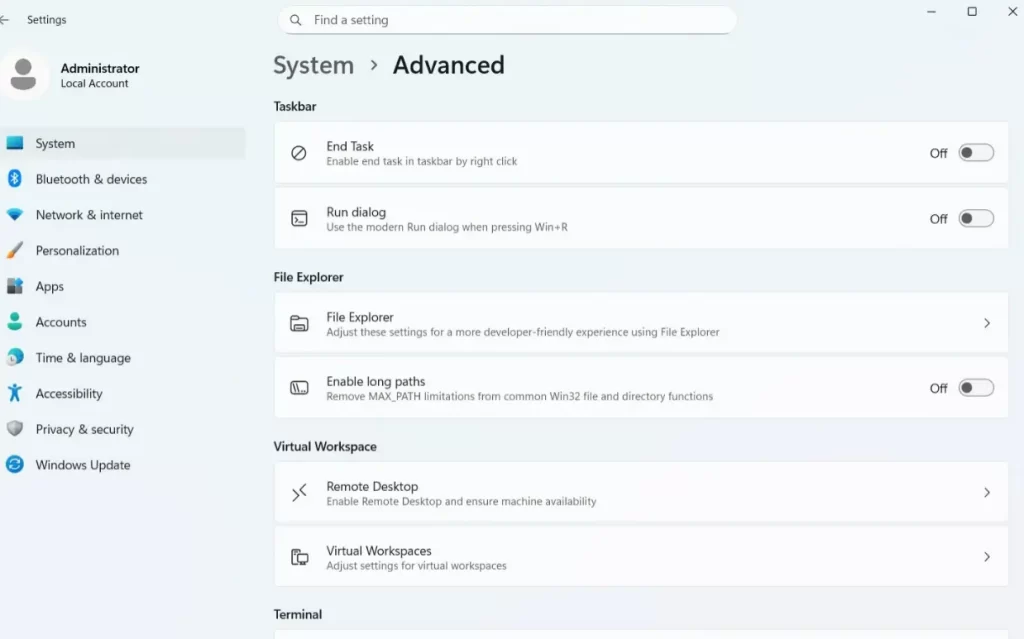
For users who prefer the classic Windows look, Microsoft is also offering a choice: the modern design can be disabled. Through the Advanced System Settings menu, power users can revert to the classic Run dialog anytime. This flexibility shows that Microsoft is taking a gradual, careful approach to visual updates.
Testing Starts with Windows Insiders
Right now, the new Run dialog is visible exclusively inside Windows Insider builds. This indicates that the update will undergo several rounds of testing before rolling out to everyone.
Microsoft has not made an official announcement yet, but insider discoveries show that the company is actively experimenting with the new interface. Screenshots shared by well-known Windows enthusiast Phantomofearth revealed the updated design for the first time. Although the experience isn’t finished yet, the overall direction is clear: simplicity, consistency, and modern UI principles.
Why Microsoft Is Updating the Run Dialog Now
The timing of this redesign is no coincidence.
Over the past few years, alternative launchers — such as Raycast on macOS — have become increasingly popular. Microsoft itself has also invested in modern tools like PowerToys Run and Command Palette, both of which offer more advanced launcher features.
With users expecting faster, integrated search and command capabilities, refreshing the Run dialog seems like a natural step in preparing Windows for the next era of productivity.
A Small Change With Big Meaning for the Windows Experience
Although the Run dialog is a tiny part of Windows, updating a tool that has been visually untouched for 30 years sends a clear message: Microsoft is continuing its mission to modernize every corner of Windows 11. Once the update rolls out officially, millions of users will get a refreshed experience that blends nostalgia with modern design.
As Microsoft prepares to introduce more UI changes across the operating system, the Windows Run Dialog Update stands as an example of how even the smallest tools can evolve while keeping their original identity intact.
