You try to log in and your password doesn’t work. You go to reset it and the recovery email isn’t yours anymore — the hacker swapped it out before you even noticed. This is how to recover a hacked Instagram account when you don’t have access to the email or phone number on file, and yes, it’s still possible even though every generic help article assumes you can just click a reset link.
I want to be upfront: this process is slower and more annoying than the standard password reset flow. But it works often enough that giving up isn’t the right move here.
Quick Answer
- Start with “Get help logging in” (or “Forgot password?”) and try your username first, not the old email — this is the step most people skip
- Look specifically for “Need more help?” or “Can’t access this email or phone number?” — that’s the path into Instagram’s actual identity verification flow
- You’ll likely be asked for a video selfie or ID upload to prove it’s really you
- If your account was ever linked to a Facebook account, try logging in through Facebook as a backup route
- Expect this to take anywhere from a few days to a few weeks — persistence matters more than speed here
Why This Happens (And Why It’s Harder to Fix)
Account takeovers follow a pretty predictable pattern, and understanding it actually helps with recovery. So it’s worth walking through quickly before jumping into fixes.
Credential stuffing is the most common entry point. If you reused a password from another site that got breached, attackers run those leaked credentials against Instagram automatically. It’s not usually a targeted hack — it’s automated, and it happens at scale.
The hacker changes contact info first, deliberately. Once they’re in, swapping the email and phone number is usually their first move, before you’d even notice the login. That’s specifically to block you from using the standard reset flow, which is exactly why that flow won’t work for you right now.
Fake “security” emails make it worse. Some hackers send a follow-up phishing email that looks like it’s from Instagram, claiming to help you “revert” the change — except the link steals your credentials again if you click it. If you get an email like this, don’t click anything in it; go directly to the app or instagram.com instead.
Linked accounts can work against you too. If your Instagram was connected to a Facebook account or another profile in your Accounts Center, that connection can actually help recovery — but only if you remember which account it was linked to, which a lot of people genuinely don’t.
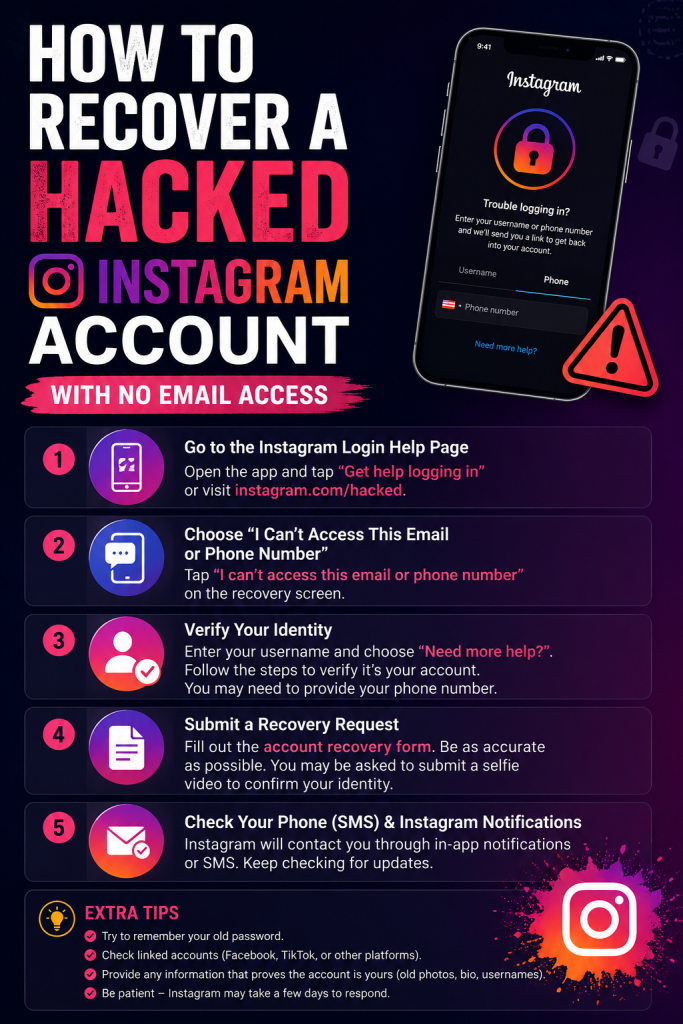
Step-by-Step Recovery Process
Step 1: Open the login help flow
On the Instagram app, tap “Get help logging in” (iPhone) or “Forgot password?” (Android). On desktop, go to instagram.com and click “Forgot password?”.
Step 2: Enter your username, not your old email
This is the part almost every guide buries or skips. If the hacker changed your email and phone, entering the old email won’t get you anywhere — but entering your username still works, because Instagram can look up the account by username even when the contact details attached to it have changed.
If you don’t remember your exact username, ask a friend who still follows you to check it, or look at an old tagged photo if you have one saved somewhere.
Step 3: Look for “Need more help?” or “Can’t access this email or phone number?”
Instagram will first try to send a code to the email or phone currently on file — which won’t reach you, obviously, since that’s the whole problem. Keep scrolling or tapping past that option until you find language like “Need more help?” or “Can’t access this email or phone number anymore?” This is the actual entry point into Instagram’s identity verification process, and it’s easy to miss because it’s not the first thing shown.
Step 4: Provide a new, secure email address
You’ll be asked for an email address that only you control — and it should be a fresh one, not connected to any other Instagram or Facebook account, since Instagram flags reused recovery emails as a fraud signal in some cases.
Step 5: Complete identity verification
Depending on your account, you may be asked to submit a photo ID, complete a video selfie where you turn your head in different directions, or answer questions about the account (recent posts, when it was created, connected accounts). This step exists specifically to stop hackers from using this same recovery path to steal accounts they don’t own — so expect it to be somewhat thorough.
Step 6: Try logging in with Facebook, if it was ever linked
If your Instagram account was ever connected to a Facebook account, try “Log in with Facebook” from the Instagram login screen. This can bypass the broken email/phone recovery path entirely if Facebook still recognizes the connection.
What Actually Worked For Me
A friend went through this a while back and let me walk through it with her, and honestly the process wasn’t as clean as any single guide made it sound. The first video selfie attempt got rejected — no explanation given, just asked to try again. That’s apparently common; lighting and having your full face clearly visible seem to matter more than people expect.
The second attempt went through fine, but then nothing happened for almost a week. No update, no email, just silence. So we assumed it had failed and started looking into alternative options, including some sketchy-looking “recovery services” that, to be clear, you should avoid entirely — most of those are scams that either take your money or try to phish you the same way the original hacker did.
Then, out of nowhere, the account came back. No warning, just a login prompt the next time she opened the app. The lesson here wasn’t some clever trick — it was just that the waiting period is real, and checking obsessively doesn’t speed it up.
Advanced Steps If Standard Recovery Fails
Check if the account got disabled, not just hacked. A significant share of hacked accounts end up flagged and disabled by Instagram’s automated systems, on top of being taken over. If that’s happened, you’re dealing with two separate problems, and you may need to go through both the hacked-account flow and a separate appeal for reinstatement.
Reach out through a connected account. If you have another Instagram or Facebook profile that was previously linked in the hacked account’s Accounts Center, reaching out to Meta support from that profile carries more weight than starting cold. Support reps are generally more responsive when there’s an existing verified connection to reference.
Document everything before you start. Screenshots of the “your email was changed” notification (if you got one before losing access), your old username, the approximate date of the hack, and any past login locations you remember all strengthen an identity claim. Vague claims with no supporting details tend to get slower responses.
Report it through Meta’s official channels only. There is no legitimate Instagram support phone number — any number claiming to be Instagram support that you find outside the app or the official Help Center is a scam. This one’s worth repeating because it’s exactly the kind of thing people search for out of desperation.
Prevention Tips
- Turn on two-factor authentication the moment you regain access — this alone blocks most credential-stuffing attempts
- Use a unique password for Instagram specifically, not one reused from another account
- Add a backup email and phone number to your account now, before anything happens, not after
- Link a trusted secondary account in your Accounts Center so you have a recovery path if this happens again
- Be skeptical of any “your account will be deleted” or “verify now or lose access” message — these are common phishing patterns, not real Instagram behavior
FAQ
How long does hacked account recovery actually take? It varies a lot — some people get back in within a day or two, others wait several weeks. There’s no reliable way to predict it, which is honestly the most frustrating part of the whole process.
Can I speed up the process by contacting Instagram support directly? Not really, no. Instagram doesn’t offer phone or live chat support for regular accounts in most cases, and paying for “priority recovery services” online is more likely to get you scammed than helped.
What if the hacker also changed my username? It gets harder, but not impossible — try recovering with any email addresses you remember ever adding to the account, even old ones, since Instagram sometimes retains a history of previously linked contact info.
Is video selfie verification safe? Yes, it’s a standard identity verification method Instagram uses specifically for account recovery cases, and the data isn’t used for anything beyond confirming you’re a real person matching the account.
Editor’s Opinion
this one just takes patience, theres no shortcut and anyone selling you a “guaranteed fast recovery” service is lying. use your username not your old email, thats the step everyone misses first try. and turn on 2fa the second your back in, dont wait a week and forget like everyone always does.
