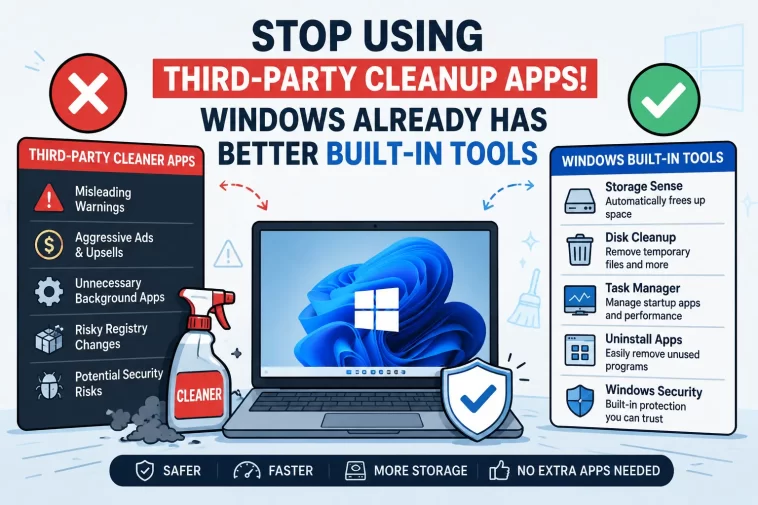
Windows cleanup tools have become powerful enough that most users no longer need third-party PC cleaning software. For years, Windows users downloaded cleanup applications hoping to speed up their computers, free up storage space, and improve overall performance. Programs promising “one-click optimization” became extremely popular, especially among users frustrated by slow boot times and cluttered storage drives.
But Windows has changed dramatically over the past few years. Microsoft now includes several built-in maintenance and optimization tools that can handle nearly everything most cleanup apps claim to do. From automatic temporary file removal to startup management and storage optimization, Windows already includes reliable features that work without additional downloads.
At the same time, many third-party cleanup applications have gained a questionable reputation. Some bundle unnecessary software, display aggressive advertisements, exaggerate system issues, or make risky registry changes that can cause stability problems. As a result, more technology experts are recommending that users rely on native Windows tools instead.
Why Third-Party PC Cleaner Apps Became Popular
Years ago, Windows systems often required regular maintenance to stay fast and responsive. Older versions of the operating system lacked many automated cleanup features users expect today. Temporary files accumulated quickly, startup programs slowed boot times, and uninstalling software frequently left behind clutter.
This environment allowed third-party PC optimizer apps to become extremely successful. Companies marketed these tools as essential utilities capable of fixing registry errors, boosting gaming performance, cleaning junk files, and extending hardware life.
Many users installed applications such as CCleaner, registry cleaners, RAM optimizers, and “system boosters” believing they would dramatically improve performance.
However, modern Windows systems now manage many of these tasks automatically. Windows 10 and Windows 11 include integrated maintenance systems designed to reduce the need for external optimization software.
Windows Cleanup Tools Already Handle Most Tasks
One of the biggest reasons users still install cleanup software is storage management. But Windows already includes several built-in tools specifically designed for that purpose.
Storage Sense Automates Cleanup
The most useful feature for everyday users is Storage Sense.
Storage Sense automatically removes temporary files, clears unnecessary cache data, empties the Recycle Bin, and manages old downloads if configured by the user. Unlike many third-party cleaners, it runs quietly in the background without ads or constant upgrade prompts.
Users can enable it by navigating to:
Settings → System → Storage → Storage Sense
Once enabled, Windows handles cleanup automatically based on the schedule selected by the user.
Technology experts increasingly recommend Storage Sense as the safest and simplest option for routine maintenance because it targets files Windows already recognizes as unnecessary.
Disk Cleanup Still Works Well
Although Storage Sense receives most attention today, the classic Disk Cleanup utility remains useful.
Disk Cleanup allows users to remove:
- Temporary internet files
- Windows update leftovers
- Cached data
- Delivery Optimization files
- System error memory dumps
The tool has existed for years and continues to work reliably in Windows 11. Many users still prefer it because it offers more manual control than automated cleanup systems.
Startup Apps Have a Bigger Impact Than Most Cleaner Apps
Many slow PC problems are not caused by “junk files” at all. Instead, the biggest issue is often too many applications launching automatically during startup.
Cloud sync services, gaming launchers, messaging apps, RGB utilities, and background services can dramatically slow boot performance.
Windows already provides a simple solution through Task Manager.
Users can open Task Manager using:
Ctrl + Shift + Esc
Under the Startup tab, Windows displays applications that launch automatically alongside a “Startup impact” rating showing how heavily each program affects boot speed. Disabling unnecessary startup apps can noticeably improve system responsiveness without installing additional software.
This is one reason many PC experts argue cleanup applications often provide little real value. Windows already exposes the exact information users need to identify slowdowns.
Task Manager Is More Useful Than Most Optimizers
Another major advantage of modern Windows systems is the improved Task Manager interface.
Instead of relying on vague optimization scores or generic “health scans,” Task Manager shows real-time hardware usage data including:
- CPU usage
- RAM consumption
- Disk activity
- GPU performance
- Network activity
Users can quickly identify which programs consume excessive resources and close or uninstall them directly.
Many so-called optimizer apps simply repackage information Windows already provides natively.
Uninstalling Unused Programs Matters More
One of the most effective ways to improve PC performance is also one of the simplest: removing unused software.
Old games, manufacturer bloatware, trial programs, and forgotten utilities often continue running background services even when users no longer actively use them. This consumes storage space, RAM, and CPU resources.
Windows allows users to uninstall software directly through:
Settings → Apps → Installed Apps
Sorting by install size or installation date helps users quickly identify unnecessary programs.
Some advanced users also use Microsoft’s built-in Winget package manager for faster software removal and updates.
Registry Cleaners Remain Controversial
Among all optimization software categories, registry cleaners are still considered the riskiest.
Registry cleaner programs claim that invalid or leftover registry entries slow down Windows performance. However, many experts argue these entries have little measurable impact on modern systems.
More importantly, deleting the wrong registry values can create serious stability issues, break installed software, or even damage Windows itself.
This is one reason many IT professionals advise users to avoid registry cleaners entirely unless absolutely necessary.
Reddit discussions also frequently warn users against aggressive registry modification tools. Several community members noted that Windows manages memory and registry systems better than most third-party applications.
Some Users Still Prefer Third-Party Uninstallers
Although many cleanup tools are unnecessary today, some users still prefer specialized uninstallers for difficult software removal cases.
Applications such as Revo Uninstaller and Geek Uninstaller remain popular because they can sometimes remove leftover folders and registry entries after broken uninstallations. Reddit users and tech forums frequently mention these tools when discussing stubborn applications that Windows fails to remove completely.
However, even supporters of these tools generally recommend using them only when Windows’ built-in uninstall system fails.
For normal users, the built-in uninstall process is usually enough.
Windows 11 Continues Expanding Built-In Maintenance Features
Microsoft continues improving Windows maintenance utilities with each major update.
Recent Windows 11 versions expanded:
- Storage management
- Startup controls
- Security protection
- Memory handling
- Driver management
- System recovery tools
Features like “Reset This PC” also make it easier for users to restore damaged systems without reinstalling Windows manually.
Many technology analysts believe this trend will continue as Microsoft pushes for a more self-managing operating system.
Security Risks of Some Cleanup Apps
Another reason experts recommend caution involves security and privacy concerns.
Some cleanup applications:
- Bundle unwanted software
- Display misleading warnings
- Continuously run background services
- Push paid upgrades aggressively
- Collect usage data
- Trigger false performance alarms
Worse, malicious fake “optimizer” programs sometimes disguise themselves as legitimate cleanup tools while actually functioning as adware or malware.
Because of this, relying on trusted Windows utilities often represents the safer option.
Community Opinions Continue to Shift
Online discussions increasingly show users moving away from aggressive system optimization tools.
Many Reddit users now recommend sticking with native Windows features unless users face a very specific technical problem. Several commenters noted that modern Windows systems already handle memory management, startup optimization, and storage cleanup efficiently without outside intervention.
That shift reflects broader changes in the PC industry. As operating systems become smarter and more automated, the demand for traditional “PC booster” software appears to be declining.
Final Thoughts
Modern Windows cleanup tools now cover most maintenance tasks everyday users actually need. Features like Storage Sense, Task Manager, Startup Apps, Disk Cleanup, and built-in uninstall tools provide reliable ways to keep PCs running smoothly without installing risky third-party optimization software.
While some advanced utilities still have niche use cases, the majority of users can safely avoid most cleanup apps entirely.
Instead of relying on aggressive “one-click optimizers,” Windows users are increasingly discovering that the safest and most effective solution is already built directly into the operating system.
