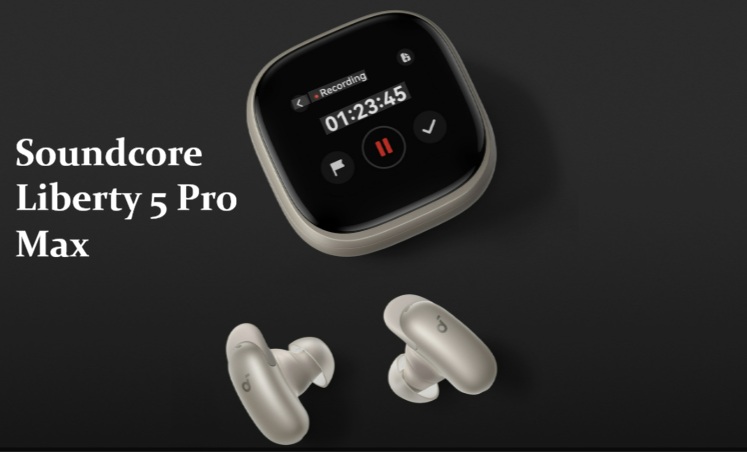
I’ve spent the better part of two weeks with the Soundcore Liberty 5 Pro Max strapped to my ears, and honestly, the earbuds themselves are only half the story here. At $229.99, this is Anker’s first real swing at “Pro Max” territory, and most of that price jump goes straight into the case, not the drivers.
So let’s get into whether that’s actually worth it, or whether you should just buy the cheaper Liberty 5 Pro and pocket the difference.
Quick Answer
- The earbuds inside the Pro Max are physically identical to the cheaper $169.99 Liberty 5 Pro — same drivers, same ANC, same battery life, same call quality.
- What you’re paying the extra $60 for is almost entirely the case: a 1.78-inch AMOLED touchscreen covering the entire lid, plus an AI Note-Taker.
- Call quality is genuinely excellent. The Liberty 5 Pro earned a Guinness World Record for objective speech quality (G-MOS) in TWS earbuds, and the Pro Max inherits that hardware.
- The AI Note-Taker can record meetings independently of your phone, but the most useful tier of transcription sits behind a paid subscription after 120 free minutes a month.
- Sound is fun and bass-forward rather than neutral, which won’t suit everyone chasing an audiophile signature.
Why the Case Is the Whole Pitch
Here’s the thing that took me a minute to wrap my head around. And so it’s worth saying plainly: if you strip away the case, the Pro Max doesn’t really exist as a separate product. The earbuds are the exact same hardware as the regular Liberty 5 Pro — same drivers, same Adaptive ANC, same battery numbers.
But that case is doing a lot. The lid is a full edge-to-edge 1.78-inch AMOLED display, a big jump up from the narrow strip screen on the standard Pro. You can swipe through it like a smartwatch home screen, adjusting ANC levels, EQ presets, and media playback without ever touching your phone.
I’ll admit I was skeptical about touchscreen cases in general — they’ve always felt like a feature looking for a reason to exist. But after using it daily, the appeal clicked for me in a specific way: the case keeps its own Bluetooth connection independent of the earbuds. That means you can leave it sitting on a desk during a meeting while your earbuds stay in your bag, and it’ll still record and process audio on its own.
What the AI Note-Taker Actually Does
This is the headline differentiator, and it works roughly like this: the case has its own microphone, records in-room conversations directly, stores up to 15 hours locally, and syncs to the Soundcore app for transcription, speaker identification, and summary generation. Important moments can be flagged with a tap on the case during the recording itself.
But — and this is where my enthusiasm cooled a bit — the free tier only gives you 120 transcription minutes a month. Past that, you’re looking at a recurring subscription to keep using the feature that’s the entire reason you paid extra for this model in the first place. That stings a little, not gonna lie.
Common Scenarios Where This Actually Helps
Frequent meeting-goers. If your week is full of in-person meetings, lectures, or interviews, having the case auto-transcribe and summarize without juggling a separate recorder app is a real workflow change.
Multi-device users. Multipoint connectivity supports up to three devices simultaneously, which matters if you bounce between a laptop, phone, and tablet throughout the day. Just know LDAC drops out once you’re connected to all three — you’ll need to step down to two devices if hi-res audio matters more than the third connection.
Cross-language conversations. Face-to-face translation runs through the case’s mic and speaker, so the other person doesn’t need to wear an earbud or share yours. One reviewer who tested this against Google Translate as a reference point found it handled short, simple sentences reasonably well.
Loud commutes and windy environments. The mic array does a solid job suppressing wind noise during calls, and the earbuds inherited that record-setting call clarity from the standard Pro model.
Step-by-Step Setup
- Pair the case separately, not just the earbuds. The AI Note-Taker and translation features rely on the case maintaining its own Bluetooth connection to your phone — this is a separate pairing step from the earbuds.
- Run HearID before judging the sound. The personalized hearing test builds a custom EQ profile, and the default Signature EQ leans heavily into bass that not everyone will like out of the box.
- Pick one AI mode at a time. Activating the AI voice control model disables AI Sound Enhancement, and vice versa — you can’t run both simultaneously, so decide which matters more for your use case.
- Customize the case wallpaper if you care about that sort of thing. It’s a small detail, but it’s there.
Technical Comparison
| Feature | Liberty 5 Pro | Liberty 5 Pro Max |
|---|---|---|
| Earbud hardware | Same drivers, same ANC | Identical to Pro |
| Case display | 0.96″ TFT touch strip | 1.78″ AMOLED, full lid |
| AI Note-Taker | Not included | Included, 120 free min/month |
| Price | $169.99 | $229.99 |
| Battery (ANC on, with case) | Up to 28 hours | Up to 28 hours |
| G-MOS certification | Yes, separately certified | Shares hardware, not separately certified |
That last row matters more than people realize — the Pro Max doesn’t have its own certification, it’s riding on the Pro’s earbud hardware.
What Actually Stood Out During Testing
The call quality genuinely surprised me. I walked along a busy street testing voice notes, and every word came through clean, no dropouts, no weird tonal shifts. That’s not nothing for sub-$250 earbuds.
What didn’t land for me was the touchscreen responsiveness. So more than once, I had to swipe two or three times before an action registered. It’s not a dealbreaker, but it’s the kind of small annoyance that chips away at the “smartwatch on your desk” fantasy the case is selling.
And the AI Sound Enhancement feature — it’s fine, but it felt more like a checkbox than something I noticed changing my listening experience day to day.
Advanced Notes for Power Users
The Thus AI chip running underneath all this is built on compute-in-memory architecture rather than the traditional separated processor-and-memory design most audio chips use. In plain terms, that’s why the on-device AI processing — translation, voice control, note transcription — runs locally without leaning on cloud servers, which helps both speed and battery life.
If privacy is a concern, recordings are secured with local AES-256 encryption, and temporary cloud files get deleted once transcription results come back, assuming you haven’t enabled cloud sync.
Prevention Tips
- Don’t expect the AI Note-Taker to work for phone calls or virtual meetings while the buds are in your ears — it’s designed for in-person, in-room audio only.
- Don’t run AI voice control and AI Sound Enhancement expecting both to work together. Pick one.
- Budget for the subscription if you’re a heavy meeting-recorder. The free tier runs out fast for daily use.
FAQ
Is the Pro Max worth $60 more than the regular Pro? Only if you’ll actually use the AI Note-Taker or want the bigger screen. The listening experience is identical between the two.
Does it really beat AirPods Pro on value? For the price, the feature set is hard to match. Apple still wins on ecosystem integration if you’re fully on iPhone.
Can the case record without my phone nearby? Yes, since the case keeps its own Bluetooth connection independently of the earbuds.
Is the sound quality genuinely good, or just loud? It’s bass-forward and fun rather than neutral. If you want a flatter, more accurate signature, you’ll want to dig into the EQ.
Editor’s Opinion
ok the case is the real story here, not the earbuds. call quality blew me away tbh, didnt expect that from a sub-250 pair. the subscription thing for the AI notes annoyed me a bit, feels like the main selling point is locked behind a paywall after the free minutes run out. touchscreen lag is minor but ill notice it every day probably. worth it if ur in meetings constantly, skip it and get the regular Pro if you just want good sound and ANC.
