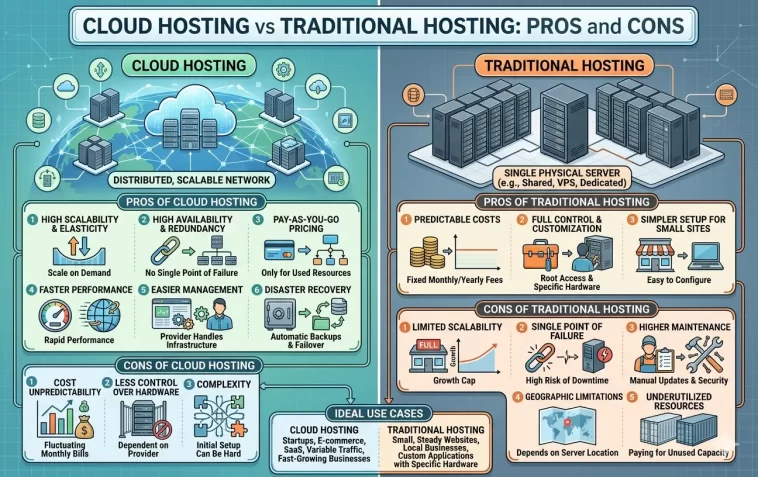
Cloud hosting vs traditional hosting is one of the most important decisions you’ll make when building a website or running an online business. Choose the wrong one and you’ll pay for it — with slow load times, unexpected downtime, or a bill that doesn’t match what you expected.
The good news is that neither option is universally “better.” They serve different needs, budgets, and growth stages. Once you understand how each one actually works, the right choice becomes much clearer.
This guide breaks down both hosting types from the ground up — what they are, how they differ, the pros and cons of each, and which one fits your specific situation.
What Is Traditional Hosting?
Traditional hosting means your website lives on a single physical server located in a data center. That server has a fixed amount of CPU, RAM, storage, and bandwidth. You pay a flat monthly fee for a set allocation of those resources — whether you use them all or not.
Traditional hosting comes in three main forms:
Shared Hosting — Your website shares a single server with dozens or even hundreds of other websites. It’s the cheapest option but comes with the most limitations. When another site on your server gets a traffic spike, your site slows down too.
VPS Hosting (Virtual Private Server) — The physical server is divided into isolated virtual environments. You get dedicated resources that aren’t shared with other users, more control over your configuration, and better performance than shared hosting.
Dedicated Hosting — You rent an entire physical server for yourself. No sharing, full resources, maximum control. It’s the most expensive traditional option and requires technical knowledge to manage.
What Is Cloud Hosting?
Cloud hosting distributes your website across a network of multiple interconnected servers — often spread across different geographic locations. Instead of relying on a single machine, your site can draw resources from any server in the network as needed.
When traffic spikes, the cloud automatically pulls extra resources from other available servers. When traffic drops, you scale back down. You pay for what you actually use, not a fixed allocation.
Major cloud platforms include Amazon Web Services (AWS), Google Cloud, and Microsoft Azure, along with managed cloud hosting providers that make these platforms accessible without needing deep technical knowledge.
Cloud Hosting vs Traditional Hosting: Side-by-Side Comparison
| Feature | Traditional Hosting | Cloud Hosting |
|---|---|---|
| Infrastructure | Single physical server | Network of multiple servers |
| Scalability | Manual upgrades required | Automatic, real-time scaling |
| Uptime | Vulnerable to single point of failure | High redundancy, usually 99.9%+ |
| Pricing model | Fixed monthly fee | Pay-as-you-go (usage-based) |
| Performance under traffic spikes | Can crash or slow significantly | Handles spikes automatically |
| Setup complexity | Simple, beginner-friendly | More complex (unless managed) |
| Cost predictability | Very predictable | Can vary month to month |
| Technical control | Varies by plan | High |
| Best for | Small sites, fixed budgets | Growing businesses, variable traffic |
Pros and Cons of Traditional Hosting
Pros
Predictable, fixed pricing You know exactly what you’ll pay every month. There are no surprises based on traffic spikes or usage. For small businesses with stable, low traffic, this financial predictability is genuinely valuable.
Simple to get started Traditional hosting — especially shared plans — is designed for non-technical users. Most providers offer one-click installs for WordPress and other popular platforms. Setup takes minutes.
Low cost at the entry level Shared hosting plans start at $2–$10/month, making them the most affordable way to get a website online. If you’re building a personal blog, a portfolio, or a small informational site, shared hosting is hard to beat on price.
Familiar and well-supported Traditional hosting has been around for decades. Documentation, tutorials, and support communities are vast. If something goes wrong, help is easy to find.
Dedicated hosting offers maximum control At the top end of traditional hosting, dedicated servers give you complete control over hardware, software, and security configuration. For businesses with specific compliance requirements or custom setups, this level of control matters.
Cons
Single point of failure This is the biggest structural weakness of traditional hosting. If the physical server your site lives on goes down — due to hardware failure, a power outage, or a cyberattack — your site goes down with it. There’s no automatic failover to another machine.
Limited scalability When your traffic grows beyond your plan’s limits, you have to manually upgrade to a higher tier. That process takes time and often causes downtime during migration. There’s no way to handle a sudden, unexpected traffic spike automatically.
“Noisy neighbor” problem on shared plans On shared hosting, you share resources with other websites. If a neighboring site runs heavy processes or gets a sudden traffic surge, it eats into the resources available to your site. Your performance suffers because of someone else’s traffic.
Fixed resources whether you use them or not You pay for your allocated CPU and RAM regardless of whether your site uses 10% or 100% of it. During low-traffic periods, you’re essentially paying for idle capacity.
Hardware limitations Traditional hosting is tied to physical hardware. Upgrading means physically migrating to a different server, which creates risk and downtime. You can’t add resources instantly the way cloud infrastructure allows.
Pros and Cons of Cloud Hosting
Pros
Near-unlimited scalability This is cloud hosting’s biggest advantage. When traffic spikes — from a viral post, a product launch, or a seasonal rush — cloud infrastructure automatically allocates more resources in real time. Your site stays fast and available without any manual intervention.
High uptime and redundancy Cloud hosting distributes your data across multiple servers. If one server fails, another takes over immediately. This built-in redundancy makes true downtime extremely rare. Most reputable cloud providers guarantee 99.9%+ uptime, and many exceed 99.99%.
Pay only for what you use The usage-based pricing model means you’re not paying for idle resources. For sites with variable traffic, this is genuinely more cost-efficient than paying for a fixed plan that’s mostly unused. During quiet periods, your bill goes down automatically.
Better performance for growing sites Cloud hosting consistently delivers faster page load times and more stable performance under real traffic conditions than traditional single-server setups. In 2026, this directly affects SEO — Google’s Core Web Vitals make page speed a direct ranking factor, meaning your hosting choice affects your search engine visibility.
Geographic distribution Cloud providers operate data centers across the globe. Your content can be served from a location physically closer to your visitors, which reduces latency and improves load times for international audiences.
Advanced security features Cloud environments typically include automated backups across multiple locations, built-in DDoS protection, and AI-powered security tools that can identify threats faster than traditional signature-based systems. As of 2026, 96% of businesses use some form of cloud hosting, driven in large part by security improvements.
Disaster recovery Because your data is replicated across multiple servers and locations, cloud hosting makes disaster recovery far more robust than traditional setups. Even in worst-case scenarios, data loss is minimal and restoration is fast.
Cons
Unpredictable monthly costs The pay-as-you-go model cuts both ways. If your traffic unexpectedly spikes — or if you misconfigure something — your bill can climb sharply. For budget-conscious small sites, this unpredictability can be stressful.
More complex to manage Raw cloud platforms like AWS, Google Cloud, and Azure are powerful but not simple. Configuring them correctly requires real technical knowledge. Mistakes in configuration can mean security vulnerabilities or unexpected costs. Managed cloud hosting reduces this problem but costs more.
Overkill for small, stable sites If you run a simple blog, a small portfolio, or a local business site with consistent low traffic, cloud hosting’s scalability features are features you’ll never use. You’d be paying for complexity you don’t need.
Data privacy and compliance concerns When your data is distributed across multiple servers in multiple countries, questions about data jurisdiction, privacy law compliance (like GDPR), and data sovereignty become more complicated. Traditional hosting on a single server in a known location is simpler to audit.
Vendor lock-in risk Migrating between cloud providers is more complex than migrating between traditional hosts. Custom configurations, proprietary services, and platform-specific tools can make switching expensive and time-consuming.
Performance and SEO: Why It Matters More Than Ever in 2026
Your hosting choice directly affects your search engine rankings — and this connection has grown stronger over time.
Google’s Core Web Vitals measure page speed, responsiveness, and visual stability. These are direct ranking signals. A site that loads in 1.5 seconds outranks an identical site that loads in 4 seconds, all else being equal.
Traditional shared hosting, under traffic load, can struggle to deliver consistent Core Web Vitals scores. Cloud hosting, by automatically managing resources, delivers more stable performance across varying traffic levels.
If organic search traffic is important to your business, hosting performance is not a technical detail — it’s a competitive advantage.
Cost Comparison: What You Actually Pay
This is where most comparisons oversimplify. “Cloud hosting is more expensive” and “traditional hosting is cheaper” are both only sometimes true.
Traditional hosting costs:
- Shared hosting: $2–$15/month
- VPS hosting: $20–$80/month
- Dedicated hosting: $100–$500+/month
Cloud hosting costs:
- Entry-level managed cloud: $20–$50/month
- Mid-range cloud (AWS/GCP/Azure): $50–$200+/month depending on usage
- Enterprise cloud: Variable, can be thousands per month
For a small site with consistent, low traffic — a traditional shared or VPS plan is almost certainly cheaper and more than adequate.
For a site with variable traffic, growth ambitions, or uptime requirements — cloud hosting’s pay-as-you-go model often ends up cheaper when you factor in the cost of downtime, emergency upgrades, and oversized traditional plans.
The hidden cost of bad hosting is also worth considering: a site that goes down during a product launch, a slow site that ranks lower in Google, a security breach on an under-protected shared server — these have real financial consequences that don’t show up in a simple monthly fee comparison.
Which One Should You Choose?
Choose Traditional Hosting If:
- You’re building a personal blog, portfolio, or small informational website
- Your traffic is consistently low and predictable
- You’re on a tight, fixed budget and need a known monthly cost
- You’re a complete beginner and want the simplest possible setup
- You don’t expect significant growth in the near term
Choose Cloud Hosting If:
- You’re running an e-commerce store where downtime means lost revenue
- Your traffic is unpredictable or expected to grow
- You need 99.9%+ uptime as a business requirement
- You’re building a SaaS product, web application, or high-traffic content site
- You need global reach with low latency for international visitors
- SEO and page speed are priorities for your business
The Middle Ground: Managed Cloud Hosting
If cloud hosting sounds right for your needs but the technical complexity is a barrier, managed cloud hosting is the sweet spot. Providers like Cloudways, Kinsta, and WP Engine run your site on cloud infrastructure (AWS, Google Cloud) but handle all the technical management for you. You get cloud performance without needing to be a systems administrator.
FAQ: Cloud Hosting vs Traditional Hosting
What is the main difference between cloud and traditional hosting?
Traditional hosting places your website on a single physical server. Cloud hosting distributes your site across a network of multiple servers. This makes cloud hosting more scalable, more resilient to downtime, and better suited to variable traffic — but also more complex and sometimes less predictable in cost.
Is cloud hosting always better than traditional hosting?
No. For small websites with predictable, low traffic, traditional shared or VPS hosting is often the better choice — it’s simpler, cheaper, and more than adequate. Cloud hosting’s advantages (scalability, redundancy, global distribution) only become meaningful at a certain scale.
Is cloud hosting more expensive?
It depends on usage. Shared and VPS traditional hosting plans are cheaper at the entry level. But cloud hosting’s pay-as-you-go model can actually be more cost-efficient for sites with variable traffic, because you only pay for what you actually use. For large, growing businesses, cloud hosting often provides better value.
Which hosting is better for SEO?
Cloud hosting generally wins for SEO because it delivers faster, more consistent page load times and better uptime — both of which affect Google rankings through Core Web Vitals. However, a well-configured VPS or dedicated traditional server can also achieve strong performance.
Can I switch from traditional hosting to cloud hosting later?
Yes, and many businesses follow exactly this path. Starting on a traditional shared plan and migrating to cloud infrastructure as the business grows is a common and sensible approach. Migration takes planning but is entirely feasible.
What is managed cloud hosting?
Managed cloud hosting runs your website on cloud infrastructure (like AWS or Google Cloud) but a third-party provider handles all the technical configuration, security updates, and maintenance. It offers cloud performance without requiring deep technical expertise.
Is traditional hosting secure?
It can be. Dedicated hosting offers strong security since you control the entire server. Shared hosting is the most vulnerable traditional option — you share an environment with other sites, and a breach or attack targeting another site can affect yours. Cloud hosting typically offers more advanced built-in security features.
What’s the uptime difference between cloud and traditional hosting?
Traditional hosting on a single server is vulnerable to single-point failures. A hardware problem, power outage, or DDoS attack can bring the whole server down. Cloud hosting uses redundant, distributed infrastructure — if one server fails, another takes over immediately. Most cloud providers guarantee 99.9%+ uptime; many deliver 99.99% or better.
Final Thoughts
There’s no universally correct answer in the cloud hosting vs traditional hosting debate. The right choice depends entirely on where you are right now and where you’re going.
If you’re just getting started and need something affordable and simple — shared or VPS traditional hosting is a perfectly sensible place to begin. Thousands of successful websites run on traditional hosting without any problems.
If you’re building something that needs to grow, that can’t afford downtime, or that serves a global audience — cloud hosting is the infrastructure that makes that possible without breaking under pressure.
The most important thing is to match your hosting to your actual needs, not to the most impressive-sounding option. A $5/month shared plan is the right answer for the right website. And a $200/month cloud setup is equally the right answer for a different one.
Pick the infrastructure that fits your current stage, keep an eye on your growth, and upgrade when the time is right.
