Mine dropped out mid-call on a Tuesday, reconnected itself twenty seconds later, then did it again on the walk back from lunch. Not a one-off glitch — Sony’s own community forum has a whole thread of WH-1000XM6 owners describing the exact same random cutting-out pattern, and Sony support’s own troubleshooting flow confirms it’s a known enough issue to have a structured diagnostic process behind it. If your WH-1000XM6 keeps disconnecting from Bluetooth for no obvious reason, here’s what’s actually causing it and what fixes tend to stick.
Quick Answer
- Switch Bluetooth Connection Quality from “Prioritize Sound Quality” to “Prioritize Stable Connection” in the Sony | Sound Connect app
- Turn off multipoint (Connect to 2 devices simultaneously) if you’re not actively using it — it’s a common conflict source even when it “shouldn’t” be
- Update the headphone firmware through the app before trying anything more involved
- Reset the headphones (power + NC button for 10 seconds) rather than jumping straight to a full initialization
- Test with a second source device to figure out if it’s the headphones or your phone/laptop’s Bluetooth stack
Why This Keeps Happening
So there isn’t one single cause here, and honestly that’s the most annoying part — the fix that works for one person does nothing for the next. From what I’ve seen digging through Sony’s own support articles and forum threads, it comes down to a handful of recurring culprits.
LDAC at high bitrate is genuinely more fragile than AAC. LDAC pushes a lot more data over the Bluetooth connection than standard codecs, and Sony’s own documentation is upfront about this: higher data transmission volume means more room for interruption, especially in busy 2.4GHz environments. If you’re getting dropouts specifically during music playback rather than calls, this is the first thing to suspect.
Multipoint connections compete for bandwidth even when idle. The XM6 supports connecting to two devices at once, and it’s enabled by default. But keeping both connections live all the time — even when you’re only actively listening on one — creates more opportunities for one of those links to hiccup and drop.
2.4GHz interference is just a fact of modern homes and offices. Wi-Fi routers, microwaves, and other Bluetooth devices all share the same frequency band. And crowded environments — open offices, transit, anywhere with a lot of active Bluetooth devices nearby — make this measurably worse.
Outdated firmware carries forward known bugs. Firmware updates aren’t just for new features. Sony has patched Bluetooth connectivity bugs through firmware updates before, and running an older version means you’re stuck with whatever connectivity quirks that version shipped with.
Wear detection sensors can misfire and trigger unwanted power-offs. This one gets mistaken for a Bluetooth issue constantly. If the headphones are worn over a hood, thick hair, or a headscarf, the automatic wear sensors can fail to detect you’re wearing them and power the headphones off — which looks and feels exactly like a random disconnect, but isn’t a connection problem at all.
Common Scenarios
- During calls specifically — often points to a background app or system-level Bluetooth conflict rather than the headphones themselves
- During music playback on LDAC — usually a bandwidth/interference issue, less common on AAC or SBC
- Right after connecting to a laptop with multipoint still linked to a phone — the two connections fighting for priority
- Windows PCs specifically — often traced back to a stale Bluetooth driver or corrupted pairing cache rather than the headphones
- Wearing the headphones with a hood, scarf, or thick hair — false “disconnect” that’s actually the wear-detection sensor turning them off
Technical Comparison Table
| Symptom | Likely Cause | Fix |
|---|---|---|
| Drops mostly during music, rarely calls | LDAC bandwidth/interference | Switch to Prioritize Stable Connection |
| Drops right after connecting a second device | Multipoint bandwidth conflict | Disable “Connect to 2 devices simultaneously” |
| Random full power-off, not just audio cutting out | Wear detection misfire | Disable Automatic Power Off or adjust fit |
| Only happens on one specific device (e.g., one laptop) | Host device’s Bluetooth stack | Update host drivers, forget and re-pair |
| Persists across every device tested | Headphone hardware or firmware | Update firmware, factory reset, contact Sony support |
Step-by-Step Fixes
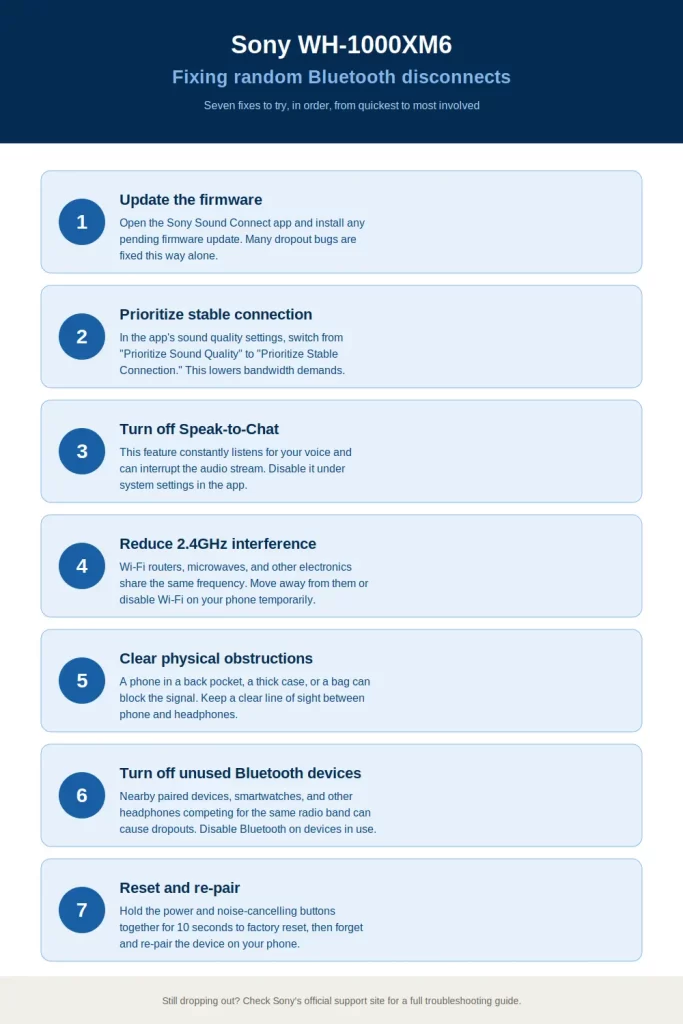
Step 1: Update the firmware first, before anything else
Open the Sony | Sound Connect app, go to your headphones’ device settings, and check for a firmware update. This is worth doing before any other troubleshooting since a chunk of connectivity bugs get resolved this way and there’s no reason to chase settings if a patch already fixes it.
Step 2: Switch to Prioritize Stable Connection
In the app, go to All device settings > Connection, and change Bluetooth Connection Quality from Prioritize Sound Quality to Prioritize Stable Connection. This forces AAC instead of LDAC, trading some audio fidelity for a meaningfully more reliable connection. Worth trying even if you’re not sure LDAC is the cause — it’s the single most commonly recommended fix and it’s genuinely fast to test.
Step 3: Turn off multipoint if you don’t need it right now
Same Connection menu, look for Connect to 2 devices simultaneously and disable it temporarily. If disconnects stop, you’ve found your cause — re-enable it only when you actually need to switch between two sources.
Step 4: Reset before you initialize
Hold both the power button and the Noise Cancellation/Ambient Sound button together for 10 seconds until the indicator flashes blue. This resets the headphones without wiping your Bluetooth pairing list, which is a lower-risk first step than a full factory initialization.
Step 5: Test with a completely different source device
Connect the headphones to a different phone, tablet, or laptop entirely. If the disconnects stop, the problem lives on your original device’s Bluetooth stack, not the headphones. If it follows the headphones to a second device too, that points toward the headphones themselves.
Step 6: Address wear detection if disconnects feel more like sudden power-offs
If it’s not really cutting out audio mid-stream but instead the headphones seem to fully power down, open the app and go to Power/Battery > Automatic Power Off, and select Do not turn off. Make sure the earpads are sitting directly over your ears rather than over a hood or thick hair, since that’s the actual trigger in a lot of these cases.
What Actually Worked For Me
I went straight for the reset first, because that’s usually my go-to and it’s worked before on older Sony models. Didn’t help at all — same pattern within an hour of reconnecting. Then I assumed it had to be a firmware issue since that’s the “correct” systematic answer, updated it, and that’s not entirely accurate either — it helped a little, dropouts got less frequent, but they didn’t stop.
What actually fixed it, and I’ll admit this felt almost too simple, was disabling multipoint. I had it connected to both my phone and laptop out of habit, barely used the laptop connection, and once I turned that off the dropouts just stopped. So the “advanced troubleshooting” answer for me turned out to be flipping one toggle I’d ignored because it seemed unrelated.
Advanced Fixes and Edge Cases
Corrupted Bluetooth cache on Windows. If disconnects are isolated to a Windows laptop specifically, the pairing cache itself can be the problem rather than anything on the headphone side. Forget the device in Windows Bluetooth settings, restart the Bluetooth Support Service through services.msc, then re-pair from scratch.
Absolute Volume and A2DP hardware offload on Android. In Developer Options, some Android phones have compatibility issues with Absolute Volume or A2DP hardware offload that manifest as random Bluetooth dropouts with certain headphone models. Disabling both and re-pairing has resolved this for some users, though it’s a more involved fix and not something to try until the simpler options are exhausted.
Wired testing to isolate hardware vs. Bluetooth. Connect the XM6 with the included USB-C or 3.5mm cable and see if audio stays stable. If it’s rock solid wired but drops constantly over Bluetooth, that narrows the problem to the radio connection rather than anything internal. If it also cuts out wired, that’s a different and more serious problem — likely worth contacting Sony support directly rather than continuing to troubleshoot Bluetooth settings.
When Sony support becomes the right move. If you’ve tried a different source device and the disconnects persist regardless of what you pair to, Sony’s own support process treats that as the signal to escalate to their technical team rather than keep testing settings — at that point it’s likely a hardware issue specific to your unit.
Prevention Tips
- Keep firmware updated through the Sony | Sound Connect app rather than ignoring update prompts
- Only leave multipoint enabled when you’re actually using both connections
- Default to Prioritize Stable Connection in noisy Bluetooth environments (offices, transit, gyms) and switch to Sound Quality only when you’re somewhere quiet and want the LDAC bump
- Keep the headphones charged — connection stability can degrade as battery gets critically low
- Periodically forget and re-pair with your primary device even without an active problem, since stale pairing data can accumulate quietly
FAQ
Does switching off LDAC actually fix disconnects, or does it just lower audio quality? Both, kind of. It reduces bandwidth demand, which genuinely improves stability in weaker signal conditions — it’s not just a quality trade-off, though you will hear less resolution on demanding tracks.
Is this a hardware defect or a software issue? In most reported cases, it’s software or environmental — codec bandwidth, multipoint conflicts, interference, or a host device’s Bluetooth driver. Hardware defects are possible but are the less common explanation, and Sony’s own troubleshooting flow treats hardware as a last resort after ruling out the connection-side causes.
Should I initialize (factory reset) the headphones right away? No — try the plain reset (power + NC button) first. Initialization wipes all Bluetooth pairing data, which means re-pairing every device, so it’s worth saving for after simpler fixes have failed.
Why does it only happen with one of my two paired devices? That usually points to something on that specific device’s Bluetooth stack — outdated drivers, corrupted pairing cache, or a conflicting setting — rather than the headphones.
Can wearing a hood or hat really cause this? Yes, more often than people expect. It’s not a true disconnect, but a wear-sensor misfire that powers the headphones off, and it looks identical to a Bluetooth drop from the user’s side.
Editor’s Opinion
the multipoint thing is the one nobody thinks to check first because it feels unrelated to “bluetooth keeps dropping,” but its been the actual fix more often than ldac in what ive seen. try that before you go digging into developer options or forgetting bluetooth caches. and if your headphones seem to just shut off mid-wear rather than cut out mid-song, check your fit before you assume its a connection bug at all.
