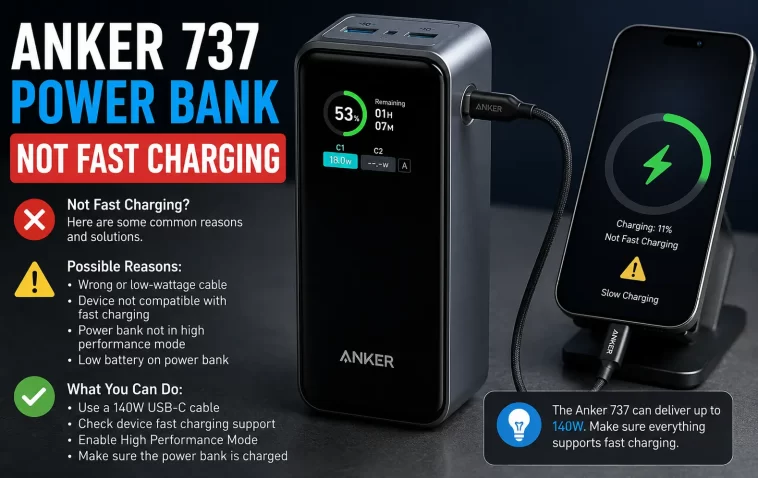
My 737 sat there showing 7W on the display while charging my MacBook, despite a 140W cable and a charger rated for exactly that. Panicked a little, assumed I’d gotten a dud unit. Turned out the screen wattage and the actual charging behavior aren’t always telling the same story, and Anker’s own support documentation is surprisingly upfront about that. If your Anker 737 isn’t fast charging devices it’s supposed to support, here’s what’s actually going on before you consider it defective.
Quick Answer
- Check total charge time, not the wattage number on the screen — Anker’s own support confirms the display can under-report actual output
- Try a different cable first; a cable rated below the port’s max wattage is the single most common cause
- The USB-C1 port is bidirectional and can occasionally misidentify a connected device as a power source, throttling output
- Reset the power bank by connecting its input and output ports together with a cable for 3-5 seconds
- Some devices (iPad Pro, certain DJI accessories) have their own charging ceilings well below 140W — that’s the device limiting itself, not the power bank failing
Why the Wattage Display Isn’t the Full Story
So this is the part that trips up almost everyone, myself included the first time — the number on the 737’s screen is not a direct readout of “this is exactly what’s happening.” Anker’s own troubleshooting documentation explains that the power bank runs an intelligent algorithm that adjusts output in real time to protect both itself and the connected device from overheating, and the displayed number doesn’t always match what’s actually reaching the device.
That’s a genuinely unusual thing for a manufacturer to say outright, and it means the better diagnostic isn’t staring at the screen — it’s timing how long the actual charge takes. If your laptop charges in roughly the time you’d expect, the power bank is doing its job even if the display showed a lower number partway through.
Common Causes of Reduced Fast Charging
Cable rated below the port’s capability. This is the most common cause by a wide margin. The 737 supports up to 140W output, but plenty of USB-C cables — including some that look identical to higher-rated ones — cap out well below that. If you’re not using a cable explicitly rated for the wattage you expect, this is the first thing to rule out.
The USB-C1 port’s bidirectional confusion. Both the power bank’s USB-C1 port and many device USB-C ports are two-way (they can accept or supply power). Anker has confirmed that when a device is connected to this specific port, the power bank can occasionally misidentify the connected device as a power input source rather than something to charge, which triggers a warning and throttles or interrupts charging. The USB-C2 port doesn’t have this issue since it’s output-only.
Smart power distribution kicking in with multiple devices connected. If you have devices on more than one port and you plug or unplug something, the power bank briefly disconnects everything, renegotiates power delivery across all connected devices, and reconnects. This looks like a random disconnect or charging interruption but is actually intentional behavior, not a fault.
The connected device has its own lower charging ceiling. Not every device that plugs into a 140W-capable port can actually accept 140W. An iPad Pro, for instance, may only accept around 18W regardless of what the power bank can output — the device itself is the limiting factor, and no amount of troubleshooting the power bank changes that.
Optimized battery charging on iPhones. If an iPhone appears to stop charging or slow dramatically around 80%, this is very often the phone’s own “Optimized Battery Charging” feature deliberately slowing the last stretch to protect battery longevity — not a power bank issue at all.
A charging adapter that isn’t actually suited to recharging the power bank itself. Some charging blocks — laptop chargers in particular — are tuned for their specific device and don’t necessarily deliver ideal output when recharging a power bank, even if the wattage rating looks sufficient on paper.
Common Scenarios
- Charging a MacBook and seeing a lower-than-expected wattage on the display — usually normal algorithm behavior, verify via total charge time instead
- iPhone charging fine to 80% then slowing dramatically — Optimized Battery Charging on the phone, not the power bank
- DJI drone accessories triggering a warning — some DJI charging docks request voltage/current combinations the 737 doesn’t support at that specific combination
- Two devices connected, one disconnects when you plug in a third — smart power distribution redistributing power, expected behavior
- iPad Pro capped well under 140W — the device’s own charging ceiling, not a power bank limitation
Technical Comparison Table
| Symptom | Likely Cause | Fix |
|---|---|---|
| Low wattage shown, but device charges in normal time | Display algorithm, not an actual fault | No action needed — check total charge time instead |
| Low wattage AND slow actual charge time | Cable or charger limitation | Swap to a certified high-wattage cable and charger |
| USB-C1 throws a warning, USB-C2 works fine | Bidirectional port misidentifying device | Use USB-C2 for output-only devices |
| Charging stops when second device plugged in | Smart power distribution renegotiating | Expected — reconnects automatically after redistribution |
| Consistently slow across all cables/chargers/devices | Possible internal fault | Reset the power bank, then contact Anker support if unresolved |
Step-by-Step Fixes
Step 1: Verify by charge time, not the display number
Before assuming anything’s wrong, time how long it actually takes to charge your device from the same starting percentage you’d normally expect. If that duration is roughly normal, the displayed wattage was likely just the algorithm doing its job, not a real problem.
Step 2: Swap the cable
Try a cable you know is rated for high wattage — ideally one that came with a device you know fast charges reliably elsewhere. This single swap resolves a large share of “not fast charging” reports.
Step 3: Test a different port
If you’re using USB-C1, move the device to USB-C2 and see if the issue persists. If it disappears, the bidirectional port confusion was almost certainly the cause.
Step 4: Isolate whether it’s the power bank or the wall charger
If the issue is with recharging the 737 itself rather than something it’s powering, try a different USB-PD wall charger with a genuinely high output rating. Laptop-specific charging blocks aren’t always ideal for recharging power banks even at a matching wattage rating.
Step 5: Reset the power bank
Take a USB-C cable and connect both ends into the input and output ports of the 737 simultaneously, holding the connection for 3–5 seconds. This has resolved a range of odd charging behaviors according to Anker’s own troubleshooting documentation. After resetting, fully discharge and recharge the unit once to let it recalibrate.
Step 6: Check the device’s own charging limits
Look up your specific device’s maximum accepted charging wattage. If it’s well below what the 737 can output, that ceiling is the device’s own design, and there’s nothing to fix on the power bank side.
Step 7: Rule out device-specific settings
For iPhones stalling around 80%, check Settings > Battery > Battery Health, and toggle off Optimized Battery Charging if you want full-speed charging past that point, understanding the tradeoff is slightly faster long-term battery wear.
What Actually Worked For Me
My MacBook situation turned out to be the cable, and I want to admit I didn’t expect that — I’d assumed a cable rated for 140W meant it was actually delivering that, since it was sold as a matching pair with the charger. Swapped to a different certified cable I had lying around from another device, and the actual charge time dropped noticeably, not just the number on the screen.
That’s not the whole story though. I also ran into the USB-C1 warning once, plugging in a device that apparently confused the power bank into thinking it might be a power source. Moving it to USB-C2 fixed that instantly, no reset needed. So depending on what “not fast charging” looks like for you specifically, the actual fix might be a five-second port swap rather than anything more involved.
Advanced Fixes and Edge Cases
DJI accessories and voltage/current mismatches. If you’re getting a UVP (under-voltage protection) warning with certain DJI charging docks, this has been specifically tested and documented by Anker — some DJI docks request 12V at 3A, which the 737 doesn’t support even though it handles similar combinations at other voltages. This isn’t fixable through troubleshooting; it’s a hardware compatibility limit, and the workaround is charging that specific accessory from a different source.
Persistent low output across every combination. If you’ve swapped cables, swapped ports, swapped chargers, and timed actual charge duration and it’s still consistently slow across the board, that points toward the power bank’s internal power management genuinely struggling rather than any external factor. At this stage, Anker’s own support has walked customers through additional diagnostic steps including testing another outlet entirely, and if that still doesn’t resolve it, warranty service becomes the realistic next step.
Trickle charge mode showing unexpected low wattage. If you see a persistent 0.1W output on the USB-A port with nothing connected, this is often trickle charging mode (activated by double-pressing the power button) or a brief 2-minute holdover after unplugging a device — not a malfunction, just an easy thing to misread as one.
Prevention Tips
- Use cables explicitly rated for the wattage you need, ideally ones from the same brand or confirmed compatible with high-wattage PD charging
- Reserve USB-C1 for devices less likely to be misidentified as power sources, and default to USB-C2 for straightforward output-only charging
- Don’t judge performance purely off the screen’s live wattage reading — track total charge time when something looks off
- Avoid daisy-chaining device connects/disconnects rapidly across multiple ports, since each change triggers a brief renegotiation
- Let the power bank fully discharge and recharge occasionally rather than only ever topping it off partially
FAQ
Why does the screen show a lower wattage than my charger’s rated output? That’s expected behavior from the power bank’s protective algorithm, not necessarily a problem. Check actual charge time to confirm whether it’s a real issue.
Is it normal for charging to briefly stop when I plug in a second device? Yes — this is the smart power distribution system redistributing power across all connected devices, and it reconnects automatically within moments.
My iPad Pro only charges at 18W even on the 140W port — is that a defect? No, that’s the iPad Pro’s own charging ceiling. The power bank can output more, but the device only requests what it’s designed to accept.
Why does my iPhone slow down dramatically near 80%? Most likely Optimized Battery Charging on the phone itself, not the power bank. It’s a battery-longevity feature, and it’s toggleable in iPhone settings.
Should I try a factory reset before contacting Anker support? Yes, the input/output cable reset (3-5 seconds, both ports connected) is quick and has resolved a range of charging quirks. If issues persist across multiple cables, chargers, and devices after that, contacting support is the appropriate next step.
Editor’s Opinion
the wattage display thing genuinely surprised me — most brands would never admit their own screen isnt telling the full story, but anker’s documentation says it outright. so dont panic over a low number, time the actual charge instead. the usb-c1 quirk is the other one worth remembering, since it looks like a defect but its really just the port getting confused about which direction power should flow. try the cable swap and port swap before you assume the unit itself is bad.
