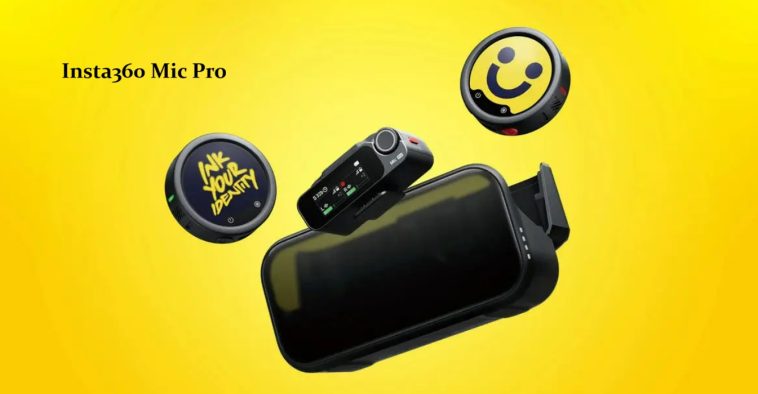
I’ve been running the Insta360 Mic Pro through actual shoots for a few weeks, and I keep coming back to the same thought: this is the first wireless mic kit where the case itself feels like part of the product story, not just a box you toss in your bag. So let’s get into why this thing matters, what it gets wrong, and whether the e-ink gimmick is actually a gimmick.
The Mic Pro ships in a 2TX+1RX configuration at the top end, plus smaller single-transmitter options, and pricing runs from roughly €109 for a single transmitter up to around $329.99 for the full kit. That’s a serious ask for a wireless lav system. But it’s also packing a feature set most competitors simply don’t have.
Quick Answer
- The headline feature is a customizable E-Ink display on each transmitter — upload a logo or image through the app, and it stays there using zero battery until you change it.
- Audio quality is genuinely excellent, with 32-bit float recording and a 3-microphone array that lets you switch polar patterns (omni, cardioid, figure-8) without swapping hardware.
- Battery life is strong — each transmitter runs roughly 10 hours, the receiver about 11, and the charging case extends total runtime up to 30 hours.
- The case itself is a mixed bag. It’s well-built and the magnetic mounts are clever, but several reviewers found it bulky and awkward to open.
- Not every accessory fits inside the case, so windshields and cables often end up loose in the included carrying pouch.
Why the E-Ink Display Actually Matters (Not Just Looks Cool)
Here’s the thing that surprised me. My first reaction to “e-ink microphone display” was that it sounded like a solution looking for a problem. And to be fair, some reviewers genuinely felt that way too — one noted the e-ink screen is nice but doesn’t offer a significant practical advantage and would’ve preferred a more compact design instead.
But once you actually use it on a shoot, the logic clicks. Because the display only draws power when it changes, you can leave a logo or branded graphic on screen indefinitely without touching battery life — not unlike a Kindle. That matters more than it sounds like on paper. A mic clipped to a shirt usually screams “this is a microphone” with a blinking LED or a visible brand logo. The e-ink panel can blend into an outfit, display a client’s branding, or just disappear visually depending on what you load onto it.
And there’s a technical bonus most people wouldn’t think of: because the screen doesn’t refresh constantly, there’s no flickering or moiré effect when it’s caught on camera. That’s a real, if small, win for anyone who’s ever had a screen strobe weirdly in footage.
Common Scenarios Where This Kit Shines
Branded content and interviews. Multiple reviewers pointed to interview setups as the obvious use case — having a logo show up on screen during a two-person sit-down adds a layer of polish that a plain black mic just can’t.
Outdoor and run-and-gun shooting. The 3-mic array and onboard noise cancellation, handled by a neural processing chip that separates voice from background noise, hold up well in wind and ambient noise.
Insta360 ecosystem users. If you’re already shooting on an X5, X4 Air, Ace 2 Pro, or GO Ultra, the transmitters connect directly to compatible cameras and record at 48kHz without needing the receiver at all. That’s a meaningful workflow shortcut if you’re already in that ecosystem — less so if you’re not.
Multi-person setups. The receiver supports up to four transmitters at once, letting you mic four separate subjects through a single connection point.
Step-by-Step: Getting the Most Out of It
- Set up the E-Ink image first, before anything else. It pairs over Bluetooth through the app, and the update process takes about 25 seconds. Do this before a shoot, not during one.
- Pick your polar pattern based on the scene, not habit. Because the patterns are emulated through the mic array rather than hardware, you can switch between omni, cardioid, and figure-8 without buying separate accessories.
- Use internal recording as a safety net. With 32-bit float onboard storage, you’ve got a backup if wireless interference or a camera failure ruins the live feed.
- Don’t expect everything to fit in the case. Windshields and certain cables stay in the separate carrying pouch — pack accordingly.
Technical Comparison
| Feature | Insta360 Mic Pro | DJI Mic 3 |
|---|---|---|
| Customizable display | Yes — E-Ink, zero battery draw when static | No |
| 32-bit float recording | Yes | Yes |
| Total runtime (with case) | Up to 30 hours | Up to 28 hours |
| Transmitter battery | ~10 hours | ~8 hours |
| Range | Up to 400m claimed | Similar claimed range |
| Polar pattern flexibility | 4 emulated patterns via 3-mic array | More limited |
The numbers are close enough that battery life isn’t really the deciding factor here — it comes down to whether the display and pickup flexibility matter to your workflow.
What Actually Stood Out (and What Didn’t)
The sound quality won me over fast, honestly faster than I expected for a mic kit this gimmicky-sounding on paper. Switching between cardioid and omni mid-shoot without unclipping anything felt like a genuine workflow upgrade, not a marketing checkbox.
The case, though — that’s where my patience wore thin. The opening mechanism isn’t intuitive, with the latch and hinge positioned in a way that doesn’t match how you’d naturally pick it up. And the translucent front panel looks like it should let you see the transmitter displays through it, but the tinting is dark enough that it basically doesn’t.
So yeah, it’s not perfect. But the core mic experience held up every time I actually needed it to.
Advanced Notes for Audio-Focused Creators
If you’re chasing maximum flexibility, the stereo 32-bit float internal recording mode is worth digging into. Because the transmitter uses all three microphones simultaneously in directional pickup mode, you can capture stereo recordings directly on the transmitter itself — useful for mounting in awkward spots like near an engine bay or inside a vehicle where running a receiver cable isn’t practical.
Auto power-saving is also worth configuring early. When enabled on both transmitter and receiver, they’ll shut down automatically after about 15 minutes of no connection, which matters if you’re prone to forgetting gear powered on between takes.
Prevention Tips
- Don’t skip pairing the E-Ink image before a shoot — doing it on set wastes time you don’t have.
- Don’t assume the case fits everything. Plan your bag setup around the separate pouch for windshields and cables.
- Keep expectations realistic about the e-ink’s color reproduction — fine detail and complex colors don’t render perfectly at close range, though it looks fine from camera distance.
FAQ
Is the E-Ink display just a gimmick? Depends who you ask. Some reviewers think it’s a genuine practical upgrade for branding and discretion. Others think it adds bulk without enough real-world payoff. Both opinions are reasonable.
How does it compare to the DJI Mic 3? Audio flexibility and the display favor the Mic Pro. Compactness and simplicity favor the DJI Mic 3.
Is it worth it for casual creators? Probably not. This is built for people who already know they need pickup pattern flexibility and internal recording, not someone shooting basic talking-head videos.
Does the case protect against water or dust? No. Build quality is solid, but there’s no IP rating mentioned for the case itself.
Editor’s Opinion
ok i didnt think id care about a screen on a microphone but here we are. sound is genuinely great and the polar pattern switching saved me from packing extra hardware on a shoot last week. case design annoys me tho, the hinge thing is weird and ill probably keep forgetting how to open it for months. worth the price if ur already doing branded content, overkill if ur just vlogging from your room.
