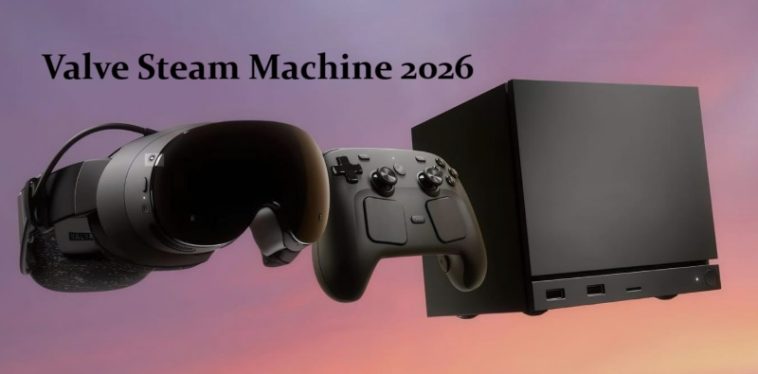
I had a reservation slot lined up for the Valve Steam Machine within an hour of sign-ups opening, and I still went back and forth on whether to actually pull the trigger once the $1,049 price showed up. That’s almost double what a lot of us assumed back when the November reveal happened. So this isn’t a spec-sheet recap — it’s me trying to figure out if this box earns a spot under my TV, and walking through the math out loud.
Quick Answer
- Base price is $1,049 for the 512GB model, $1,428 for the 2TB bundle with a Steam Controller.
- Performance sits between a PS5 and a midrange gaming PC — roughly six times the Steam Deck, mostly thanks to FSR upscaling rather than raw horsepower.
- It runs SteamOS 3, so your existing Steam library and Deck-verified games work out of the box.
- You can’t just buy one outright right now — Valve’s using a randomized reservation queue instead of first-come-first-served.
- Worth it if you’re deep in the Steam ecosystem and don’t already own a gaming PC. Skip it if you’re chasing console-level value or already have a decent rig.
Why It Costs This Much
Three things are driving the price, and none of them are really Valve’s fault.
The memory shortage hit at the worst possible time. RAM and VRAM prices climbed hard through 2026 as AI data center demand sucked up supply, and Valve has said directly that its original price target wasn’t viable once components got locked in over the past six months. That’s not marketing spin — Steam Deck prices went up more than 40% earlier this year for the same reason.
Valve isn’t subsidizing the hardware. Sony and Microsoft sell consoles near or below cost and make it back on games and subscriptions. Valve confirmed it’s not doing that here, which is a defensible long-term strategy but means you’re paying closer to PC-market rates from day one.
And honestly, the chip itself isn’t cheap to make. The semi-custom AMD silicon — a Zen 4 six-core paired with a 28-CU RDNA3 GPU — isn’t off-the-shelf, and custom silicon runs are never the cheap option for a company shipping at this scale.
What’s Actually Inside
The spec sheet reads like a console aimed at the upper-midrange PC tier, not a flagship:
| Component | Spec | Real-World Read |
|---|---|---|
| CPU | Semi-custom AMD Zen 4, 6-core/12-thread, ~4.86GHz | Solid for single-thread work, noticeably better than the PS5’s older Zen 2 cores per Geekbench leaks |
| GPU | Semi-custom RDNA3, 28 CU, 8GB VRAM | Roughly RX 7600-class — fine, not exciting |
| RAM | 16GB DDR | Workable but not generous for 2026 game requirements |
| Storage | 512GB or 2TB | 512GB fills up fast with modern install sizes |
| OS | SteamOS 3 | Mature Linux gaming layer, inherits Deck Verified compatibility |
That GPU is the thing to pay attention to. Valve’s “six times the Steam Deck” claim is technically true, but it leans entirely on FSR upscaling from 1080p to hit 4K60 — and Valve itself softened its messaging from a flat “4K 60” promise to a more careful “up to 4K.” Native 4K with ray tracing on is just not happening here. Read the six-times number as a ceiling, not a guarantee.
Real-World Scenario: Who This Actually Makes Sense For
Picture someone with a few hundred games already bought on Steam, no gaming PC, and a TV they’d rather not run a noisy tower next to. That’s the actual target buyer — not someone trying to replace a $3,000 desktop, and not someone comparing it dollar-for-dollar against a PS5. If you fall outside that lane, the value case gets a lot shakier fast.
Step-by-Step: Should You Reserve One?
- Check your eligibility first. You need a Steam account in good standing with at least one purchase before April 27, 2026, and it’s one reservation per household. No account history, no reservation slot — period.
- Be honest about your current setup. If you’ve already got a gaming PC that can output to a TV, you’re basically paying $1,049 for convenience, not new capability.
- Price out the alternative. A custom mini PC with similar specs runs about the same money but needs Windows configuration and more fiddling for couch use. The Steam Machine wins purely on the “turn it on and it works” front.
- Look at your library, not the marketing. If most of what you play is Deck Verified already, you’ll have a smooth time. If you’re heavy into ray-tracing-dependent AAA titles, temper expectations.
- Decide if you can stomach the queue. Reservations are randomized, not first-come. Waitlisted buyers could be looking at 2027 for stock, according to early reporting.
What Actually Changed My Mind
I went in assuming I’d skip it — $1,049 felt steep for something I was mentally pricing at $700. What flipped it for me wasn’t the spec sheet, it was honestly just doing the math on what I’d spend cobbling together a mini PC with comparable RDNA3-class graphics, a case, and SteamOS tinkering time. It came out close enough in price that the “it just works” part stopped feeling like a luxury tax and started feeling like a fair trade. Your mileage may vary here — if you already enjoy building PCs, this calculation doesn’t help you at all.
Advanced Considerations: FSR, Verified Games, and Proton Quirks
If you’re coming from PC gaming and care about image quality, it’s worth digging into how Steam Machine Verified actually differs from Steam Deck Verified. Valve isn’t requiring the same resolution or legibility thresholds for Verified status on the Steam Machine, since it assumes a TV rather than a handheld screen. That means a game marked merely “Playable” on Deck could show up as fully “Verified” here — and vice versa, oddly enough, since some titles flagged Unplayable on Deck run fine in practice. From what I’ve seen browsing ProtonDB threads, that database is still more reliable for edge cases than Valve’s own labeling, at least for less mainstream titles.
On the Proton side, most modern AAA and indie games run with minimal fuss at this point — that’s a real shift from where things stood even two or three years ago. But anti-cheat-heavy multiplayer titles remain the recurring problem category. If your library leans competitive shooter, check compatibility before you commit, not after.
Common Recommendations That Don’t Actually Move the Needle
A lot of comparison posts frame this purely against the PS5 on raw teraflops, which misses the point — this isn’t a console-versus-console fight, it’s an ecosystem decision. Similarly, “just build a PC instead” gets thrown around a lot, but with current RAM and GPU prices, that advice is weaker right now than it would’ve been a year ago. The price gap between DIY and Valve’s box has narrowed more than people give it credit for.
Prevention Tips (For Your Wallet, Not Your Hardware)
- Don’t buy the 512GB model if you install more than a handful of large modern titles — you’ll be deleting and reinstalling within months.
- Don’t assume the bundled controller is mandatory; if you already own a Steam Controller or a compatible gamepad, skip the bundle and save the difference.
- Don’t reserve on a whim during the sign-up window just because it’s there — the 72-hour purchase window after you get invited is unforgiving if you haven’t decided yet.
FAQ
Is the Steam Machine worth it compared to a PS5? Not if you’re purely chasing value-per-dollar — the PS5 wins there. It’s worth it if your games and friends are already on Steam.
Can I just buy one without reserving? Not in the first wave. Valve’s running everything through the randomized queue system for now.
Will the price drop later? Maybe. Valve has said pricing reflects the components it locked in over the past six months, so if the memory market eases up, later batches could see adjustments. No promises though.
Does it play every Steam game? Most of them, especially anything Deck Verified. Anti-cheat-dependent multiplayer games are the main exception category.
Is 16GB of RAM going to be a problem? For most current titles, no. For a few years from now, possibly — it’s not a generous amount by 2026 standards.
Editor’s Opinion
honestly went back and forth on this one more than i expected to. the price stings, no way around that, but once you actually price out a comparable mini PC build right now it stops looking so bad. if you’re not neck deep in Steam already i’d just skip it tho — this thing only makes sense as an ecosystem play, not a raw hardware deal.
