
Firefox Nova redesign is the name being given to a potential major visual overhaul that Mozilla is currently exploring for its popular web browser. Early design mockups shared by developers offer the first glimpse at what could become the next major interface evolution for Firefox.
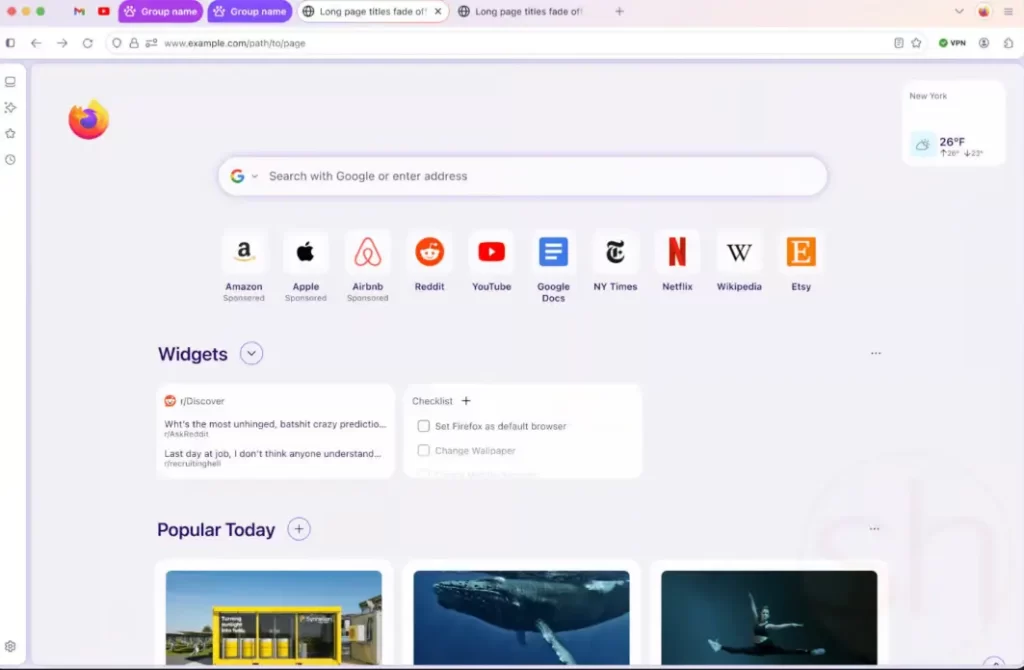
Although the redesign is still in its early stages, the concept shows significant changes to the browser’s appearance. Rounded shapes, pastel colors, floating interface elements, and a refreshed new tab page are among the features shown in the early images.
These concepts were revealed through mockups published by web developer and open-source contributor Sören Hentzschel. While the images are not final and could change before any official release, they provide insight into how Mozilla might be planning to modernize the Firefox experience.
Mozilla has redesigned Firefox multiple times in the past, but if implemented, Nova could represent one of the most noticeable visual changes the browser has seen in years.
A Softer, More Rounded Interface
One of the most obvious characteristics of the Firefox Nova redesign is the heavy use of rounded shapes throughout the interface.
In the current Firefox interface, tabs and navigation elements are relatively flat and structured. The Nova concept, however, introduces curved corners and softer shapes across many UI components.
Tabs appear more rounded, the address bar has smooth curves, and navigation elements seem grouped inside floating containers. Instead of looking like separate pieces, the interface feels more unified and fluid.
These floating sections create what designers call an “island UI” approach. In this style, the tab bar, address bar, and navigation tools appear as a single floating element rather than separate strips.
This design concept is becoming increasingly popular in modern software interfaces because it creates a cleaner and more minimal look.
Dynamic Colors Inspired by Modern Design Trends
Another key highlight of the Firefox Nova redesign is the use of dynamic colors.
Some of the early mockups suggest that the browser’s accent colors may automatically adjust based on the user’s desktop wallpaper or theme. This idea is similar to the dynamic color system used in Google’s Material You design language.
For example, if a user selects a mint-green wallpaper, the browser’s interface could shift to a similar color palette to match the background.
This approach helps create a more personalized browsing environment. Instead of a fixed color scheme, the browser would visually adapt to the user’s preferences.
The mockups also show pastel gradients, subtle shading, and brighter accent tones across menus and tabs.
Redesigned New Tab Page
The Firefox Nova redesign also introduces a refreshed new tab page.
In the concept images, the new tab layout looks cleaner and more modern. Elements appear inside rounded containers, and spacing between sections has been increased.
These changes could make the page easier to read and interact with. Important items like frequently visited websites, search tools, and shortcuts appear more organized.
Some screenshots also show refreshed icons with smoother shapes that match the new rounded design language.
The goal seems to be creating a more consistent visual style across every part of the browser.
Vertical Tabs Support
Another feature highlighted in the early mockups is support for vertical tabs.
Instead of displaying tabs horizontally at the top of the browser window, vertical tabs place them along the side of the screen. This layout can be especially useful for users who open many tabs at once.
Vertical tabs have become popular in alternative browsers like Arc and Microsoft Edge. Mozilla has been experimenting with the feature for some time, and the Nova design appears to integrate it directly into the interface.
If implemented, this could give Firefox users more flexibility in how they organize their browsing sessions.
Updated Panels and Settings Windows
Several other interface elements also appear redesigned in the Firefox Nova redesign mockups.
Panels such as downloads, site permissions, extension management, and privacy controls all seem to follow the same rounded visual style.
Instead of simple rectangular menus, these panels appear as smooth floating windows with softer edges.
This consistent design language could help make the browser feel more cohesive and easier to navigate.
Even smaller UI components such as hover effects and menu icons appear updated to match the new aesthetic.
Framed Web Page Content
One interesting design idea seen in the mockups is the concept of framed web content.
Instead of stretching web pages from edge to edge inside the browser window, the Nova design sometimes places the content inside a rounded container.
This creates a subtle frame around the page and visually separates the browser interface from the website itself.
Some experimental browsers have explored similar ideas before. The concept can make the browser feel more polished, though it remains to be seen whether Mozilla will adopt it permanently.
Mozilla’s History of Firefox Redesigns
The Firefox Nova redesign would not be the first major interface change in the browser’s history.
Over the past decade, Mozilla has introduced several large redesign projects, each aiming to modernize the browser’s appearance and improve usability.
One of the most notable was the Australis redesign in 2014, which introduced curved tabs and a more simplified interface.
In 2017, Mozilla launched the Photon interface with Firefox 57. That update focused on speed improvements and a cleaner design with square tabs and streamlined menus.
Later, in 2021, the Proton redesign arrived with Firefox 89. Proton simplified the interface further and removed visual clutter to create a more minimal experience.
Each redesign sparked strong reactions from the Firefox community, with some users welcoming the changes while others preferred the older layouts.
Not Every Redesign Succeeds
While many updates have been successful, Mozilla has also experimented with redesigns that never reached widespread adoption.
One example was Firefox Metro, an ambitious project designed specifically for Microsoft’s Windows 8 touch interface.
The browser was built to work both as a traditional desktop program and as a full-screen Metro application optimized for touch screens.
However, the project struggled to gain traction. Users had to manually set Firefox as the default browser to use it in Metro mode, which limited its reach.
After two years of development and limited adoption, Mozilla eventually discontinued the project in 2014.
This history shows that even major design experiments do not always make it into the final product.
Development Status of Firefox Nova
At the moment, the Firefox Nova redesign remains an internal design exploration.
Mozilla has not officially announced the project or confirmed a release timeline. However, references to “Project Nova” have appeared in Mozilla’s public Bugzilla development tracker.
These entries suggest that designers and developers are actively experimenting with interface improvements connected to the concept.
Still, the images currently circulating online are only early mockups. The final design could change significantly before any public release.
In fact, some ideas might never appear in a stable version of the browser at all.
When Could Firefox Nova Be Released?
Because the Firefox Nova redesign is still in early development, it is impossible to say when it might reach users.
Mozilla often tests experimental features internally before introducing them in Firefox Nightly builds. From there, features may move to beta versions and eventually the stable browser.
However, some design concepts remain experimental and are never released.
For now, Nova appears to be an exploration of potential directions rather than a confirmed update.
Still, the project offers an interesting look at how Mozilla may be thinking about the future of Firefox.
What This Means for Firefox Users
If the Firefox Nova redesign eventually becomes a real product update, it could signal a major shift in how the browser looks and feels.
The emphasis on rounded shapes, personalized colors, and floating UI elements reflects broader trends in modern software design.
These changes could make Firefox feel more contemporary and approachable, particularly for new users who are accustomed to visually dynamic interfaces.
At the same time, longtime Firefox fans will likely be watching closely to see whether the redesign maintains the customization and flexibility that have long been hallmarks of the browser.
For now, the Nova concept remains an early preview of what could be Mozilla’s next big step in browser design.
