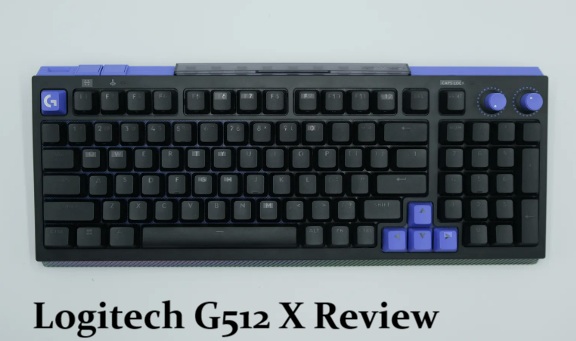
I’ve been swapping switches on the Logitech G512 X for about a week now, and I’ll admit I went in assuming “dual-switch” was just a marketing label for something I’d seen a dozen times before. It isn’t, exactly. So before you drop $180-200 on this thing, here’s what the dual mechanical-and-analog switch setup actually changes day to day, and where it doesn’t quite deliver.
Quick Answer
- Two sizes: 75% layout around $179.99/£199.99, 98% layout around $199.99/£200 (some retailers list it slightly higher — pricing has been inconsistent across regions).
- 39 of the switch beds support hot-swappable analog (TMR) switches alongside standard mechanical ones — the rest of the board stays fixed mechanical.
- Comes with 9 Gateron KS-20 analog switches and 5 SAPP rings stored directly on the keyboard, plus feet that double as switch/keycap pullers.
- Supports up to 8,000Hz polling and 0.125ms input latency on both switch types.
- Worth it if you want to experiment with analog switches without committing to a fully analog board. Skip it if you want full hot-swap coverage or wireless — neither is here.
Why “Dual-Switch” Actually Means Something Here
Most gaming keyboards make you pick a lane — full mechanical, or full Hall-effect/TMR analog. The G512 X doesn’t force that choice. Of its switch beds, 39 are built around tunneling magnetoresistance (TMR) sensors, which means you can either drop in the bundled analog switches for rapid trigger and custom actuation, or leave standard mechanical switches in place for that familiar tactile feel. The rest of the board stays fixed mechanical, full stop.
That’s a genuinely different approach from something like the Wooting 80HE, which is all-analog out of the box. The G512 X is betting that most people only actually want analog behavior on a handful of keys — WASD, arrow keys, maybe a couple of ability keys — and mechanical everywhere else. From what I’ve used so far, that bet is mostly right. I never found myself wishing more keys outside that 39-key zone were swappable, though your use case might genuinely differ if you play something with unusual keybinds.
Where It Falls Short
A few things keep this from being an easy top recommendation.
Only 39 of the switch beds are analog-capable. Competing boards like the Glorious GMMK 3 Pro HE and Cherry Xtrfy MX 8.2 Pro TMR offer full-board hot-swap, analog or otherwise. If you want total flexibility across every key, the G512 X simply doesn’t offer it.
No wireless option. Every G512 X ships wired only. Logitech’s reasoning is that 8,000Hz polling burns through battery life fast enough that a wireless version wouldn’t make practical sense — which tracks technically, but it’s still a real limitation if your setup is built around a clean desk.
Plastic chassis flex. A few reviewers flagged that the corners of the frame can flex slightly under pressure, and build quality doesn’t quite match boards like the Keychron K2 HE Concrete Edition. It’s not a flimsy keyboard, but it’s not a tank either.
The SAPP rings can work loose. These tiny rubber rings enable the dual-actuation trick (more on that below), and more than one reviewer mentioned they can fall out the back of a switch if you’re not careful during swaps.
How the SAPP Rings and Dual Actuation Actually Work
This is the feature that took me the longest to wrap my head around, so let me actually explain it instead of assuming you already know.
A second actuation pressure point (SAPP) ring is a small rubber ring that sits under the keycap on an analog switch. It adds physical resistance right around the 2mm mark in the key’s travel. Combined with Logitech’s G Hub software, this lets you map two different inputs to one key, depending on how far you press it. The textbook example — and the one basically every reviewer tested first — is binding walk to the shallow 0.1mm-2mm range and sprint to anything past 2mm on the W key. You feel the ring’s resistance as a tactile signal for when the second input kicks in.
It’s a genuinely niche feature. But it’s the kind of thing that, once you’ve used it in a fast-paced shooter, is hard to go back from. I’d recommend starting with just your spacebar or W key rather than rebuilding your whole movement scheme on day one — it takes a few sessions to build the muscle memory for hitting that second threshold reliably.
Logitech G512 X vs Competing Hybrid and Analog Boards
| Keyboard | Switch Coverage | Wireless | Approx. Price | Notable Tradeoff |
|---|---|---|---|---|
| Logitech G512 X | 39 of total switches (hybrid mechanical/TMR) | No | $180-$200 | Partial coverage, but better software/build than rivals at this price |
| Wooting 80HE | All keys analog (Hall effect) | No | Similar or less | More analog coverage for similar money, no mechanical option |
| Glorious GMMK 3 Pro HE | Full hot-swap, analog | Yes (some configs) | Higher | Full coverage but pricier |
| Keychron K10 HE | All-magnetic keys | Varies | Similar | Strong customization, different software ecosystem |
Step-by-Step: Setting Up Your First Analog Swap
- Pick your target keys. WASD and arrow keys are the obvious starting point since those are within the 39 TMR-capable beds — check the underside coloring (purple base = Dual Swap capable, black = standard mechanical) if you’re not sure which keys qualify.
- Use the included pullers. The G512 X’s adjustable feet double as keycap and switch pullers, so you don’t need separate tools.
- Swap in the Gateron KS-20 analog switches. Pop out the mechanical switch, drop in the analog one, replace the keycap.
- Open G Hub and let it scan. The software automatically detects which switches are now analog and unlocks rapid trigger and custom actuation settings for them.
- Set actuation conservatively at first. A lot of reviewers tested actuation as low as 0.1mm, but that’s genuinely too sensitive for most people — 0.5mm is a more livable starting point that still feels meaningfully faster than mechanical.
- Add a SAPP ring if you want dual actuation. Drop one into the slot under a swapped key, then configure the dual input in G Hub.
What Actually Surprised Me
I expected the mechanical side of this board to feel like an afterthought — like Logitech bolted on standard switches just to hit a price point. That’s not what happened. The low-profile MX mechanical switches have a rolling, clacky feel that’s genuinely enjoyable to type on, even if it’s a notch below a premium DIY board. What did catch me off guard was how often I reached for the analog WASD cluster even when I wasn’t gaming competitively — there’s something satisfying about rapid trigger that bleeds into regular typing speed too, in a way I wasn’t expecting going in.
Advanced Notes: Polling Rate and Game Mode
The G512 X supports up to 8,000Hz polling with 0.125ms input processing on both switch types, mechanical and analog alike. In practice, the difference between 1,000Hz and 8,000Hz polling is subtle for most people — it mostly shows up in extremely fast-paced competitive titles like CS2, where shaving milliseconds off input latency has measurable impact. If you’re not playing anything that demanding, don’t treat the polling rate number as the headline reason to buy this board.
There’s also a dedicated Game Mode button that disables keys you wouldn’t normally use mid-match (Windows key being the obvious culprit), which is a small but genuinely useful detail that’s easy to overlook when comparing spec sheets.
Prevention Tips
- Don’t crank actuation down to 0.1mm immediately — start higher and work down once you’ve got a feel for the switches.
- Don’t lose track of your SAPP rings — they’re small, and the storage slot helps, but it’s easy to misplace one during a swap session.
- Don’t expect full-board analog coverage — if that’s your priority, look at the Wooting 80HE or GMMK 3 Pro HE instead.
FAQ
Is the Logitech G512 X worth it over a fully analog keyboard? If you specifically want a mix of mechanical feel and analog precision, yes. If you want every key to be analog-capable, no — look elsewhere.
Does the G512 X work on Mac? Yes, though Windows/Alt key mapping needs manual reconfiguring in G Hub to behave like Command/Option.
What’s the difference between the 75% and 98% versions? Layout size and price — the 98% adds a number pad and costs roughly $20 more.
Can I use my own switches instead of the included Gateron KS-20s? Yes, as long as they’re compatible with the 39 TMR-enabled beds; that’s the whole point of the hot-swap design.
Is this keyboard loud? Moderately. The mechanical switches have a noticeable clack, and reviewers compared the typing sound favorably to higher-end boards, though it’s not silent by any stretch.
Editor’s Opinion
honestly didnt expect to get this into the swap-and-tinker side of things but here we are. the 39-key limit annoyed me at first then i realized i never wanted more than that anyway. price is a little steep for what’s still a partly-plastic board, but the software and the SAPP ring trick make up for it more than i expected going in.
