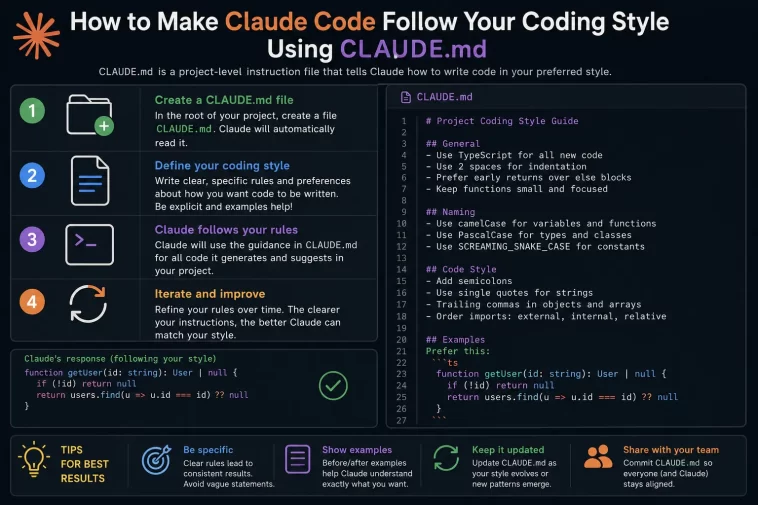
If Claude Code keeps writing code that technically works but doesn’t match how your team actually writes code, the fix usually lives in one file: CLAUDE.md. It’s a plain markdown file Claude Code reads automatically at the start of every session, and when it’s written well, it stops a lot of the repetitive “no, we don’t do it that way” corrections.
I spent a few weeks fighting this before I figured out why my CLAUDE.md wasn’t working the way I expected. Turns out the problem wasn’t that Claude ignored it — it was that I’d written it like documentation instead of instructions.
Quick Answer
- CLAUDE.md is a markdown file Claude Code loads automatically every session, at three possible scopes: project, personal, and organizational
- Vague style notes (“write clean code”) don’t change behavior — specific, checkable rules do (“use 2-space indentation, never em dashes in comments”)
- Keep it under roughly 200 lines; longer files lead to instructions getting missed or contradicted
- Move deep, path-specific, or occasional rules into
.claude/rules/subdirectory files instead of bloating the root file - If Claude isn’t following a rule, run
/memoryto check whether the file is even being loaded before assuming the rule itself is the problem
Why CLAUDE.md Doesn’t “Just Work” for Style
There are a handful of real reasons style rules in CLAUDE.md get ignored, and most of them aren’t bugs — they’re how the file is meant to behave.
Vague rules don’t give Claude anything to check against. “Write clean, maintainable code” sounds reasonable but means nothing operationally. From what I’ve seen, anything that isn’t specific and verifiable just gets treated as background noise. “Use 2-space indentation” works because it’s testable. “Keep formatting clean” doesn’t, because there’s no clear pass/fail.
The file might not be loading at all. Claude Code walks up the directory tree from wherever you started the session, collecting CLAUDE.md files along the way. If you’re working three folders deep and there’s a CLAUDE.md sitting at the repo root that hasn’t been read yet because nothing’s triggered it, your rules just aren’t in context. This trips people up constantly — they assume the rule is being seen and ignored, when actually it’s not being loaded.
The file is too long and rules start contradicting each other. Once a project file creeps past roughly 200 lines, compliance with any individual instruction tends to drop. And that’s not really Claude being inconsistent — it’s a long document with competing priorities, the same way a 40-page style guide gets skimmed instead of followed.
Style rules get mixed in with things that should be handled by tooling instead. Formatting preferences — tabs vs. spaces, quote style, line length — are things a linter or formatter should enforce, not something you should be re-litigating in every conversation. Putting them in CLAUDE.md as plain-text instructions works, but it’s the wrong layer for anything your CI already checks.
Where This Comes Up Most
- Monorepos with multiple services — a root-level CLAUDE.md with org-wide conventions, and each service having its own file for local patterns. Conflicts get messy fast if the layering isn’t clear.
- Solo developers across multiple projects — personal-scope CLAUDE.md (
~/.claude/CLAUDE.md) for things that should hold true everywhere, separate from project-level files. - Teams onboarding a new engineer who’s never used Claude Code — this is honestly where a good CLAUDE.md earns its keep the most. A new teammate would need the same context to be productive, and so would Claude.
- Personal local quirks that shouldn’t be shared —
CLAUDE.local.md, never committed, for the stuff that’s just about how you personally work, not the team’s conventions.
Technical Comparison: Where to Put a Rule
| Rule type | Where it belongs | Why |
|---|---|---|
| Indentation, quote style, line length | Linter/formatter config, not CLAUDE.md | Tooling enforces it consistently; text instructions degrade over a long session |
| “Always use async/await, never raw promises” | Project-level CLAUDE.md | Stable, applies repo-wide, changes Claude’s actual decisions |
| “I prefer terse commit messages” | Personal CLAUDE.md or CLAUDE.local.md | Individual preference, not a team standard |
Deep, path-specific conventions (e.g. how the /api folder structures error handling) | .claude/rules/ subdirectory file | Keeps the root file short; only loads when relevant |
Step-by-Step: Building a CLAUDE.md That Actually Controls Style
Step 1: Generate a Starting Point With /init
Run /init in your project root. It scans the codebase and creates a CLAUDE.md with a baseline structure — project overview, tech stack, development standards. Don’t treat the output as finished. It’s a skeleton, not a style guide.
Step 2: Replace Vague Statements With Verifiable Rules
This is the step people skip, and it’s the one that matters most. Go through every line and ask: could Claude check this against the code and know if it’s true? If not, rewrite it.
So instead of:
Follow good naming conventions
write:
Use camelCase for variables and functions, PascalCase for classes and types. Never abbreviate variable names below 3 characters except for loop indices (i, j, k).
Step 3: Write Style Rules as a Dedicated Section
A focused section header makes it easier for Claude — and your teammates — to find the relevant block instead of style notes being scattered across the file:
markdown
## Code Style
- Functional components only in React; no class components
- Prefer early returns over nested if/else
- Error handling: always catch and log with context, never swallow errors silently
- Comments explain *why*, not *what* — don't narrate obvious code
Step 4: Separate “Always” Rules From “Usually” Rules
Claude treats CLAUDE.md as context, not enforced configuration — it’s a strong influence, not a hard gate. If something must never be violated regardless of what Claude decides in the moment (say, a security rule), that’s a job for a PreToolUse hook, not a markdown instruction. CLAUDE.md is for guidance; hooks are for guarantees.
Step 5: Test It With a Throwaway Task
Give Claude a small, unrelated coding task and see if the style rules show up unprompted. If they don’t, that’s your signal something’s wrong with loading or specificity — not that Claude is being stubborn.
Step 6: Keep It Short on Purpose
If your file’s creeping toward 200+ lines, start splitting. Path-specific or occasional rules move to .claude/rules/, and the root CLAUDE.md becomes more of an index pointing at them rather than a single giant document.
What Actually Worked For Me
My first CLAUDE.md was almost 300 lines, and a chunk of it was personality and tone instructions that had nothing to do with code style — stuff like “be concise” and “explain your reasoning.” None of that was wrong exactly, it just buried the actual style rules under filler that didn’t change behavior.
I tried trimming adjectives first, thinking the problem was wordiness. That wasn’t really it — the problem was that half my “rules” weren’t checkable rules at all, just vibes. “Write idiomatic code” isn’t an instruction, it’s a wish.
What actually fixed it was going line by line and deleting anything Claude could’ve just figured out by reading the codebase itself — the file doesn’t need to explain things Claude will pick up naturally in the first session anyway. I kept maybe 40 lines of genuinely specific, testable rules, split the React-specific stuff into its own rules file, and the difference was immediate. Not perfect, but a lot closer to what I’d actually ask a new contractor to follow.
Advanced Fixes and Edge Cases
Rules in a nested CLAUDE.md aren’t being applied. Run /memory to see exactly which files are currently loaded. If the rule lives in a subdirectory’s CLAUDE.md and you haven’t navigated into or referenced that folder yet, it won’t be in context. Either explicitly mention the relevant file path or cd into the directory to trigger the load.
Conflicting rules across layers. When project-level and personal-level CLAUDE.md files disagree, more specific generally wins, and layers combine rather than replace each other outright. If you’re seeing inconsistent behavior, audit every CLAUDE.md in your tree with find . -name CLAUDE.md and check for contradictions — it’s a more common cause than people expect.
Excluding certain directories from a CLAUDE.md. You can configure claudeMdExcludes at the user, project, or local settings layer, and these arrays merge across layers. One caveat — managed policy CLAUDE.md files can’t be excluded this way, which is intentional, so that org-wide rules apply regardless of individual settings.
Auto memory drifting from your written style rules. Auto memory (on by default in recent versions) lets Claude save its own notes about preferences it picks up from corrections. Occasionally this can drift from or even contradict what’s in CLAUDE.md, especially weeks into a project. Worth periodically opening /memory and skimming what’s accumulated there — not 100% sure why, but auto-saved notes from edge cases sometimes generalize further than they should.
Fixes That Sound Right But Rarely Help
Writing longer, more “thorough” CLAUDE.md files is the instinct most people have when style rules aren’t sticking, and it almost always backfires — past a certain length, compliance drops rather than improves. So adding more words is rarely the fix; tightening what’s already there usually is.
Repeating the same rule in multiple places “for emphasis” doesn’t help either, in my experience. It just adds noise and increases the odds two slightly different phrasings of the same rule end up contradicting each other.
Prevention Tips
- Keep style rules specific and testable from the start, instead of writing them loosely and tightening later
- Let linters and formatters own pure formatting; reserve CLAUDE.md for decisions that aren’t mechanically enforceable
- Review CLAUDE.md occasionally and delete anything Claude clearly already knows from reading the code
- Split by scope early — project, personal, local — rather than dumping everything into one file and sorting it out later
- Use
/memoryregularly, not just when something’s broken, to see what’s actually loaded and what auto memory has picked up
FAQ
Does CLAUDE.md override what I type in a prompt? No — within a single conversation, a direct instruction generally takes precedence for that session, but CLAUDE.md is what persists across sessions. Use prompts to experiment, then move it to CLAUDE.md once you want it permanent.
Can I have more than one CLAUDE.md in a project? Yes. Claude Code collects them by walking up the directory tree, and they combine rather than override each other, with managed/org-level files always applying.
Why does Claude still write code differently than what I asked for in CLAUDE.md? Usually one of two things: the file isn’t being loaded from where you’re working, or the rule itself is too vague to be checkable. Run /memory first before assuming it’s ignoring you.
Is there a hard line limit for CLAUDE.md? No hard limit, but real-world usage shows compliance degrading well before 300 lines. Aim for 50-200 lines on the root file and move the rest into .claude/rules/.
Should formatting rules go in CLAUDE.md or in a linter config? Linter config, almost always. CLAUDE.md is for decisions a linter can’t make — architectural patterns, naming philosophy, error-handling approach — not indentation width.
Editor’s Opinion
CLAUDE.md is one of those things that looks simple and isn’t, mostly because it’s tempting to write it like a README instead of a set of rules. The biggest unlock for me wasn’t adding more to the file, it was cutting it down to things that are actually checkable. If your style rules sound like something you’d say to a teammate in passing rather than something a linter could verify, rewrite them — that’s usually the gap.
