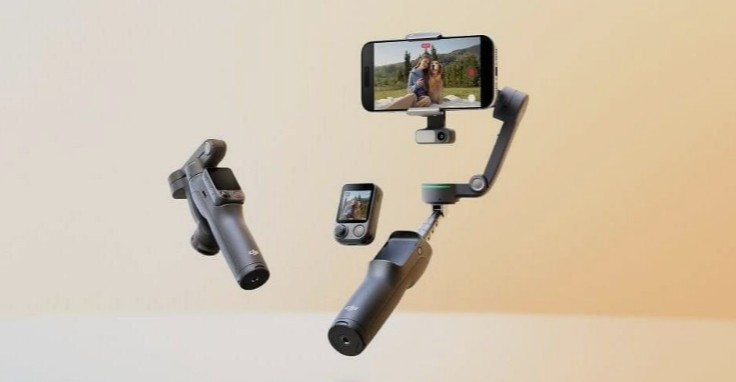
I had the Osmo Mobile 8P’s Advanced Tracking Combo running through a full afternoon shoot, phone clamped in, FrameTap remote popped off and in my back pocket, and at some point I just plugged my phone into the gimbal’s USB-C port out of curiosity. It actually charged. So yes, the power bank thing is real, not a footnote — but it’s not the whole story here, and there’s a control trade-off buried in this upgrade that nobody seems to be talking about enough.
Quick Answer
- Three bundles: Standard Combo (~£135), Advanced Tracking Combo (~£169), Creator Combo with mic (~£195) — pricing is UK/international, since DJI hasn’t officially launched this in the US.
- The headline new feature is the Osmo FrameTap, a detachable touchscreen remote that snaps onto the handle or pops off for remote framing.
- Doubles as a power bank via USB-C on the roll arm or the tracking module, useful during long shoots or livestreams.
- Up to 10 hours of battery life, 360° pan rotation, and three separate tracking methods (Mimo app, Module 2, and native DockKit/NFC tracking).
- Worth it if you shoot solo content and want remote framing control. Skip it if you relied heavily on the OM8’s physical zoom wheel — it’s gone.
What Actually Changed From the OM8
The Osmo Mobile 8 already had strong tracking and a 360° pan motor. What it didn’t have was any way to control the gimbal from a distance beyond basic gestures — and that gap is exactly what the 8P closes.
The FrameTap remote is the real story. It’s a small unit, roughly the size of a matchbox, with a 1.4-inch touchscreen bright enough to read outdoors. It clicks onto the handle magnetically for close-up use and detaches cleanly when you want distance — set the gimbal on a pole or tripod, walk away, and you can still see your framing and hit record from the remote itself. That’s a genuinely useful workflow change if you’ve ever set up a shot, walked into frame, and had to guess whether you nailed the composition.
Tracking also got a real bump. The new Multifunctional Module 2 (sold separately or bundled in the Advanced Tracking and Creator combos) follows not just people and pets now, but vehicles and other moving objects too — and it’s noticeably better at re-acquiring a subject who’s briefly stepped out of frame in a crowd. From what I’ve seen, the previous module would lose the thread fairly easily at concerts or busy streets; the new one holds on more often than not.
The Power Bank Feature, Specifically
This is the part that gets buried in most coverage, so let’s actually talk through it. The gimbal can feed power to your phone via USB-C, either through the port on the roll arm or through the tracking module if you’ve got one attached. It’s not designed to be your primary charging solution — think of it as an emergency buffer during a long livestream or a multi-hour shoot when your phone’s battery is dropping faster than you’d like.
A full recharge of the gimbal itself takes around 2.5 hours, and DJI’s quoting up to 10 hours of gimbal runtime in plain stabilization mode, dropping to roughly 8.5 hours with tracking and the fill light running at 50% brightness. So if you’re using the reverse-charging feature heavily during a shoot, expect your own runtime numbers to come in lower than DJI’s headline figures — that’s just basic battery math, not a flaw in the product.
Where It Falls Short
Not everything here is a clean upgrade.
The zoom/focus wheel is gone. The OM8 had a physical wheel for this. The 8P moved that control behind the FrameTap’s touchscreen, which means a function that used to be instant and tactile now takes a tap-and-swipe. It’s a real regression if you used that wheel often.
The joystick got smaller. Mode switching and camera toggling now mostly live in the touchscreen menu rather than dedicated buttons, so the 8P feels a step less hands-on day to day compared to its predecessor.
Module 2 dropped direct wireless mic support. If you’re upgrading from a gimbal that used the original Multifunctional Module, note that you can no longer connect a DJI wireless mic straight to the module — it has to go through your phone instead.
Still not officially sold in the US. As of this review, US buyers need to go through third-party retailers, which complicates warranty support and pricing consistency. Japanese pricing converts to roughly $127, $173, and $226 for the three combo tiers, though your actual cost will vary depending on where you buy.
Tracking Methods Compared
| Method | Works With | Needs Module 2? | Best For |
|---|---|---|---|
| DJI Mimo app | Any supported phone | No | Most flexible, full creative controls |
| Multifunctional Module 2 | Any camera app, no phone restrictions | Yes | Tracking vehicles/objects, native camera apps |
| Native DockKit/NFC tap | iPhone (DockKit), select Huawei/Samsung | No | Fastest setup, works in TikTok/Instagram directly |
That third option is genuinely underrated. Tap an eligible phone to the gimbal’s NFC zone and tracking just starts working inside whatever app you’re already in — no DJI app required. Android users outside the DockKit-equivalent ecosystems will need the Mimo app or the module instead.
Step-by-Step: Setting Up Your First Solo Shoot
- Unfold the gimbal. It powers on automatically — no separate button press needed.
- Attach your phone to the magnetic clamp. It self-centers and auto-calibrates; no manual balancing required, even with a heavier Android device.
- Decide your tracking method. iPhone users with DockKit can just tap to the NFC zone. Everyone else, open Mimo or attach Module 2.
- Position the gimbal and detach FrameTap. Walk to your mark, checking your composition live on the remote screen.
- Adjust framing using the joystick. It’s smaller than the old physical controls, so expect a slight adjustment period if you’re coming from the OM8.
- Hit record from the remote. No need to walk back to the gimbal to start or stop a take.
What Actually Surprised Me
I expected the FrameTap to feel like a gimmick — DJI throwing in a remote because competitors like Hohem already had one. It didn’t feel that way in practice. The first time I used it to check my framing from 15 feet away before walking into a shot, I realized how much guesswork I’d been doing with every previous gimbal I’d used. That said, I did miss the OM8’s zoom wheel more than I expected to — muscle memory is a real thing, and tapping through a touchscreen menu for something that used to be a single twist of a dial felt like a step backward more than once during testing.
Advanced Notes: Heavy Phones and Thermal Management
If you’re running a large, case-heavy Android phone, the 8P’s increased motor torque (DJI claims 20% more than the OM8) genuinely helps — earlier generations of this gimbal noticeably struggled with unbalanced camera modules on bulkier devices. Whether you’ll feel that 20% number directly is another matter; it’s the kind of spec that mostly shows up as fewer micro-stutters during fast pans rather than something dramatically obvious.
On the tracking module’s thermal side, Module 2 offloads ActiveTrack 8.0’s AI processing to its own built-in camera and chip rather than your phone’s CPU. That matters more than it sounds — long 4K or 8K recording sessions tend to heat up phones fast enough to trigger thermal throttling, and offloading that work to the module is a real, if invisible, benefit during extended shoots.
Prevention Tips
- Don’t rely on the reverse-charging feature as your main power source — treat it strictly as an emergency top-up.
- Don’t skip checking your phone’s weight and thickness against the clamp’s supported range (170g-300g, 6.9mm-11mm thick) before buying — heavier or thicker phones simply won’t fit securely.
- Don’t buy the Standard Combo if subject tracking on objects or vehicles matters to you — that requires the separately sold Module 2.
FAQ
Is the DJI Osmo Mobile 8P available in the US? Not officially through DJI’s US store as of this review — you’ll need a third-party retailer, which can complicate warranty claims.
Does the power bank feature work with any phone? Yes, via USB-C, regardless of brand, as long as your phone supports standard USB-C charging input.
Is the FrameTap remote sold separately? It comes included in all three combo bundles, including the base Standard Combo.
How is this different from the regular Osmo Mobile 8? Same core gimbal and battery life, but the 8P adds the detachable FrameTap remote and (with the right bundle) the upgraded Module 2 tracking.
Is the zoom wheel removal a dealbreaker? Depends on your workflow. If you zoomed constantly mid-shot on the OM8, you’ll notice it. If you rarely used it, you probably won’t care.
Editor’s Opinion
the FrameTap genuinely changed how i shoot solo stuff, not gonna lie about that. losing the zoom wheel still bugs me tho, feels like DJI traded one good thing for another instead of just adding the remote on top. power bank feature is a nice surprise extra, not a reason to buy it on its own, but good to have when you need it.
