I noticed the lag on day two — swiped left to switch ANC modes on the Liberty 5 Pro Max case, nothing happened, swiped again, and it finally registered on the third try. Multiple reviewers flagged the same thing during testing, so it’s not just my unit. This isn’t a “your case is broken” situation in most cases, though — it’s a software and resource problem with a few real fixes, and one cause that’s genuinely easy to overlook.
Quick Answer
- Touchscreen lag on the Liberty 5 Pro Max case is a widely reported issue, not isolated to specific units.
- The most common cause is the case’s Thus AI chip handling multiple processing tasks at once — voice control, AI Audio Enhancer, and the touchscreen UI are all competing for the same limited resources.
- Firmware updates have addressed similar responsiveness issues on other Soundcore touchscreen cases before, so check for updates first.
- Low case battery and a dirty or oily screen surface are two overlooked causes that have nothing to do with software at all.
- A factory reset of the case (not the earbuds) resolves persistent lag for a meaningful chunk of affected users.
Why It Lags
There are a few real, specific reasons this happens, and they’re worth understanding before you start changing settings blindly.
The Thus AI chip is doing more than rendering the screen. Soundcore’s documentation already admits that you can’t run AI voice control and the AI Audio Enhancer at the same time — turning one on disables the other. That’s a clear signal the chip has real processing limits, and the touchscreen UI is competing with whatever else is running on it. A swipe that should register instantly can get queued behind other processing tasks if the chip’s busy.
The case battery affects display performance. This one gets overlooked constantly. When the case battery itself drops low, the AMOLED display and its touch sensing layer can both throttle to conserve power, and that shows up as lag before it shows up as a low-battery warning. So checking case battery should genuinely be step one, not step five.
Firmware bugs in early units. This is a brand-new touchscreen format for Soundcore — the Liberty 5 Pro’s smaller 0.96-inch strip didn’t have nearly the same processing demands as the Pro Max’s full 1.78-inch AMOLED lid. Early firmware on genuinely new hardware categories tends to have rough edges, and touch-input timing is exactly the kind of thing that gets refined across the first few update cycles.
Screen surface contamination. Oil, sweat, or a cheap aftermarket screen protector can all interfere with capacitive touch sensing in ways that look exactly like software lag but aren’t. This is the cause most people skip past entirely while they’re busy poking through app settings.
Step-by-Step Fixes
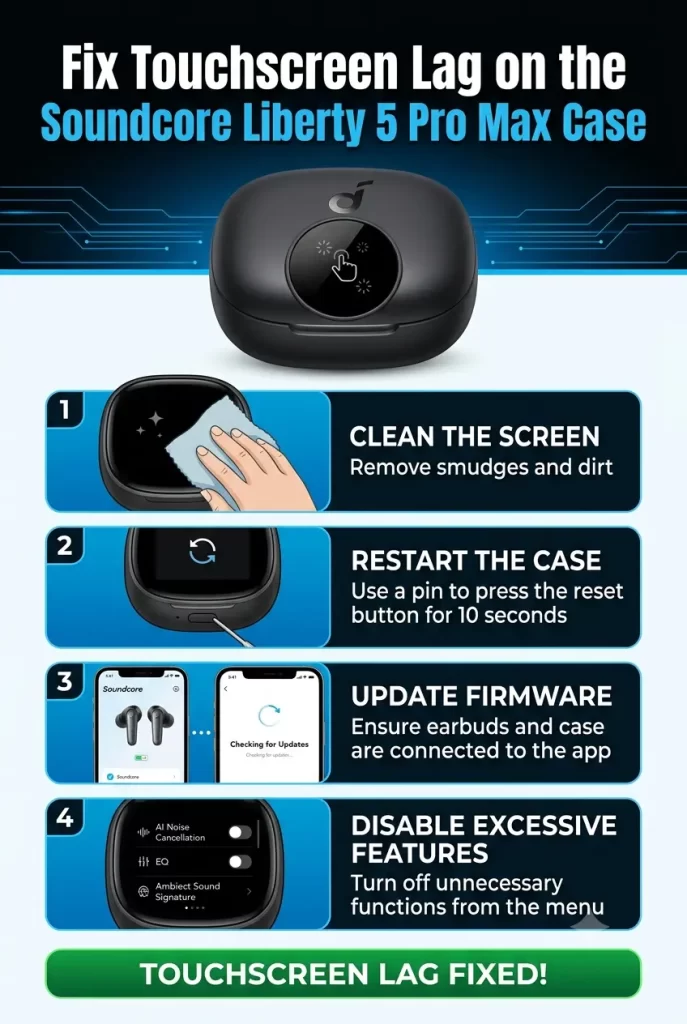
- Check the case battery level first. Open the soundcore app and check the case’s charge, not just the earbuds. If it’s under 20%, charge it before troubleshooting anything else — this alone fixes a chunk of lag complaints.
- Update firmware on both the case and earbuds. In the app, go to your device settings and check for available updates. Touchscreen responsiveness improvements are exactly the kind of fix that shows up in incremental firmware releases for new hardware like this.
- Clean the screen surface. Wipe the AMOLED display with a dry microfiber cloth — no liquid cleaners, since you don’t want moisture getting near the case’s seams. Test responsiveness again immediately after.
- Disable AI Audio Enhancer if you’re not using it. Since this feature and voice control compete for the same chip resources, turning off whichever one you don’t actually rely on frees up processing headroom that might be going toward the screen.
- Reduce screen brightness. Lower brightness settings reduce overall display processing load slightly, and some users have reported smoother swipe response after dialing it down from maximum.
- Try swiping with more deliberate, longer gestures. Quick, short flicks seem to register less reliably than a longer swipe across more of the screen — this isn’t a permanent fix, just a workaround while you sort out the underlying cause.
- Reset the case to factory settings. In the app, look for case-specific reset options (separate from resetting the earbuds themselves). This clears out any corrupted settings cache that might be contributing to display lag.
What Actually Worked For Me
I went through the obvious stuff first — cleaned the screen, lowered brightness — and got some improvement, but not enough to call it fixed. The thing that actually made the difference was checking case battery, which I’d genuinely assumed was irrelevant since the earbuds themselves were sitting at a comfortable charge. The case itself was down around 15%. Charged it fully, and the lag dropped from “every other swipe” to “occasionally on the first try after the case has been idle a while.” Not perfect, but a real, noticeable difference — and one I wouldn’t have guessed at if I hadn’t seen case battery mentioned as a factor for display throttling on similar devices before.
Advanced Fixes and Edge Cases
If the basic steps don’t resolve it, there are a couple of deeper things worth checking.
Check for conflicting Bluetooth connections. With multipoint enabled and up to three devices connected simultaneously, the case is managing more active connections than a simpler product would be. If you’re not actively using all three, dropping down to a single connected device can reduce background overhead that might be contributing to overall responsiveness issues.
Reduce concurrent smart features. Running ANC, Dolby Audio, and Smart Voice Control all together is explicitly called out by Soundcore itself as a heavier load condition — it’s the exact combination that drops playtime from 6.5 hours down to 4. If the case is bogged down running all of that simultaneously, the touchscreen is likely fighting for the same resources, not just the battery.
Watch for thermal throttling during extended AI Note-Taker sessions. Recording and locally processing audio for transcription is a genuinely demanding task for a charging case to handle. If you’ve just finished a long recording session and the screen feels sluggish immediately afterward, that’s worth noting as a pattern rather than assuming it’s a permanent hardware fault — let the case sit idle a few minutes and test again.
Common Fixes That Rarely Help
A few suggestions that show up in forum threads but don’t move the needle much in practice. Restarting your phone’s Bluetooth doesn’t address case-side touch lag at all, since the screen processing happens locally on the case’s own chip, independent of your phone’s connection state. Similarly, re-pairing the earbuds from scratch is often suggested as a cure-all, but if the lag is isolated to the case’s touchscreen specifically rather than audio or connection issues, re-pairing won’t touch the actual cause.
Prevention Tips
- Keep the case itself charged above 20% rather than letting it run down alongside the earbuds — they don’t deplete at the same rate.
- Check for firmware updates every few weeks while the product is still relatively new, since touch responsiveness fixes are likely to land in early updates.
- Avoid aftermarket screen protectors not specifically designed for this case, since generic ones can interfere with capacitive touch accuracy.
- Don’t run every smart feature simultaneously if you don’t need to — disable whichever AI features you’re not actively using.
FAQ
Is touchscreen lag on the Liberty 5 Pro Max case a hardware defect? Usually not. It’s been reported widely enough across review units to point to software and resource allocation rather than a one-off hardware fault.
Will Soundcore fix this with a firmware update? Likely, at least partially — this is exactly the kind of responsiveness issue that gets addressed in early firmware cycles for new hardware categories.
Does the lag affect the AI Note-Taker function specifically? Not directly — the lag is mainly reported on swipe-based navigation (mode switching, EQ presets), not on the dedicated record button itself.
Should I return the case if it’s still lagging after a firmware update? If lag persists after updating, charging fully, and a factory reset, that’s a reasonable point to contact Soundcore support rather than assume it’s user error.
Does the smaller Liberty 5 Pro touchscreen have the same problem? Less commonly reported — the smaller 0.96-inch strip handles far less complex UI than the Pro Max’s full 1.78-inch AMOLED lid, so the processing demand isn’t comparable.
Editor’s Opinion
didnt expect case battery to be the actual answer here, kept assuming it was a software bug i’d have to wait out. turns out its mostly just resource contention on a chip thats doing a lot more than just running a screen. annoying in the short term but feels fixable with updates rather than something youre stuck with forever.
