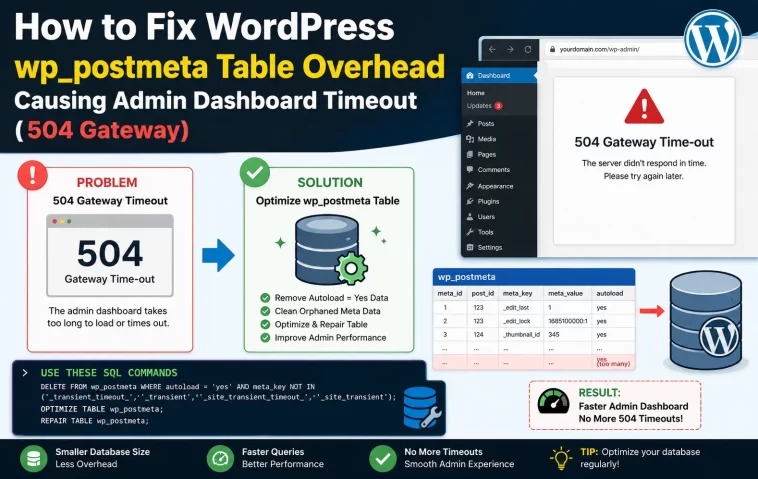
I had a client site where the dashboard loaded fine for weeks, then started throwing a 504 gateway timeout every single time someone opened the Posts list. Not the frontend — just wp-admin. Took me longer than I’d like to admit to land on wp_postmeta as the actual culprit, mostly because “504” screams server problem, not database problem. So let’s walk through why this table specifically causes so much grief and how to fix it without guessing.
Quick Answer
- wp_postmeta is a key-value (EAV) table, and it doesn’t scale gracefully — every plugin, page builder, and custom field adds more rows per post
- <cite index=”27-1″>A 504 means your web server gave up waiting on PHP-FPM, and slow wp_postmeta scans without proper indexing are one of the most common reasons for that delay on WordPress specifically</cite>
- The dashboard hits this table constantly — admin list screens, quick edit, meta boxes — so it feels worse there than on the frontend
- Fix path: find the slow query, check for missing indexes on
meta_key, then clean up orphaned and duplicate rows - Don’t just increase the timeout limit as your only fix — that treats the symptom, not the table
Why It Fails
wp_postmeta stores custom field data as rows instead of columns — post ID, meta key, meta value, repeated for every single piece of metadata a post has. It’s flexible, which is exactly why every plugin uses it, and exactly why it turns into a mess over time.
Here’s where it actually breaks down:
No index on meta_key by itself in older or unoptimized installs. WordPress core does index post_id and meta_key together, but plenty of real-world queries filter or sort on meta_key and meta_value in ways that don’t use that composite index efficiently. And when a table has a few hundred thousand rows, an unindexed scan on meta_value — which is stored as longtext and can’t be indexed the normal way anyway — turns into a genuinely slow query.
Revision and autosave meta piling up. Every post revision can carry its own postmeta rows if plugins attach metadata to revisions (some SEO and page builder plugins do this without much fanfare). So a post edited 200 times over its life might be dragging 200 sets of orphaned meta behind it, most of which nothing ever reads again.
Serialized data in meta_value. Plugins that store arrays or objects serialize them into a single row. That’s fine for storage, but it’s miserable for querying — you can’t filter on part of a serialized blob without WordPress unserializing it in PHP after the fact, which means it pulls way more data than it needs before it can even start filtering.
Orphaned rows from deleted posts. When a post gets deleted improperly — through a broken import, a bulk delete gone sideways, a plugin uninstall that didn’t clean up — its postmeta rows can survive with no matching post. They just sit there, bloating table size and slowing every full scan.
The one that surprises people: it’s rarely one giant query causing the timeout. It’s usually dozens of small, individually-fast queries that add up, especially on the Posts list screen where WordPress checks meta for things like featured images, SEO scores, and custom field previews on every single row shown.
Technical Comparison Table
| Cause | Typical symptom | Fix difficulty |
|---|---|---|
| Missing/inefficient index usage | Slow query on wp_postmeta specifically | Medium — needs query analysis |
| Serialized meta_value bloat | Slow on pages with lots of custom fields | Medium to hard |
| Orphaned meta rows | Table size grows without post count growing | Easy |
| Revision-attached meta | Gets worse the older/more-edited a site is | Easy, but tedious at scale |
Step-by-Step Fixes
Step 1: Confirm it’s actually wp_postmeta and not something else
Don’t assume. Install Query Monitor, load the slow admin screen, and look at the database queries panel. Sort by duration. If you see multiple SELECT * FROM wp_postmeta WHERE... queries eating most of the load time, you’ve confirmed it.
Step 2: Enable MySQL slow query logging temporarily
sql
SET GLOBAL slow_query_log = 1;
SET GLOBAL long_query_time = 1;
Let it run for a day of normal admin usage, then check the log for repeated wp_postmeta offenders. Turn logging back off once you’ve got what you need — leaving it on indefinitely adds its own overhead.
Step 3: Check table size and row count
sql
SELECT COUNT(*) FROM wp_postmeta;
SELECT table_name, ROUND(((data_length + index_length) / 1024 / 1024), 2) AS size_mb
FROM information_schema.TABLES WHERE table_name = 'wp_postmeta';
A table with millions of rows on a modest site (a few thousand posts) is a strong signal something’s accumulating that shouldn’t be.
Step 4: Clean up orphaned meta
sql
DELETE pm FROM wp_postmeta pm
LEFT JOIN wp_posts wp ON pm.post_id = wp.ID
WHERE wp.ID IS NULL;
Back up the database before running this. Not optional — I say this every time and I still mean it every time.
Step 5: Remove revision-attached meta bloat
Delete excess revisions first (keep a reasonable number, not zero — some editorial workflows genuinely need version history):
sql
DELETE FROM wp_posts WHERE post_type = 'revision';Then re-run the orphaned meta cleanup from Step 4, since that revision meta becomes orphaned the moment its parent revision post is gone.
Step 6: Optimize the table after cleanup
sql
OPTIMIZE TABLE wp_postmeta;On InnoDB this rebuilds the table and reclaims space, which matters after a big deletion pass. Skipping this step is common, and it’s why some cleanups don’t actually shrink the table size the way people expect.
What Actually Worked For Me
My first instinct was to just raise the PHP-FPM timeout and the Nginx fastcgi_read_timeout. It “fixed” it in the sense that the page eventually loaded instead of erroring out — but it took 40+ seconds, which nobody’s going to sit through, so that was never a real fix, more of a way to buy time to actually diagnose things properly.
Query Monitor pointed at wp_postmeta pretty quickly, but that’s not entirely the full story — it took me a minute to realize the queries weren’t slow individually, they were slow in aggregate because the Posts list screen was running a meta lookup per row, and this particular site had almost 400,000 postmeta rows for around 3,000 posts. That ratio alone told me something was hoarding rows it shouldn’t.
Turned out an old SEO plugin, uninstalled two years earlier, had left behind meta on every revision it ever touched. Nobody remembered it existed. The cleanup queries took maybe ten minutes to write and run; the dashboard went from 40+ seconds to under 3. From what I’ve seen, that’s a pretty typical outcome once the orphaned data’s actually gone — the fix itself is rarely dramatic once you’ve found the source.
Advanced Fixes and Edge Cases
Check for plugins storing large objects in meta_value. Some page builders serialize entire layout structures into a single postmeta row. If a handful of pages have unusually large meta_value blobs, that alone can slow admin screens that preview or process that data. Query for row size:
sql
SELECT post_id, meta_key, LENGTH(meta_value) AS size
FROM wp_postmeta ORDER BY size DESC LIMIT 20;
Look at WooCommerce lookup tables if it’s a store. WooCommerce has moved a lot of product meta into dedicated lookup tables in recent versions specifically because raw postmeta queries got too slow at scale. If you’re on an old WooCommerce version, that migration alone can resolve a chunk of the problem.
Check Event Viewer / PHP-FPM slow log for correlation. On the server side, PHP-FPM has its own slow log setting (request_slowlog_timeout) that logs the exact PHP stack trace for requests exceeding a threshold. This can confirm the delay’s happening inside a specific WordPress function rather than somewhere else in the stack, like an external API call that just happens to coincide.
Consider a custom index if you control the database directly. In genuinely large installs, adding a targeted composite index on frequently-queried meta_key values (via a plugin’s activation hook or manually, carefully) can help — but this isn’t something to do casually, and it’s easy to make things worse if you index the wrong columns or on a table using heavy write traffic.
Prevention Tips
- Uninstall plugins properly through the WordPress admin (not by just deleting files) so their cleanup routines actually run
- Set a sane revision limit in wp-config.php:
define('WP_POST_REVISIONS', 5); - Run orphaned meta cleanup as a quarterly maintenance task, not just when something breaks
- Avoid plugins that store large serialized arrays in single postmeta rows when a dedicated table would’ve made more sense — hard to know this in advance, but it’s worth checking a plugin’s database footprint before committing to it long term
- Monitor table sizes over time, not just when the dashboard starts crawling
FAQ
Is wp_postmeta bloat the same thing as a “bloated database”? It’s one specific and very common form of it. wp_options with too many autoloaded rows is another common one, and they often get confused for each other.
Will WP-Optimize or similar plugins fix this automatically? Partially. They handle revisions, trash, and some orphaned data well, but they generally won’t catch plugin-specific meta bloat left behind by something you’ve already uninstalled.
Why does this only affect wp-admin and not my visitors? Because the frontend is usually cached, while admin screens query the database live on every load — no cache layer to hide a slow query behind.
Could this be a hosting problem instead? Sometimes both — a slow query on decent hosting might finish before hitting the timeout, while the same query on an underpowered shared server trips it. Worth testing after cleanup either way.
Is it safe to just delete all my postmeta and start fresh? No. That’ll break your site — meta stores things like featured images, custom fields, and SEO data your posts actually need. Clean up orphaned rows specifically, don’t nuke the table.
Editor’s Opinion
this is one of those bugs where the error message (504) points you totally the wrong direction and you waste time in server configs before realising its the database the whole time. postmeta is just built this way, it gets messy fast especially on older sites thats been through a few seo plugins and page builders over the years. run the orphan cleanup query, back up first obviously, and honestly most sites will see a real difference. not glamorous work but it works.
