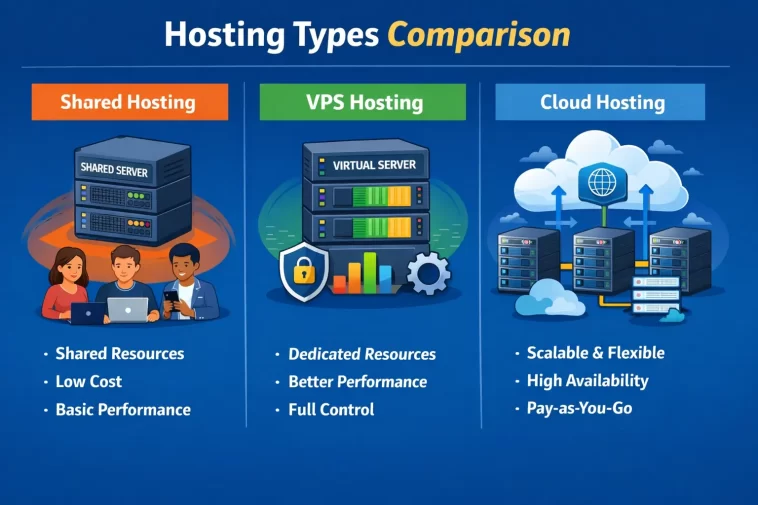
If you’ve ever tried to pick a web hosting plan, you already know how confusing it can get. Shared hosting, VPS, cloud hosting — they all promise to keep your website up and running, but they work in very different ways. And depending on where you are in your online journey, the wrong choice can cost you both money and headaches.
So let’s cut through the noise. In this guide, we’re going to break down shared hosting vs VPS vs cloud hosting in plain English, so you can actually make a decision that fits your situation — not someone else’s.
What Is Shared Hosting?
Think of shared hosting like renting a room in a big apartment building. You’re sharing the kitchen, the bathroom, the hallways — basically everything — with your neighbors. In hosting terms, your website shares a single physical server with hundreds (sometimes thousands) of other websites. You all split the same CPU power, RAM, and bandwidth.
Who is it for?
Shared hosting is perfect for beginners, personal bloggers, small business websites, and anyone just getting started online. If you’re launching your first WordPress site or building a portfolio, shared hosting makes total sense. It’s affordable — often less than $5/month — and you don’t need to know anything technical to get started.
Where does it fall short?
Here’s the catch: because you’re sharing resources, your site’s performance can be affected by what your neighbors are doing. If the website next to yours gets a traffic spike, you might notice slower loading times. This is called the “noisy neighbor” problem, and it’s one of the most common complaints with shared hosting.
Also, shared hosting usually comes with limited customization. You can’t install custom software or tweak server settings much. What you see is what you get.
Pros of Shared Hosting:
- Very affordable
- Beginner-friendly with easy control panels (cPanel, etc.)
- Hosting provider handles all server maintenance
- Usually includes one-click installs for WordPress and other CMS platforms
Cons of Shared Hosting:
- Limited resources (CPU, RAM, bandwidth)
- Performance can suffer when traffic spikes
- Less control and flexibility
- Not suitable for high-traffic or resource-heavy websites
What Is VPS Hosting?
VPS stands for Virtual Private Server. Going back to our apartment analogy — VPS is like renting your own apartment in that same building. You still share the physical structure with others, but you have your own dedicated space. Your own kitchen, your own bathroom. Nobody can walk in and eat your food.
In technical terms, a physical server is divided into several virtual machines using software called a hypervisor. Each VPS gets its own allocated resources — a fixed amount of RAM, CPU, and storage — that nobody else can touch.
Who is it for?
VPS hosting is a great fit for growing websites, online stores, developers who need root access, and businesses that have outgrown shared hosting. If your site is getting a few thousand visitors per day, or you’re running WooCommerce with a real product catalog, VPS is usually the next logical step.
Where does it fall short?
VPS hosting requires a bit more technical knowledge — or at least a willingness to learn. You’ll often have to manage server updates, security patches, and configurations yourself (unless you go for a managed VPS, where the host takes care of that for you). It’s also more expensive than shared hosting, typically ranging from $20 to $100/month depending on the specs.
Pros of VPS Hosting:
- Dedicated resources — no noisy neighbor problem
- Full root access for custom configurations
- Much better performance than shared hosting
- Scalable — you can upgrade your plan as you grow
- Great for developers and technically confident users
Cons of VPS Hosting:
- More expensive than shared hosting
- Requires technical knowledge (unless managed)
- You’re still on a single physical server — if it goes down, your site goes down
What Is Cloud Hosting?
Cloud hosting is where things get interesting. Instead of your website living on one physical server, it runs across a network of multiple servers. If one server has a problem, another one in the network picks up the slack instantly. You’re not tied to a single machine.
Think of it like streaming music. It doesn’t matter where the data comes from — it just plays. Cloud hosting works similarly: your website’s data is distributed, and the system automatically balances the load and handles failures behind the scenes.
Who is it for?
Cloud hosting is ideal for websites with unpredictable traffic patterns, growing eCommerce stores, SaaS applications, and businesses that can’t afford downtime. It’s also increasingly popular with developers building modern web applications because of its flexibility and scalability.
Where does it fall short?
Cloud hosting can be harder to understand, especially when it comes to pricing. Many cloud providers charge based on usage — so your monthly bill can vary. If you’re not monitoring things, costs can creep up. Also, the sheer number of options (AWS, Google Cloud, Azure, DigitalOcean, etc.) can be overwhelming for someone who just wants to launch a blog.
Pros of Cloud Hosting:
- Highly scalable — handle traffic spikes with ease
- Excellent uptime and reliability
- You only pay for what you use (with some providers)
- Resources can be increased or decreased on demand
- Not tied to a single server
Cons of Cloud Hosting:
- Can be more complex to set up and manage
- Variable pricing can be unpredictable
- Overkill for simple or low-traffic websites
Shared Hosting vs VPS vs Cloud Hosting: Side-by-Side Comparison
| Feature | Shared Hosting | VPS Hosting | Cloud Hosting |
|---|---|---|---|
| Price | $ (Very low) | $$ (Moderate) | $$–$$$ (Varies) |
| Performance | Basic | Good | Excellent |
| Scalability | Very limited | Limited | Highly scalable |
| Technical skill needed | None | Moderate | Moderate–High |
| Uptime reliability | Good | Good | Excellent |
| Customization | Low | High | Very High |
| Best for | Beginners, blogs | Growing sites, devs | Large sites, businesses |
How to Actually Choose the Right One
Here’s the honest truth: there is no universal “best” option. The right choice depends entirely on where you are right now and where you’re planning to go.
Choose shared hosting if:
- You’re just starting out
- Your budget is tight (under $10/month)
- You’re running a personal blog, portfolio, or small informational site
- You don’t have technical experience and don’t want to deal with server management
Choose VPS hosting if:
- Your website is growing and you’re hitting the limits of shared hosting
- You need more control over your server environment
- You’re running an online store or a membership site
- You’re a developer who needs to install custom software or use SSH access
Choose cloud hosting if:
- You expect rapid or unpredictable traffic growth
- Uptime and reliability are critical to your business
- You’re building a web application or SaaS product
- You’re okay with a more technical setup in exchange for serious performance
A Word on Managed vs Unmanaged
One thing that trips a lot of people up: the difference between managed and unmanaged hosting. This applies mostly to VPS and cloud hosting.
With managed hosting, the provider handles all the technical stuff — server updates, security, monitoring, backups. You just focus on your website. It costs more, but it’s a lifesaver if you’re not a server administrator.
With unmanaged hosting, you’re on your own. You get the server, and everything else is your responsibility. This is great for developers who want full control, but it’s not the right move for most website owners.
If you’re not sure, go managed. It’s worth the extra cost.
What About Price? Let’s Be Real
Here’s a rough breakdown of what you can expect to pay:
- Shared Hosting: $2–$10/month
- VPS Hosting: $15–$100/month (managed VPS can go higher)
- Cloud Hosting: $10–$500+/month (depends heavily on usage and provider)
Shared hosting wins on price, no contest. But if your website goes down because of a bad neighbor, or if it loads slowly and you lose visitors, that “cheap” plan starts costing you more in lost opportunities.
Think about hosting as an investment, not just a monthly bill.
Real-World Example: What Would I Actually Pick?
Let’s say you’re starting a food blog from scratch. You have no traffic yet. Shared hosting is absolutely fine — grab a plan from a reputable provider, install WordPress, and start writing. You’ll be happy.
Now let’s say 18 months later, your food blog is getting 50,000 page views per month and you’ve added a recipe card plugin, email opt-ins, and a few affiliate links. Suddenly your shared hosting plan is struggling. That’s when you move to a VPS.
A few years after that, you decide to launch an online cooking course with live enrollment periods where thousands of people hit your site at the same time. Now cloud hosting starts to make real sense.
The point is: start where you are, not where you think you’ll be in five years.
FAQ
Is shared hosting good enough for WordPress?
Yes, for most beginners, shared hosting works perfectly fine for WordPress sites. If you’re just starting out, a good shared hosting provider with WordPress-optimized servers (like Hostinger, Bluehost, or SiteGround) will handle a standard blog or small business site without any issues. The limitations start showing when your traffic grows significantly or you add resource-heavy plugins.
When should I upgrade from shared hosting to VPS?
A good rule of thumb: if your site is regularly getting more than 10,000–20,000 visitors per month, you’re running an online store, or you keep getting “resource limit exceeded” warnings from your host, it’s time to consider a VPS. Also, if your site takes more than 3–4 seconds to load even with caching enabled, that’s a sign your current hosting is the bottleneck.
Is cloud hosting the same as a CDN?
No, they’re different things. A CDN (Content Delivery Network) distributes your website’s static files (images, CSS, JavaScript) across multiple locations to reduce load times for visitors in different countries. Cloud hosting refers to where your entire website and application actually runs. You can — and often should — use both together.
Is VPS hosting safe?
Yes, VPS hosting is generally very safe, especially compared to shared hosting. Since your files and resources are isolated from other users on the same physical server, the risk of one account affecting another is much lower. That said, security also depends on you: keeping your software updated, using strong passwords, and setting up a firewall are all things you’re responsible for with unmanaged VPS.
Can I switch hosting types later?
Absolutely. Most websites start on shared hosting and migrate as they grow. Moving from shared to VPS, or from VPS to cloud, is a normal part of the process. Good hosting providers either handle the migration for you or provide detailed guides. Just make sure you back up everything before making any moves.
Which hosting type is best for eCommerce?
For a small shop just starting out, shared hosting can work. But for anything serious — a real product catalog, regular transactions, and a need for consistent uptime — VPS or cloud hosting is the better choice. The speed and reliability improvements alone will likely have a direct impact on your conversion rates. WooCommerce and Shopify in particular benefit noticeably from better hosting resources.
Final Thoughts
The shared hosting vs VPS vs cloud hosting debate doesn’t have a single winner. Each type has its place, and the best choice is the one that matches your current needs and budget — not the fanciest or most expensive option out there.
Start simple. Upgrade when you need to. And don’t let analysis paralysis stop you from getting your website online.
If you’re just getting started, shared hosting will serve you well. If you’ve outgrown it, VPS is the natural next step. And if you’re building something serious that needs to scale, cloud hosting is your answer.
Whatever you choose, make sure the provider has solid support, good uptime guarantees, and a reputation you can trust. The technology is only as good as the team behind it.
Have questions about which hosting type is right for your specific situation? Drop a comment below — happy to help you figure it out.
