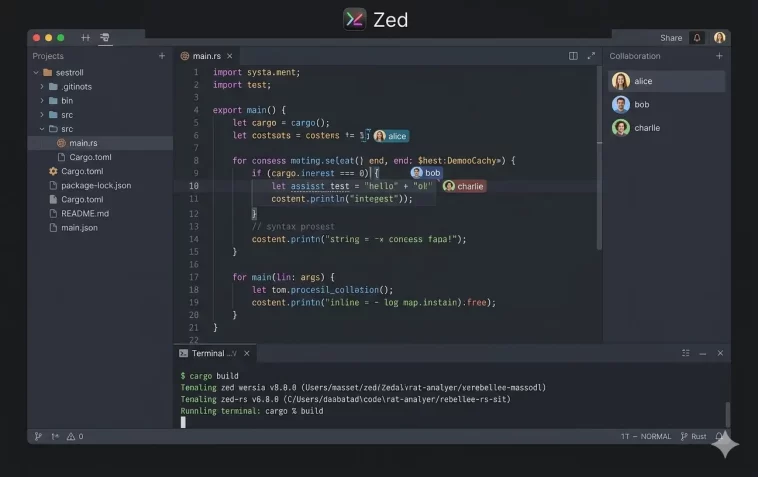
Zed editor arrived at a version 1.0 milestone on April 29, 2026 — and it’s making serious waves in the developer community. Built from scratch in Rust, GPU-accelerated, open source, and natively multiplayer, Zed isn’t just another code editor. It’s a rethink of what a development environment should feel like in the age of AI agents.
If you’re tired of slow, bloated editors and want something that feels fast and genuinely useful with AI, this is worth your full attention.
What Is Zed?
Zed is a high-performance, multiplayer code editor built in Rust by the same team that created Atom and Tree-sitter. It was founded by Nathan Sobo — Atom’s co-creator — after GitHub discontinued Atom in June 2022.
The founding thesis was simple and ambitious: throw out Electron, throw out the DOM, throw out JavaScript, and build a new editor from the ground up in Rust with a custom GPU-accelerated UI framework. The result is an editor that renders at 120 frames per second, opens large monorepos in under a second, and uses a fraction of the memory that VS Code or Cursor require.
Zed is fully open source under the GPL-3.0 license and available on macOS, Linux, and Windows.
Why Zed Is Different: The Performance Argument
Most modern code editors — VS Code, Cursor, Windsurf — are built on Electron. That means they’re essentially running a browser engine (Chromium) under the hood, which comes with real performance costs.
Zed eliminates that entirely. Here’s how it compares in independent benchmarks:
| Metric | Zed | VS Code | Cursor |
|---|---|---|---|
| Cold start | 0.6 seconds | 1.3 seconds | 4.5 seconds |
| Idle RAM | 222 MB | 3.5 GB | ~3+ GB |
| Input latency | ~2 ms | ~30 ms | ~30 ms |
| Rendering | 120 FPS (GPU) | Variable | Variable |
These aren’t minor differences. The performance gap is structural — Electron-based editors can’t close it without a full rewrite. Zed’s Rust architecture handles concurrency at a fundamentally different level.
One developer described it memorably: “Multibuffer editor and 120fps resizing is orgasmic.”
Core Editor Features
Zed isn’t just fast. It’s a fully featured development environment.
Language Server Protocol (LSP) Support
Zed has full LSP support for over 80 programming languages. This includes intelligent code completion, inline diagnostics, go-to-definition, hover documentation, and refactoring across every major language from Rust and Go to Python, TypeScript, and C++.
Native Git Integration
Git is built directly into the editor — no extension required. You can stage, commit, and navigate diffs without leaving Zed.
Integrated Terminal
Zed includes a built-in terminal that feels native, not bolted on. It supports split panes and integrates cleanly with the rest of the editing workflow.
SSH Remoting and Dev Containers
Zed supports remote development over SSH natively. You can connect to a remote server or dev container and get the same local editing experience without performance degradation.
Native Debugger
A built-in debugger is included — another thing you’d normally need an extension for in VS Code.
Vim and Helix Mode
Zed ships with optional Vim and Helix keybinding modes built in. No plugins needed.
WASM-Based Extensions
Zed’s extension system uses WebAssembly, which keeps extensions sandboxed and performant. The ecosystem is smaller than VS Code’s, but growing steadily.
Multiplayer: Collaboration as a First-Class Feature
Multiplayer isn’t a plugin in Zed — it’s built into the editor’s core architecture. Multiple developers can co-edit the same buffer in real-time using operational transformation (OT) algorithms, with zero-lag synchronization.
This isn’t screen sharing. Multiple cursors, live edits, shared channels, and team conversations all happen inside the editor itself.
The architecture also extends to AI: multiple humans and multiple agents can all share the same buffer, cursor stream, and thread system simultaneously. This is what makes Zed genuinely unique — no other editor does this natively.
Zed AI: A Deep Overview
Zed’s AI features aren’t added on top of the editor. They’re built into the same architecture that powers everything else. No Electron wrapper, no separate process — AI runs at native speed.
Multi-Model Support
Zed supports a wide range of AI providers out of the box:
- Anthropic (Claude Opus, Sonnet, Haiku)
- OpenAI (GPT-4o and variants)
- Google (Gemini models)
- Ollama (local models)
- Groq, Mistral, DeepSeek, and 8+ additional providers
You can bring your own API keys or use Zed’s hosted models. You can also switch models per thread — run Claude for complex reasoning and a faster local model for quick completions in the same session.
Inline AI Transformations
Select any code block, describe what you want in natural language, and Zed applies the transformation inline. It’s immediate and feels like editing, not chatting.
Code Completions
Zed’s open-source model Zeta provides code completions on every keystroke. Unlike simple autocomplete, Zeta is designed to predict intent — what you’re likely to write next — rather than just completing the current token.
The Agent Panel
The Agent Panel is where you interact with AI for longer, multi-step tasks. You can ask Claude or any connected model to:
- Read and navigate your codebase
- Edit multiple files at once
- Run terminal commands
- Search for patterns across the project
- Interact with external tools via MCP
The Agent Panel shows tool calls as they happen, giving you full visibility into what the model is doing — not just the final output.
Parallel Agents: Zed’s Biggest AI Innovation
This is the feature that’s generating the most attention in 2026.
Zed launched Parallel Agents on April 22, 2026 — making it the first and currently only code editor with native parallel agent support. Cursor, Windsurf, VS Code’s Copilot, and every other mainstream editor are single-threaded when it comes to agents. Zed isn’t.
What Are Parallel Agents?
Parallel Agents lets you run multiple AI agents simultaneously in the same editor window, each working on a different part of your codebase at the same time.
Think of it like this: instead of asking one agent to refactor a module, add tests, and update documentation sequentially, you can assign those tasks to three separate agents running concurrently. They work in parallel. You review results as they come in.
The Threads Sidebar
Parallel Agents introduced a new Threads Sidebar to manage everything:
- View and switch between all active agent threads
- Assign a different model to each thread
- Group threads by project or worktree
- Monitor progress without leaving your current context
- Use worktree isolation to keep agents from stepping on each other
How It Works Under the Hood
This is real concurrency — not queued tasks. Zed’s Rust architecture handles multiple agent threads at the operating system level, bounded by your API rate limits and token budget rather than the editor’s own architecture.
For throughput-heavy workloads — large refactors, multi-file feature implementations, test generation at scale — parallel agents can significantly reduce wall-clock time. The tradeoff is higher token spend and the need to review multiple diffs at once.
Who Should Use Parallel Agents?
Parallel Agents is most useful when:
- You’re working on a large codebase with multiple independent components
- You want to run a migration, a test suite update, and a refactor simultaneously
- You’re working in a team where multiple developers and agents need to collaborate on the same project
- You’re doing complex multi-step tasks that benefit from specialized agents handling different subtasks
External Agents: ACP Support
Zed doesn’t try to lock you into its own agent ecosystem. Through the Agent Client Protocol (ACP), you can run external agents inside Zed directly:
- Claude Code (Anthropic)
- Codex (OpenAI)
- Aider
- Gemini CLI
These external agents run inside Zed’s interface, with full access to the editor’s tools, context, and file system. You’re not switching windows — the agent lives in the editor.
ACP is also being developed as an open standard, with Zed collaborating with JetBrains and others to establish a universal protocol for editor-agent communication.
MCP: Model Context Protocol
Zed has full support for the Model Context Protocol (MCP) — the open standard for connecting AI models to external data sources and tools.
Through MCP, your agents in Zed can access:
- Databases and internal APIs
- Documentation systems
- External services and web browsing
- Custom tools you define yourself
This turns Zed into a genuine orchestration layer, not just a text editor with a chat window.
Effort Control and Configuration
Users can configure how much effort the AI puts into each request:
- High effort — deeper reasoning, better results, higher token cost
- Standard — the default balance for most tasks
- Fast mode — quicker responses for simple queries, lower rate limit usage
You can also set system prompts per thread, configure context window behavior, and control exactly what files and context the agent has access to.
Pricing
Zed has two main plans:
| Plan | Price | Includes |
|---|---|---|
| Personal (Free) | $0 | Full editor, open source, bring your own API keys |
| Pro | $10/month | $5 monthly token credits, hosted models, Zed’s own completions |
For teams, Zed for Business adds centralized billing, team management, and administrative controls.
The editor itself is free and open source. You can use it with your own API keys at zero cost indefinitely.
Zed vs Cursor vs VS Code: How They Compare
| Feature | Zed | Cursor | VS Code |
|---|---|---|---|
| Architecture | Rust + GPUI | Electron (VS Code fork) | Electron |
| Cold start | 0.6s | 4.5s | 1.3s |
| Memory (idle) | 222 MB | ~3+ GB | 3.5 GB |
| Rendering | 120 FPS GPU | Standard | Standard |
| Multiplayer | Native | No | Extension only |
| Parallel agents | Native | No | No |
| External agents (ACP) | Yes | No | No |
| MCP support | Yes | Limited | Extension |
| Open source | Yes (GPL-3) | No | Core only |
| Local models | Yes (Ollama) | Yes | Extension |
The key differentiator is multiplayer plus parallel agents. Cursor remains the strongest single-developer experience for solo AI coding. Claude Code is better for fully autonomous, headless workflows. Zed is the only option if you want humans and multiple agents working in the same editor at the same time.
Who Is Zed For?
Zed is a great fit if you:
- Want the fastest editor available, period
- Work on large codebases where startup time and latency matter
- Do pair programming or collaborative development
- Want to run multiple AI agents on different tasks simultaneously
- Prefer open-source tools with full transparency
- Use local models via Ollama alongside cloud APIs
- Are working in Rust, Go, Python, TypeScript, or any of the 80+ supported languages
Zed may not be the best fit if you:
- Rely heavily on VS Code extensions with no Zed equivalent
- Need a fully productized AI memory and skills system out of the box
- Do design-to-code or heavy UI iteration (Cursor still leads here)
- Are on Windows and need battle-tested stability (the Linux and macOS experience is more mature)
FAQ
Is Zed free? Yes. The core editor is free and open source under the GPL-3.0 license. The Pro plan costs $10/month and adds hosted model credits and Zed’s own completions.
What platforms does Zed support? Zed is available on macOS, Linux, and Windows. Version 1.0 brought full cross-platform parity.
Who built Zed? Zed was built by Nathan Sobo and the team at Zed Industries. Nathan Sobo was also the co-creator of Atom at GitHub.
What is GPUI? GPUI is Zed’s custom GPU-accelerated UI framework, built in Rust. It renders directly to hardware, bypassing browser engines entirely, which is why Zed achieves 120 FPS rendering and ~2ms input latency.
Can I use Zed with Claude? Yes. Zed supports Claude Opus, Sonnet, and Haiku via your Anthropic API key. You can also run Claude Code as an external agent inside Zed via ACP.
What is ACP? ACP stands for Agent Client Protocol. It’s an open standard that allows external AI agents (like Claude Code, Codex, and Aider) to run natively inside Zed, with full access to editor context and tools.
What are Parallel Agents? Parallel Agents is Zed’s feature for running multiple AI agents simultaneously in the same editor window. Each agent works on a different thread, with its own model and context, visible in the Threads Sidebar.
Does Zed support local AI models? Yes. Zed supports Ollama, which lets you run local open-source models on your own hardware without sending data to cloud APIs.
Is Zed better than VS Code? For raw performance, yes — significantly. For extension ecosystem breadth and stability on Windows, VS Code still leads. The right choice depends on what you prioritize.
What is Zeta? Zeta is Zed’s own open-source code completion model, designed to predict intent beyond simple token completion. It runs locally and integrates directly into the editor’s keypress pipeline.
Final Thoughts
Zed version 1.0 marks the arrival of a genuinely different kind of code editor. It isn’t a VS Code fork with AI features tacked on. It’s a from-scratch rethink of what a development tool should be — built for the speed and collaborative workflows that 2026 actually demands.
The performance numbers are real. The multiplayer architecture is genuinely unique. And Parallel Agents is the most interesting structural bet any editor has made in years.
If you last tried Zed in the early 0.x days and found it rough around the edges, 1.0 is a different animal. It’s worth another look.
Download it free at zed.dev.
