With its rounded corners, sleek animations, and cutting-edge Fluent Design interface, Windows 11 represents the pinnacle of modern desktop computing. However, if you scratch beneath this modern surface like a digital archaeologist, you will find remnants from the earliest days of personal computing history.
One of the most fascinating digital fossils quietly surviving deep within the Windows 11 directory is a 31-year-old piece of software: Phone Dialer (known in the system as dialer.exe).
Why does a tool from the era of Windows 95, dial-up internet, and analog landlines still exist in a 2026 operating system? In this article, we dive deep into this hidden treasure of Windows history, show you how to run it, and explain why Microsoft refuses to delete it.
What is the Phone Dialer (dialer.exe)? A Historical Journey
First introduced in 1995 with Windows 95, the Phone Dialer was a product of its time—an era dominated by dial-up internet and analog telephone systems.
+-------------------------------------------------------------+| 1995: GOLDEN ERA || Computer ---> Modem ---> Telephone Line ---> Voice Call |+-------------------------------------------------------------+| 2026: NOSTALGIA || Windows 11 ---> dialer.exe ---> "Hardware Not Found" |+-------------------------------------------------------------+
Back in the mid-90s, making voice calls or sending faxes directly from a personal computer was a groundbreaking feature. Phone Dialer allowed users to make voice calls through an analog modem physically connected to their PC and a landline telephone cable (RJ-11). Users would dial the number using the on-screen keypad, pick up their physical telephone receiver, and talk.
Although the utility received minor visual updates and TAPI (Telephony Application Programming Interface) integrations in Windows 98, Windows 2000, and Windows XP, its core functionality remained virtually unchanged. By the mid-2000s, broadband internet and mobile phones phased out analog modems, leaving the Phone Dialer to be forgotten.
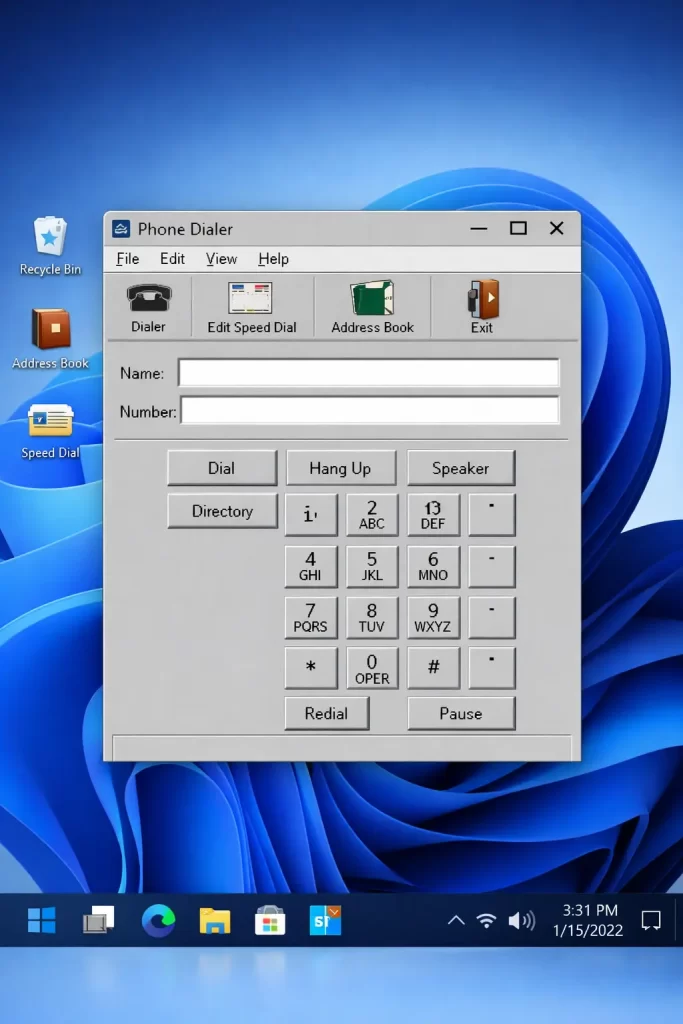
How to Open Phone Dialer in Windows 11
If you want to experience this retro tool yourself, you don’t need to download any external software. It is still fully integrated into your Windows 11 system:
- Press the
Windows + Rkeys on your keyboard to open the Run dialog box. - Type
dialerin the box and press Enter. - A tiny, grey window sporting classic Windows 95/XP design aesthetics will instantly appear on your screen.
NOTE
Because modern PCs lack analog modems or telephone jacks, you will immediately be greeted with a warning: “Phone Dialer cannot start telephone services because no telephone hardware is detected…” You can simply click “OK” to dismiss it and explore the interface.
Key Features of the Interface:
- Virtual Dial Pad: A classic telephone button grid clickable with your mouse.
- Manual Input Field: Allows you to type telephone numbers directly using your keyboard.
- Speed Dial: Eight customizable buttons on the right side where users could store their most frequently called contacts.
- Call Log: A simple log window that kept track of placed and received calls.
Why Hasn’t Microsoft Deleted This App Yet?
This is one of the most common questions in the tech community: Why does Microsoft aggressively retire popular tools like Windows Live Mail, WordPad, or the classic Paint, while keeping an obsolete utility like Phone Dialer?
There are two major reasons behind this decision:
1. The Holy Grail: Backward Compatibility
Microsoft’s operating system philosophy is heavily anchored in backward compatibility. Millions of businesses, hospitals, military installations, and government agencies worldwide still rely on legacy custom software. Some older call center automation tools, custom database triggers, or specialized industrial systems hook directly into Windows’ TAPI (Telephony API). Removing dialer.exe could break these critical, older commercial setups.
2. Tiny Footprint and Low Risk
The dialer.exe executable is incredibly small—only about 70 to 80 KB. It consumes no system resources, poses no security risks, and doesn’t interfere with modern codebases. For Microsoft developers, the risk of breaking legacy enterprise workflows by deleting it far outweighs the benefit of removing a few kilobytes of code.
The Modern Solution: Phone Link
While the classic Phone Dialer is obsolete for everyday consumers, Microsoft offers a powerful modern alternative. The Phone Link app (built into Windows 10 and 11) connects your Android or iOS smartphone to your PC wirelessly.
| Feature | Classic Phone Dialer (dialer.exe) | Modern Phone Link |
|---|---|---|
| Connection Type | Analog Phone Line & Modem | Wi-Fi / Bluetooth (Smartphone) |
| SMS Support | No | Yes (Send/Receive texts on PC) |
| App Streaming | No | Yes (Open phone apps on PC) |
| Contacts Sync | Limited to 8 Speed Dials | Full Contact List Integration |
| User Interface | Retro Windows 95 Grey | Modern Fluent Design & Dark Mode |
Conclusion: Windows 11 as a Living Museum
The presence of the Phone Dialer proves that Windows is not just a collection of modern code, but also a living museum of computer history. Typing dialer into your Windows Run box opens a portal to the era of dial-up sounds, landlines, and the early days of personal computing.
If you enjoy exploring tech history, press Windows + R, type dialer, and take a look at this 31-year-old hidden gem waiting inside your Windows 11 machine!
