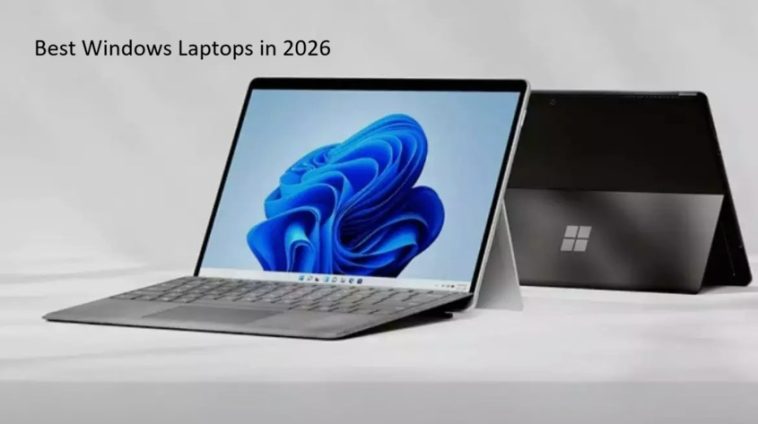
Best Windows laptops in 2026 are better than ever — and honestly, picking one has never been more confusing. There are thin ultrabooks, beefy gaming rigs, 2-in-1 convertibles, and everything in between. I’ve been following the laptop market closely, and after looking at what’s actually worth buying this year, I put together this guide to help you cut through the noise.
Whether you’re a student trying not to break the bank, a professional who lives in spreadsheets, or a gamer who wants a portable powerhouse — there’s something here for you.
Why 2026 Is a Great Year to Buy a Windows Laptop
A few things happened over the past year or so that genuinely changed the game. Intel’s Core Ultra series and AMD’s Ryzen AI chips brought serious on-device AI capabilities to mainstream machines. Battery life across the board has gotten noticeably better. And Qualcomm’s Snapdragon X Elite processors — which started showing up in Windows laptops in late 2024 — have matured nicely, giving Apple’s M-series chips some real competition on efficiency.
On top of that, Microsoft’s Copilot+ PC initiative pushed manufacturers to include dedicated NPUs (neural processing units) in new machines, which means AI features actually run locally instead of chewing through your battery or requiring an internet connection.
So yeah — it’s a solid time to upgrade.
What to Look for Before You Buy
Before we get into specific models, here’s a quick checklist of things worth thinking about:
- Processor: Intel Core Ultra 5/7/9, AMD Ryzen AI 300 series, or Qualcomm Snapdragon X Elite are all strong choices in 2026. Each has its own strengths depending on your workflow.
- RAM: 16GB is the new minimum for comfortable multitasking. 32GB if you do creative work or run virtual machines.
- Storage: 512GB SSD at minimum. 1TB if you store a lot locally.
- Battery life: Look for real-world numbers, not the marketing ones. Anything above 10 hours of mixed use is genuinely good.
- Display: 1080p is fine for budget laptops. On anything mid-range or above, look for 1440p or OLED.
- Weight: If you travel a lot, try to stay under 1.5kg (about 3.3 lbs) for the laptop itself.
The Best Windows Laptops in 2026
1. Dell XPS 13 Plus — Best Premium Ultrabook
If you want a laptop that makes people stop and ask “what is that?” the XPS 13 Plus is still doing it in 2026. Dell refined the design even further this year — the borderless keyboard, edge-to-edge glass trackpad, and the clean, seamless lid make it feel like it’s from the future.
Under the hood, it comes with Intel Core Ultra 7 processors and 32GB of LPDDR5X RAM as standard on the higher configurations. The OLED display option is stunning — 3.5K resolution with excellent color accuracy, great for anyone doing photo or video editing on the go.
Battery life lands around 10–11 hours in real use, which is a big improvement over older XPS models.
Best for: Professionals, travelers, anyone who wants a compact and beautiful machine.
Starting price: Around $1,299
2. ASUS ROG Zephyrus G16 — Best Gaming Laptop
Gaming laptops used to be big, loud, and hot. The ROG Zephyrus G16 is still technically all three of those things, but ASUS has done an impressive job of making it manageable. It’s slim enough to slide into a backpack, the 240Hz OLED display is incredible for gaming and media, and NVIDIA’s latest discrete GPU handles anything you throw at it.
What sets the G16 apart is the balance between performance and portability. It doesn’t sacrifice one entirely for the other, which is a hard line to walk. The keyboard is comfortable for long sessions, thermal management has improved a lot, and the speakers are genuinely good — a rare thing for gaming laptops.
Best for: Gamers who also travel, content creators who game on the side.
Starting price: Around $1,499
3. Microsoft Surface Pro 11 — Best 2-in-1 / Tablet Hybrid
The Surface Pro has been around forever, but the 11th generation is the version that finally gets the chip right. It runs on Qualcomm Snapdragon X Elite, which means incredible battery life (you can genuinely get 14–16 hours of mixed work out of it), fanless silent operation on the base model, and a slim profile that makes it work brilliantly as a tablet.
The keyboard cover (sold separately, which is still annoying) adds a proper typing experience, and the Surface Slim Pen 2 is one of the best styluses available on any platform. If you draw, sketch wireframes, or annotate documents, the pen experience here is hard to beat.
It’s not the best choice for heavy video editing or gaming, but as a productivity and writing machine, it’s exceptional.
Best for: Writers, students, people who travel a lot and want tablet + laptop in one.
Starting price: Around $1,099 (keyboard sold separately)
4. Lenovo ThinkPad X1 Carbon Gen 13 — Best Business Laptop
If you work in an office — or if your company’s IT department has opinions about your laptop — the ThinkPad X1 Carbon is still the go-to choice for business users. It’s not the flashiest machine, but it’s built to survive, it’s incredibly light for a 14-inch laptop, and the keyboard is still one of the best you’ll find on any laptop, period.
The Gen 13 model added Intel Core Ultra processors and improved the battery life meaningfully. MIL-SPEC durability testing means it can handle drops, dust, and temperature swings. It also has all the ports businesses care about — two Thunderbolt 4, two USB-A, HDMI, and a headphone jack.
The TrackPoint (that little red nub in the keyboard) is either your best friend or something you’ll ignore. Either way, the large glass trackpad is excellent.
Best for: Business users, IT professionals, anyone who needs reliability above all else.
Starting price: Around $1,399
5. Acer Swift Go 14 — Best Mid-Range Laptop
Not everyone needs to spend $1,500 on a laptop. The Acer Swift Go 14 hits a sweet spot that a lot of people overlook. For somewhere between $750 and $900, you get an AMD Ryzen AI 5 or AI 7 processor, a 2.8K OLED display, 16GB of RAM, and a 1TB SSD. That’s a genuinely impressive package at this price point.
The build quality is solid without feeling cheap. Battery life runs 10–12 hours depending on what you’re doing. It’s not particularly exciting to look at, but it’s thin, well-made, and does everything a student or everyday user needs without requiring them to take out a second mortgage.
Best for: Students, everyday users, people who want solid specs without a premium price tag.
Starting price: Around $749
6. HP Spectre x360 14 — Best Premium 2-in-1
HP’s Spectre line has always been the stylish alternative to the Surface Pro, and the x360 14 continues that tradition. It’s a 14-inch convertible laptop that flips all the way around into tablet mode, and it includes an OLED display with excellent touch response and a built-in stylus.
This year’s model benefits from Intel Core Ultra internals with improved NPU performance, making it fully Copilot+ certified. The gem-cut design on the corners gives it a distinctive look that stands out from every other laptop in a coffee shop. Battery life is solid at around 11–13 hours, and the 4K OLED display option is one of the best screens you can get on a laptop.
Best for: Creative professionals, people who want a premium convertible, design-conscious buyers.
Starting price: Around $1,399
7. Lenovo IdeaPad Slim 5i — Best Budget Laptop Under $600
Budget laptops used to mean compromises everywhere. The IdeaPad Slim 5i proves that’s not as true anymore. For under $600, you’re getting an Intel Core 5 processor, 16GB of RAM, a 512GB SSD, and a 1080p IPS display that’s perfectly fine for everyday work, streaming, and studying.
It’s not going to win any design awards and it won’t run demanding games, but it’s light, the keyboard is comfortable, and it gets the job done reliably. For a high schooler, a college student, or someone who just needs a reliable everyday machine, this is one of the smartest buys in 2026.
Best for: Students, budget-conscious buyers, first laptop buyers.
Starting price: Around $549
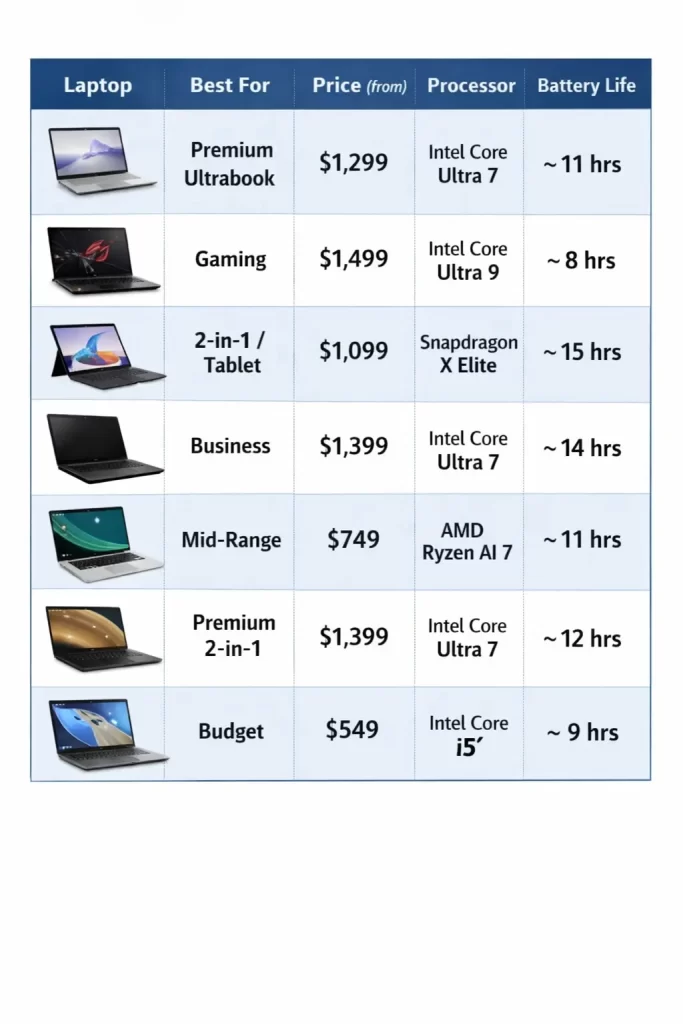
Quick Comparison Table
| Laptop | Best For | Price (from) | Processor | Battery Life |
|---|---|---|---|---|
| Dell XPS 13 Plus | Premium ultrabook | $1,299 | Intel Core Ultra 7 | ~11 hrs |
| ASUS ROG Zephyrus G16 | Gaming | $1,499 | Intel Core Ultra 9 | ~8 hrs |
| Microsoft Surface Pro 11 | 2-in-1 / tablet | $1,099 | Snapdragon X Elite | ~15 hrs |
| Lenovo ThinkPad X1 Carbon | Business | $1,399 | Intel Core Ultra 7 | ~14 hrs |
| Acer Swift Go 14 | Mid-range | $749 | AMD Ryzen AI 7 | ~11 hrs |
| HP Spectre x360 14 | Premium 2-in-1 | $1,399 | Intel Core Ultra 7 | ~12 hrs |
| Lenovo IdeaPad Slim 5i | Budget | $549 | Intel Core 5 | ~9 hrs |
Tips for Getting the Best Deal
Laptop prices fluctuate a lot. Here are a few things worth knowing before you buy:
Buy during sale seasons. Black Friday, back-to-school season (July–September), and Amazon Prime Day are when you’ll see the most significant discounts. It’s not unusual to save $200–$400 on a mid-range or premium laptop.
Check the manufacturer refurbished store. Dell, Lenovo, and Microsoft all sell certified refurbished laptops that come with warranties. You can often save 20–30% on machines that are essentially new.
Don’t over-spec for what you actually need. If you’re using your laptop mostly for email, browsing, and documents, you don’t need a Core Ultra 9 with 32GB of RAM. Spend your money where it matters for your use case.
Check for student and education discounts. Most manufacturers offer meaningful discounts for students. Dell, Apple (yes, for Boot Camp users), Lenovo, and Microsoft all have education storefronts worth checking.
Frequently Asked Questions (FAQ)
Q: What is the best Windows laptop overall in 2026?
A: It depends on what you need, but for most people who want a balance of performance, design, and battery life, the Dell XPS 13 Plus and the Lenovo ThinkPad X1 Carbon Gen 13 are the most consistently excellent machines. If budget matters, the Acer Swift Go 14 is the best value.
Q: Is 8GB of RAM enough for a Windows laptop in 2026?
A: Honestly, no — not if you plan to keep the laptop for more than a year or two. With Windows 11 and modern browsers consuming more memory, 8GB starts to feel sluggish quickly. Aim for at least 16GB, especially since RAM is often soldered and can’t be upgraded later.
Q: Should I get an Intel, AMD, or Qualcomm laptop?
A: All three are competitive in 2026. Intel Core Ultra is the safest choice for compatibility with all software. AMD Ryzen AI 300 offers excellent performance per watt and is great for productivity and creative work. Qualcomm Snapdragon X Elite shines on battery life but still has some ARM compatibility quirks with older Windows software — though that’s gotten much better.
Q: Are Copilot+ PCs worth it?
A: If you’re buying new, the Copilot+ features are increasingly useful — things like Recall, live captions, and AI-enhanced photo editing work noticeably better on certified hardware. But don’t pay a big premium specifically for the Copilot+ badge. Focus on the processor, display, and battery life first.
Q: How long should a Windows laptop last?
A: A well-chosen laptop should comfortably last 4–6 years. The key is buying at least 16GB of RAM (preferably more) and a fast SSD. The processor matters less over time than having enough memory to handle software bloat as the years go by.
Q: What’s the best Windows laptop for students in 2026?
A: The Acer Swift Go 14 is the sweet spot for most students — OLED display, solid performance, good battery life, and reasonable price. If budget is really tight, the Lenovo IdeaPad Slim 5i gets the job done without the OLED screen.
Q: Do Windows laptops still get viruses easily?
A: Windows 11 has significantly better built-in security than older versions. Windows Defender is a genuinely capable antivirus, and Secure Boot is standard. As long as you keep your system updated and don’t install sketchy software, modern Windows laptops are quite secure.
Q: Is it better to buy a laptop in-store or online?
A: Online is usually better for price and selection. However, if you’ve never used a particular keyboard or display before, it’s worth going to a store first to get a feel for the build quality. Then you can buy online if you find a better deal.
Final Thoughts
The best Windows laptops in 2026 cover every need and budget better than they ever have. The gap between budget and premium has narrowed significantly — you can get an OLED display and a fast processor for under $800 now, which would have cost you $1,200+ just a few years ago.
My honest advice: figure out how you actually use your laptop day to day, set a realistic budget, and pick based on battery life and display quality — those two things will affect your experience far more than raw CPU benchmarks in real-world use.
If you’re still not sure which one is right for you, the Acer Swift Go 14 is the one I’d recommend to most people. It’s genuinely good, it won’t empty your wallet, and you won’t feel like you’re settling.
Prices mentioned are approximate and may vary by region and retailer. Always check the manufacturer’s website for the most current configurations and pricing.
