If your Z Fold 5 stops a few degrees short of lying flat, or feels like it’s catching on something right before it should hit 180, that’s not always a hinge failure — though sometimes it genuinely is. The Z Fold 5 inner screen not opening fully issue usually comes down to debris in the hinge track, a software calibration glitch, or a case that’s fighting the mechanism without you noticing. I had this happen on mine about four months in, and my first assumption — that I’d broken something — turned out to be wrong.
So let’s go through the actual causes before you assume it’s a warranty claim.
Quick Answer
- Most common cause: dust, sand, or lint caught in the hinge track, especially the U-shaped bracket area.
- Second most common: a case or screen protector edge interfering with the fold mechanism.
- Software-related: a display calibration glitch after an update, which is rarer but does happen.
- Fastest fix that works most often: a careful manual clean of the hinge gap with compressed air, not liquid cleaners.
- If cleaning doesn’t fix it and the resistance feels mechanical (grinding, clicking, uneven), that’s a hardware issue and needs Samsung service — don’t force it further.
Why It Fails
The Z Fold 5’s hinge is a genuinely complex piece of engineering — Samsung‘s “Flex Hinge” design uses interlocking gears and a sweeper mechanism specifically meant to push debris out rather than let it accumulate. It mostly works. But it’s not sealed against everything, and the parts of the phone that flex the most are also the parts most exposed to whatever’s in your pocket or bag.
From what I’ve seen, there are three real mechanical causes and one software one:
Debris caught in the hinge gap. Sand is the worst offender — genuinely tiny particles can work their way into the gap between the two halves and interfere with the last few degrees of the fold, right where the hinge mechanism has the least amount of leverage. Lint from pockets is a close second, especially if you carry the phone loose rather than in a case.
A case or screen protector edge catching on the frame. This one’s sneaky because it doesn’t look like the problem — the case fits fine when the phone’s open, but as it closes, a slightly-too-thick edge or a warped screen protector corner can create just enough resistance to stop it short of flat. Not every case does this; it depends on tolerances that vary batch to batch, which is annoying because you can’t always tell from a listing photo.
Actual hinge mechanical wear or damage. After a drop, or after enough open/close cycles over a year or more, the hinge gears themselves can develop play or resistance that’s genuinely mechanical, not debris. This is the one case where cleaning won’t help and you shouldn’t keep forcing the fold — that risks cracking the inner display, which is the expensive part to fix.
An overlooked cause worth checking: temperature. Cold weather stiffens the hinge lubricant slightly on some units, which can look exactly like a debris problem but resolves once the phone warms up. If it only happens outdoors in winter and opens fine indoors a few minutes later, that’s probably what’s going on rather than anything mechanical.
Common Scenarios
- After a beach trip or dusty environment, sand or fine grit works into the hinge over a day or two, not always noticeable immediately.
- After installing a new third-party case, especially budget ones where hinge clearance tolerances aren’t as tight as Samsung’s own cases.
- In cold weather, the fold feels stiff and stops short outdoors, then opens fully once the phone’s been indoors a few minutes.
- After a drop, even a minor one, where the hinge alignment shifts slightly and the fold no longer sits flush the way it used to.
Step-by-Step Fixes
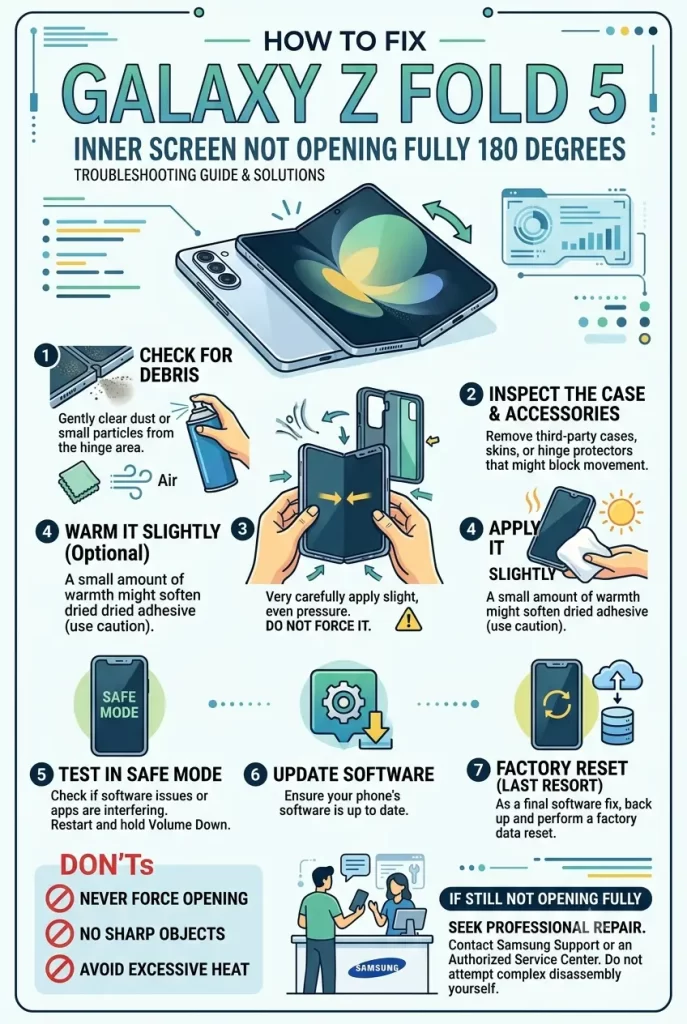
Step 1: Remove the case and screen protector completely, then test
Take the phone out of any case, peel back or remove any screen protector on the inner display, and try opening it fully bare. If it opens flat without the case, you’ve found your cause — it’s a fit issue with your accessories, not the phone itself. Try a different case, or check if the current one has a manufacturing defect (uneven edges, slight warping) that a replacement of the same model wouldn’t have.
Step 2: Inspect the hinge gap visually under good light
With the phone open at whatever angle it stops at, look directly into the hinge gap from the side. You’re looking for visible debris — sand grains, lint fibers, anything that shouldn’t be there. A flashlight held at an angle helps a lot here since the gap is narrow and easy to miss things in under normal room light.
Step 3: Clean the hinge with compressed air, not liquid
Hold the phone at roughly a 90-degree angle and use short bursts of compressed air directed into the hinge gap from multiple angles — top, bottom, and the sides of the U-bracket area. Don’t use liquid cleaners, alcohol, or anything wet near the hinge — that risks pushing contaminants further in or affecting the internal lubrication rather than clearing it out.
Repeat this a few times, opening and closing the phone slowly between bursts to help work debris toward the opening rather than deeper in.
Step 4: Cycle the hinge slowly and repeatedly
Sounds almost too simple, but slowly opening and closing the phone through its full range fifteen or twenty times, applying gentle even pressure at the point of resistance (not forcing past it, just consistent light pressure), can help the sweeper mechanism clear out debris it’s already caught but hasn’t fully ejected yet.
Step 5: Check for a pending software update
Go to Settings > Software Update > Download and install. This sounds unrelated to a mechanical issue, but Samsung has shipped display calibration fixes in updates before that affect how the inner screen’s flex sensor reports fold angle — in rare cases the screen is actually opening fully but a software display quirk makes it look or feel like it isn’t. Worth ruling out before you assume it’s purely mechanical.
Step 6: Try Samsung Members app’s diagnostic tool
Open Samsung Members > Support > Interactive Checks, and run through the hinge and display diagnostics if listed. It’s not perfect, but it flags some sensor-level issues that aren’t obvious from just looking at the phone.
Technical Comparison Table
| Symptom | Likely cause | Fix reliability |
|---|---|---|
| Stops a few degrees short, fine after cleaning | Debris in hinge track | High |
| Fine without case, catches with case on | Case/protector interference | High — swap accessory |
| Only happens in cold weather | Lubricant stiffening | Resolves on its own indoors |
| Grinding or clicking resistance | Mechanical hinge wear/damage | Low without service — needs repair |
What Actually Worked For Me
Mine started after a weekend at the coast — didn’t even think about sand being the cause at first, honestly assumed I’d somehow damaged the hinge just from normal use. Spent a few days just living with a fold that stopped maybe ten degrees short of flat, telling myself I’d deal with it eventually.
First thing I tried was removing my case, since that’s the easy thing to rule out. Still stopped short without it, so that wasn’t it. Then I actually looked into the hinge gap with a flashlight — and yeah, there it was, a small amount of visible grit right in the fold track, exactly where you’d expect sand to end up after a beach trip.
Compressed air in short bursts, a few rounds of it, opening and closing slowly between each burst — took maybe five minutes total and it opened flat again. So — a little embarrassing in hindsight that I didn’t check for debris first, since it’s the obvious cause once you think about where I’d just been with the phone. Not entirely sure why it took a few days to become noticeable rather than happening immediately at the beach, but that’s roughly consistent with what other people report too — it seems to take a day or so of normal opening and closing for accumulated grit to actually start interfering.
Advanced Fixes and Edge Cases
Check hinge alignment visually from directly above and behind. With the phone open flat (or as flat as it currently gets), look along the hinge line from directly behind it. Any visible twist or misalignment between the two halves — not just a fold-angle problem but an actual lateral shift — points toward mechanical damage rather than debris, and cleaning won’t fix that.
Use Samsung’s official Care+ or authorized service diagnostic rather than third-party repair for hinge issues. The Fold’s hinge assembly is a sealed, precision-manufactured unit, and third-party disassembly attempts have a real track record of making the fold problem worse rather than better, given how tightly integrated the hinge and inner display flex cable are.
If the issue appeared right after a drop, check for inner display separation at the crease, not just the hinge angle itself. Sometimes what looks purely like a hinge problem is actually a display panel that’s shifted slightly at the flexible center section — visible as a faint ripple or uneven light reflection along the crease under angled light.
Log the exact fold angle over time if this is a slow-developing issue. If it’s progressively getting worse week over week rather than staying consistent, that’s a stronger signal of genuine wear and a reason to get it looked at sooner rather than continuing to clean and hope.
Prevention Tips
- Carry the phone in a case with a snug, well-reviewed fit specifically for hinge clearance — cheap cases are the most common source of this issue that isn’t debris-related.
- Avoid pockets with loose sand, dirt, or lint-heavy fabric when possible; a dedicated phone pocket or bag compartment helps more than people expect.
- Don’t force the fold past resistance — ease off and check for debris rather than pushing through it.
- Clean the hinge gap with compressed air periodically as routine maintenance, not just when a problem shows up.
- If you’re in a cold climate, don’t panic about stiffness outdoors — but do keep an eye on whether it resolves indoors consistently, since that pattern is a good sign it’s just temperature.
FAQ
Is this covered under Samsung warranty? Yes, if it’s a genuine mechanical hinge defect and not caused by debris, damage, or an incompatible case — Samsung’s standard warranty and Care+ both typically cover hinge issues that aren’t user-caused.
Can I use isopropyl alcohol to clean the hinge? Not recommended near the hinge mechanism itself — stick to compressed air. Liquid cleaners risk affecting the internal lubrication or pushing debris further into the mechanism.
Does this happen more on the Z Fold 5 specifically, or all Fold models? It’s been reported across most Fold generations, though the Fold 5’s redesigned hinge is somewhat better sealed than the Fold 3 and 4 — doesn’t mean it’s immune, just less prone to it in most reports.
Should I keep forcing it open if it’s stuck? No. If you feel real resistance, especially anything that feels like grinding or clicking, stop and check for debris rather than pushing through — forcing it risks cracking the inner display.
How much does hinge repair cost if it turns out to be mechanical? Varies by region and whether you have Care+, but out-of-warranty hinge assembly repairs on Fold devices tend to be a significant portion of the phone’s value — worth checking your specific coverage before assuming a number.
Editor’s Opinion
Most of the time this is just sand or lint, not a broken phone, so try the compressed air fix before panicking about a repair bill. Check without a case first too, since a lot of the “my Fold is broken” reports online turn out to be a case that doesn’t fit the hinge clearance quite right. If it’s genuinely grinding or misaligned though, don’t keep forcing it — that’s the one scenario where waiting makes it worse.
