Your Wi-Fi is fine. Netflix streams, your browser loads pages instantly, and yet Instagram just sits there flashing “Couldn’t Refresh Feed” like your connection is the problem. It isn’t, or at least not in the way you’d think. I spent a solid twenty minutes restarting my router over this before realizing the issue was sitting entirely on my phone, not my network.
This one trips people up because every generic fix online starts with “check your internet connection” — and when that’s already ruled out, most guides just stop being useful.
Quick Answer
- Clear Instagram’s app cache first — this fixes it more often than any other single step
- Check if a VPN, proxy, or custom DNS is quietly interfering with Instagram’s servers specifically, even while other apps work fine
- Confirm your device’s date and time are set to automatic — an incorrect clock breaks SSL verification silently
- Update the app; Instagram pushes frequent builds and an outdated version can lose sync with backend API changes
- Rule out a soft account restriction, which behaves a lot like a connectivity error but isn’t one
Why It Fails (When Your Internet Is Actually Fine)
So here’s the thing people miss: “Couldn’t Refresh Feed” isn’t really a network error message in the strict sense. It’s closer to a catch-all Instagram throws whenever the app can’t complete a specific handshake with its own servers, regardless of whether your internet works for literally everything else. That distinction matters, because it points you toward different fixes.
Cache corruption. Instagram stores a huge amount of local data — thumbnails, story previews, cached API responses — and when that cache gets partially corrupted (which happens more than you’d expect after an app crash or a forced update), the app can fail to reconcile new data with what it already has stored. It doesn’t throw a clear “cache error.” It just says it couldn’t refresh.
DNS or CDN-level blocking that’s specific to Meta’s infrastructure. Your ISP, a public Wi-Fi network, or a custom DNS provider (1.1.1.1, certain ad-blocking DNS services, some corporate networks) can block or throttle Instagram’s domains specifically while leaving the rest of the internet untouched. This is the one that confuses people most, because every other test they run — speed tests, other apps, other websites — comes back clean.
Clock drift breaking SSL handshakes. If your device’s date and time aren’t synced automatically, certificate validation can silently fail for apps that rely on strict SSL checks. Instagram is one of them. Your browser might tolerate a small clock skew better than the Instagram app does — not 100% sure why the tolerance differs, but it’s a real and recurring cause in the threads I’ve seen.
Background App Refresh or battery optimization killing the sync process. On iOS, disabling Background App Refresh for Instagram stops it from quietly syncing while closed, which can leave the app in a stale state that throws the refresh error on open. Android’s aggressive battery optimization does something similar — it kills Instagram’s background processes before the sync completes.
A soft account-level restriction. Instagram sometimes limits an account’s activity — usually after unusual login patterns, third-party app use, or automation flags — and one symptom is a feed that won’t refresh even though everything else on the account technically works. This one’s genuinely overlooked because it looks identical to a network problem from the user’s side.
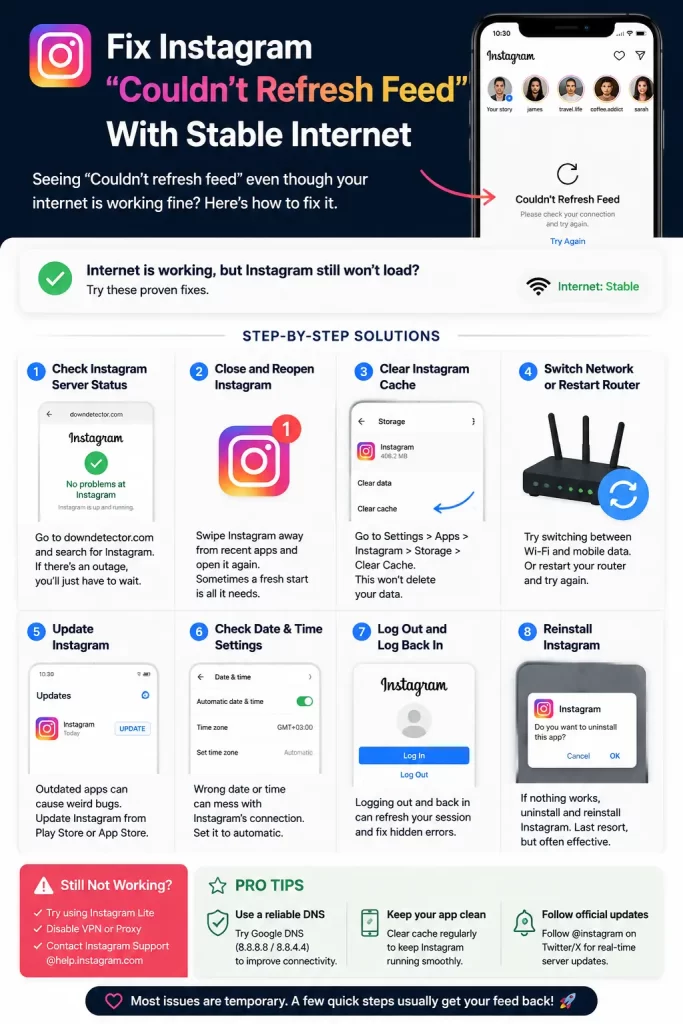
Step-by-Step Fixes
Step 1: Clear the app cache
Android: Settings → Apps → Instagram → Storage → Clear Cache (not Clear Data — that logs you out).
iOS: There’s no direct cache-clear option. You’ll need to offload the app: Settings → General → iPhone Storage → Instagram → Offload App. This removes the app but keeps your login data, then reinstalls a fresh copy.
This step alone resolves the issue for a lot of people. If it doesn’t, keep going.
Step 2: Rule out DNS and VPN interference
Turn off any VPN and switch your DNS back to automatic (your carrier or router default) temporarily. On iOS: Settings → Wi-Fi → tap the network → Configure DNS → Automatic. On Android it’s under your Wi-Fi network’s advanced settings.
And if the feed loads immediately after switching, you’ve found your cause — you can either leave DNS on automatic or find a different custom DNS provider that doesn’t interfere with Meta’s domains.
Step 3: Check your date and time settings
Set your device to automatic date and time (Settings → General → Date & Time on iOS, Settings → System → Date & Time on Android). Even a few minutes of drift can cause certificate validation issues that manifest as vague loading errors.
Step 4: Update the app
Open the App Store or Play Store, check for an Instagram update, and install it. Instagram’s backend changes frequently enough that an app version even a few weeks old can occasionally lose sync with new API requirements.
Step 5: Check Background App Refresh / battery settings
iOS: Settings → General → Background App Refresh → make sure it’s enabled for Instagram specifically.
Android: Settings → Apps → Instagram → Battery → set to “Unrestricted” or disable aggressive battery optimization for the app.
Step 6: Log out and back in
This forces a full token refresh with Instagram’s servers rather than relying on a cached session that might be stale. Simple, but it catches a surprising number of cases the cache clear alone doesn’t fix.
What Actually Worked For Me
Mine turned out to be the DNS thing, and I only found it by accident. I’d already cleared cache, reinstalled the app, and reset network settings on my phone — none of it worked. I was about to give up and just wait it out, figuring it was a server-side issue on Instagram’s end.
Then a coworker mentioned she’d had a similar problem months back that turned out to be a custom DNS she’d set up for ad-blocking. I checked mine, and sure enough, I’d switched to a privacy-focused DNS provider weeks earlier for unrelated reasons and completely forgotten about it. Flipped it back to automatic, feed loaded instantly. Your mileage may vary here — this isn’t the most common cause, cache issues are — but it’s the one that’s easiest to overlook because it feels unrelated to an app-specific error.
Advanced Fixes and Edge Cases
Test with mobile data vs Wi-Fi separately. If the error only happens on one connection type, that narrows it to a router or ISP-level DNS configuration rather than the app itself. This is a fast way to rule the app out entirely.
Check for a Meta service outage. Before assuming it’s your device, a quick check of Instagram’s status or a service-status tracker can save you from troubleshooting a problem that’s actually on their end. This happens more often than people assume, and it’s easy to mistake for a local issue.
Try a different network entirely. If you’ve got access to a friend’s Wi-Fi or a public hotspot, testing there isolates whether it’s your specific network configuration causing the block.
Check for a shadow restriction via the Instagram app itself. Go to Settings → Accounts Center → Account Status, if it’s available on your account. This won’t always show restrictions clearly, but it’s worth a look if none of the technical fixes work and you suspect the account itself is flagged.
Fixes That Are Commonly Recommended But Rarely Solve It
Restarting your router gets recommended constantly, and in most cases it does nothing here — because, again, this usually isn’t a general connectivity problem. Similarly, “just wait it out” gets thrown around a lot in forum comments, and while server-side outages do happen occasionally, treating that as the default explanation means people skip the cache and DNS checks that actually fix most cases.
Prevention Tips
- Keep Instagram updated automatically rather than manually checking every few weeks
- Avoid using custom DNS providers on the same network you use Instagram heavily on, or at least know which ones you’ve configured
- Periodically clear app cache on Android before it builds up to a size that causes sync issues
- Keep automatic date and time enabled unless you have a specific reason not to
- Avoid third-party “Instagram tools” or automation apps that request account access — these are a common trigger for account-level restrictions
FAQ
Does restarting my phone actually help? Sometimes, but it’s a low-probability fix here. It clears temporary memory issues, not the cache corruption or DNS problems that cause most cases of this specific error.
Is this different from “Instagram not loading” errors? Related but not identical — “couldn’t refresh feed” specifically points to the app failing a sync request rather than a total loading failure. The causes overlap a lot, but the DNS and clock-drift causes are more specific to this exact message.
Can a weak but technically working connection still cause this? Yes. A connection that’s “stable enough” for browsing but has high latency or occasional packet loss can still fail Instagram’s sync requests, which are more sensitive to timing than a basic page load.
Will reinstalling the app fix account-level restrictions? No. If it’s an account restriction rather than a device issue, reinstalling won’t help — you’d need to wait it out or check your account status directly.
Editor’s Opinion
ngl the dns thing is the one nobody thinks to check and its probably behind more of these “stable internet but nothing works” complaints than people realize. clear your cache first tho, thats still the highest hit rate fix by a mile. if none of it works just check if instagram itself is having a bad day before you blame your router again.
