Windows Defender vs paid antivirus — it’s a question millions of people ask every year, and the honest answer is more nuanced than most tech sites admit.
Windows Defender comes free with every Windows 10 and Windows 11 machine. It runs quietly in the background, updates automatically, and doesn’t cost a penny. So why do paid antivirus companies still exist?
Because “free” and “enough” aren’t always the same thing.
This guide gives you a straight, no-hype comparison so you can decide whether Windows Defender covers your needs — or whether it’s time to upgrade.
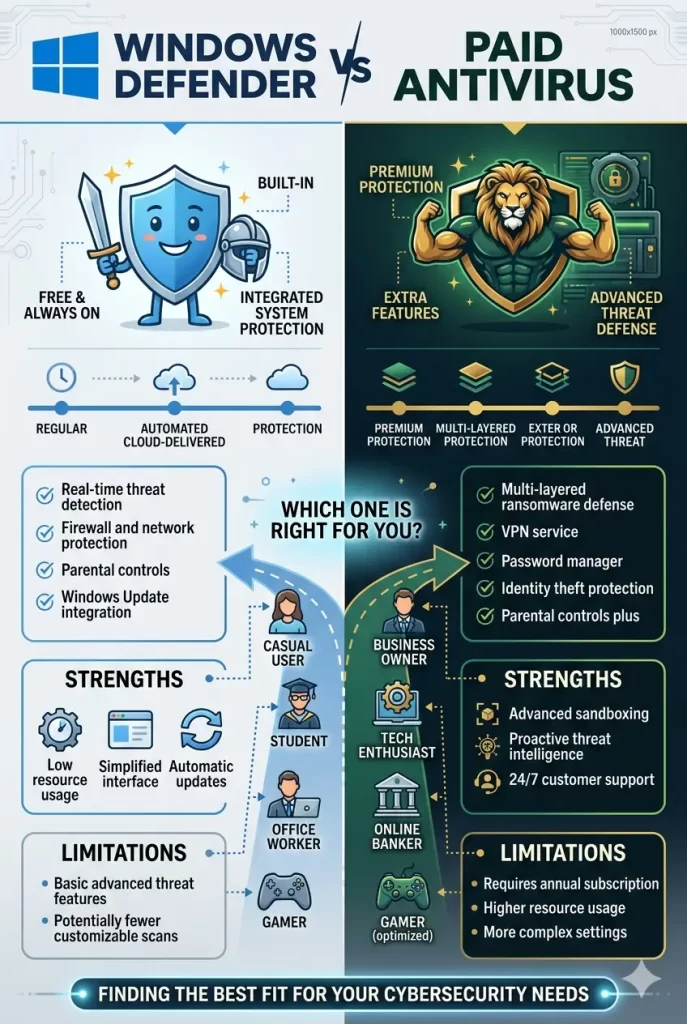
What Is Windows Defender?
Windows Defender — officially called Microsoft Defender Antivirus — is Microsoft’s built-in security tool. It’s been part of Windows since Vista, but it was largely ignored for years because it wasn’t very good.
That changed around 2018. Microsoft invested heavily in Defender, and it’s now a genuinely capable antivirus engine. It handles:
- Real-time malware protection
- Ransomware protection (via Controlled Folder Access)
- Phishing and malicious website blocking (Microsoft Edge integration)
- Firewall management
- Device performance and health reports
- Parental controls (via Microsoft Family Safety)
It’s not the bare-minimum tool it used to be. But it still has limits.
Windows Defender vs Paid Antivirus: Side-by-Side
| Feature | Windows Defender | Paid Antivirus (e.g. Norton, Bitdefender) |
|---|---|---|
| Price | Free | $30–$100+/year |
| Malware detection rate | 95–99% | 99–100% |
| Real-time protection | Yes | Yes |
| VPN | No | Yes (most plans) |
| Password manager | No | Yes (most plans) |
| Dark web monitoring | No | Yes |
| Identity theft protection | No | Yes (premium plans) |
| Parental controls | Basic | Advanced |
| Performance impact | Very low | Low–Medium |
| Multi-device coverage | Windows only | Windows, Mac, Android, iOS |
| Customer support | Limited | 24/7 live support |
| Ransomware protection | Basic | Advanced |
| Browser protection | Edge only | All browsers |
Malware Detection: How Does Defender Hold Up?
Independent testing labs — AV-Test and AV-Comparatives — test antivirus products against thousands of real-world malware samples every month. Here’s what the data shows.
Windows Defender
In recent AV-Test results, Windows Defender scores between 95% and 99% for protection against widespread malware. That’s solid. For the average user visiting normal websites and downloading from legitimate sources, Defender catches most threats.
Where it struggles is with zero-day threats — brand new malware that hasn’t been seen before. Defender’s detection of zero-day attacks averages around 95–96%, which is noticeably lower than the best paid options.
It also generates more false positives than premium products — occasionally flagging safe software as dangerous. Not a dealbreaker, but it can be annoying.
Paid Antivirus (Norton, Bitdefender, Kaspersky)
Top-tier paid antivirus products consistently score 99–100% in the same tests. The gap in overall protection may seem small, but zero-day detection is where it really matters.
Bitdefender, for example, routinely scores 100% in zero-day protection. Norton hits 99–100% consistently. These products use more sophisticated behavioral analysis and cloud-based threat intelligence that updates faster than Defender.
Verdict: Both protect well against known malware. Paid antivirus is meaningfully better against new, never-seen-before threats.
What Windows Defender Doesn’t Include
This is where the real comparison lives. Malware detection is just one part of modern security.
No VPN
Windows Defender has no VPN. If you use public Wi-Fi at a coffee shop, airport, or hotel, your connection is unencrypted and visible to anyone on the same network.
Paid antivirus suites from Norton, McAfee, and Bitdefender all include a VPN. It’s not a replacement for a dedicated VPN service, but it covers basic public Wi-Fi protection.
No Password Manager
Defender doesn’t include a password manager. Weak and reused passwords remain one of the top causes of account breaches. A good password manager generates and stores strong, unique passwords for every account.
Paid suites typically include one. Norton Password Manager and Dashlane (bundled with some plans) are solid options that come at no extra cost.
No Dark Web Monitoring
If your email address, passwords, or personal data appear in a data breach, Defender won’t tell you. Paid antivirus products actively monitor the dark web and breach databases, alerting you immediately when your data surfaces.
This matters more than ever — data breaches happen constantly, and knowing early gives you time to change passwords before accounts are compromised.
No Identity Theft Protection
Norton (with LifeLock) and McAfee offer credit monitoring, identity alerts, and even identity theft insurance on their higher-tier plans. Defender offers nothing in this space.
If identity protection is a concern — especially for anyone who’s experienced fraud before — this gap is significant.
Browser Protection Is Limited to Edge
Windows Defender integrates deeply with Microsoft Edge for phishing and malicious link protection. But if you use Chrome, Firefox, or Brave, Defender’s browser protection is much weaker.
Paid antivirus products install browser extensions that work across all major browsers.
No Multi-Platform Coverage
Defender only protects Windows devices. If you have an Android phone, an iPhone, or a Mac, you’re on your own.
Most paid antivirus plans cover 3–10 devices across all platforms, making them a better fit for anyone with a mixed device household.
Where Windows Defender Actually Shines
Let’s be fair — Defender has real advantages too.
It’s Completely Free
This sounds obvious, but it’s worth stating clearly. For users on a tight budget, Defender provides solid baseline protection at zero cost. That’s better than no protection, and it’s better than a cheap, sketchy “free antivirus” from an unknown company.
Zero Performance Impact
Defender is deeply integrated into Windows and runs more efficiently than any third-party antivirus. It has virtually no impact on boot times, file operations, or everyday performance.
Some paid antivirus products — especially on older machines — can slow things down noticeably. Defender never will.
Automatic Updates via Windows Update
Defender updates its virus definitions automatically through Windows Update. You never need to manage it. For non-technical users who forget to update software, this is genuinely valuable.
No Upselling or Pop-ups
Third-party antivirus products — even paid ones — often display pop-ups, renewal reminders, and upsell notifications. Defender runs silently. No nag screens, no “upgrade now” banners, no interruptions.
Privacy: Microsoft Already Has Your Data
Some users worry about privacy with third-party security software, since antivirus products need deep system access to work. With Defender, you’re trusting Microsoft — the same company that already runs your operating system. No new company is getting access to your machine.
Who Should Stick With Windows Defender?
Windows Defender is genuinely enough if you:
- Use your computer for basic tasks — browsing, streaming, email, documents
- Download software only from official sources (Microsoft Store, official developer sites)
- Use Microsoft Edge as your primary browser
- Protect only one Windows device
- Are on a tight budget and can’t justify a paid subscription
- Are reasonably tech-savvy and practice good security habits (strong passwords, avoiding suspicious links)
Who Should Upgrade to Paid Antivirus?
You should seriously consider a paid antivirus if you:
- Use public Wi-Fi regularly and want VPN protection
- Have multiple devices across Windows, Mac, Android, or iOS
- Want dark web monitoring to catch data breaches early
- Need advanced parental controls for children
- Are concerned about identity theft or have experienced it before
- Run a small business with sensitive data
- Frequently download files, open email attachments, or visit less mainstream websites
- Want 24/7 customer support if something goes wrong
- Use Chrome, Firefox, or another non-Edge browser as your main browser
Best Paid Antivirus Alternatives to Defender
If you decide to upgrade, here are the top options in 2026:
Bitdefender Total Security — Best Overall
Consistently ranks #1 in independent lab tests. Excellent malware detection, minimal performance impact, great multi-device coverage. Starts around $39.99/year for 5 devices.
Norton 360 Deluxe — Best for Identity Protection
Strong detection rates, solid VPN, and optional LifeLock identity protection. Best for users who want an all-in-one security suite. Starts around $49.99/year for 5 devices.
Malwarebytes Premium — Best Lightweight Option
Doesn’t replace Defender — it works alongside it. Focuses on catching malware that slips through, especially browser-based threats. Very light on system resources. Around $39.99/year for 1 device.
McAfee Plus — Best for Families
Unlimited device coverage, solid VPN, and privacy tools including data broker removal. Best for households with many devices. Starts around $39.99/year.
Kaspersky Premium — Best Detection Rates
Top-tier malware detection, feature-rich, and competitively priced. Note: some governments have raised concerns about Kaspersky’s Russian origins — consider this if you handle sensitive government or business data.
The Hybrid Approach: Defender + Malwarebytes
Here’s a strategy many security professionals actually recommend:
Keep Windows Defender active for real-time protection, and add Malwarebytes Premium as a second layer for catching threats that slip through — especially adware, browser hijackers, and aggressive PUPs (potentially unwanted programs).
This combination gives you:
- Defender’s deep Windows integration and zero performance cost
- Malwarebytes’ specialized detection for browser and behavioral threats
- Better overall coverage than either alone
- A total cost of ~$39.99/year — cheaper than most full antivirus suites
It’s not the right approach for everyone, but for tech-savvy users who want strong protection on a budget, it works well.
The Bottom Line
Windows Defender is no longer the weak, ignore-it tool it was five years ago. For casual users with good security habits, it provides real, legitimate protection at no cost.
But it has genuine gaps — no VPN, no password manager, no dark web monitoring, no cross-platform coverage, and weaker browser protection outside of Edge. These aren’t minor omissions. They’re features that matter in 2026, when threats go far beyond just malware.
Stick with Defender if you’re a careful, budget-conscious user on a single Windows device who practices good security habits.
Upgrade to paid antivirus if you want comprehensive protection, cover multiple devices or platforms, use public Wi-Fi, or want the peace of mind that comes with full identity and privacy protection.
The free option is good. The paid option is better. Which one you need depends entirely on how you use your devices — and what you can’t afford to lose.
Frequently Asked Questions (FAQ)
Is Windows Defender good enough in 2026?
For basic users, yes. Windows Defender provides solid real-time protection against most common malware and is a huge improvement over older versions. However, it lacks a VPN, password manager, dark web monitoring, and cross-platform support — all features available in paid antivirus suites.
Does Windows Defender slow down your PC?
No. Windows Defender has virtually no measurable impact on PC performance. It’s deeply integrated into Windows and uses system resources far more efficiently than most third-party antivirus products.
Can I use Windows Defender alongside another antivirus?
Generally, no. Running two real-time antivirus engines simultaneously can cause conflicts and actually reduce protection. The exception is Malwarebytes, which is designed to run alongside Defender in a complementary role — Defender handles real-time protection, Malwarebytes handles on-demand scanning and browser threats.
Does Windows Defender protect against ransomware?
Partially. Defender includes Controlled Folder Access, which blocks unauthorized apps from modifying protected folders. It’s a useful feature, but paid antivirus products offer more advanced and reliable ransomware protection with backup and rollback capabilities.
Is Windows Defender free forever?
Yes. Windows Defender is built into Windows 10 and Windows 11 and requires no subscription. It’s updated automatically through Windows Update at no cost.
Which is better — Norton or Windows Defender?
Norton is better in most measurable ways: higher detection rates, VPN, password manager, dark web monitoring, identity protection, and multi-device coverage. But Norton costs money. Defender is free. If budget isn’t a concern, Norton 360 Deluxe is a stronger all-around solution.
Does Windows Defender protect my phone?
No. Windows Defender only protects Windows devices. For Android and iOS protection, you need a separate mobile security app or a paid antivirus plan that includes mobile device coverage.
What’s the best free antivirus alternative to Windows Defender?
Avast Free and AVG Free are the most capable free alternatives, with slightly better detection rates and more features. However, both are ad-supported and collect some usage data. For most users, Windows Defender is the better free choice — cleaner, more private, and built right in.
