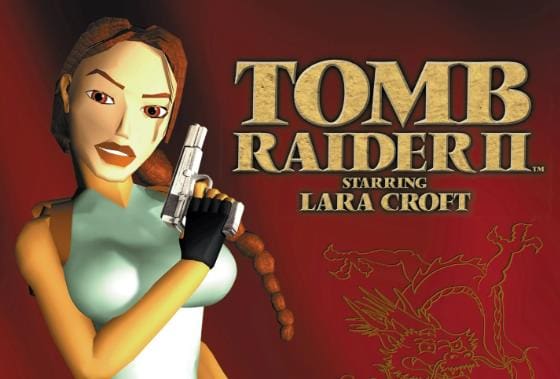
“Tomb Raider II” is an action-adventure video game developed by Core Design and published by Eidos Interactive. It is the second installment in the popular “Tomb Raider” series and was released in 1997 for various platforms, including PlayStation, Microsoft Windows, and Mac OS.
In “Tomb Raider II,” players once again assume the role of the iconic adventurer Lara Croft. The game follows Lara’s quest as she searches for the mythical Dagger of Xian, an artifact rumored to have the power to turn its bearer into a powerful dragon.
Tomb Raider II Facts
- “Tomb Raider II” was released in 1997 as the second installment in the “Tomb Raider” series.
- The game was developed by Core Design and published by Eidos Interactive.
- It was initially released for the PlayStation, followed by releases for Microsoft Windows and Mac OS.
- “Tomb Raider II” once again features the iconic adventurer Lara Croft as the main protagonist.
- The game introduced new gameplay mechanics, including the ability to climb walls, swing on ropes, and use a grappling hook.
- It features various environments, including jungles, sunken shipwrecks, snow-capped mountains, and ancient ruins.
- The story revolves around Lara’s quest to find the Dagger of Xian, an artifact with mythical powers.
- “Tomb Raider II” expanded on the puzzle-solving elements, offering more complex and challenging puzzles for players to solve.
- The game introduced new enemies and bosses for Lara to overcome, including human adversaries and mythical creatures.
- Lara has access to an arsenal of weapons, including pistols, shotguns, uzis, and harpoons, which players can use to fight enemies.
- The levels in “Tomb Raider II” are larger and more expansive compared to the first game, with hidden areas and secrets to discover.
- The game received critical acclaim for its improved graphics, level design, and gameplay mechanics.
- It sold millions of copies worldwide and became one of the best-selling games of its time.
- “Tomb Raider II” introduced the iconic dual pistols as Lara’s signature weapons, which became synonymous with the character.
- The game features a memorable soundtrack composed by Nathan McCree, known for its adventurous and atmospheric tunes.
- It received several expansions and add-ons, including bonus levels and additional content.
- “Tomb Raider II” was praised for its improved controls and camera system compared to its predecessor.
- The game continued to establish Lara Croft as a cultural icon in the gaming industry, known for her intelligence, athleticism, and courage.
- “Tomb Raider II” marked the beginning of a successful franchise that spawned numerous sequels, spin-offs, and adaptations.
- It is considered one of the classic entries in the “Tomb Raider” series and is remembered fondly by fans for its engaging gameplay and memorable levels.

Tomb Raider II Gameplay Tips
- Explore Thoroughly: Take the time to thoroughly explore each level. Look for hidden areas, secrets, and collectibles, as they often provide valuable rewards and additional resources.
- Observe the Environment: Pay attention to the environment and its surroundings. Look for clues, distinctive landmarks, or changes in the environment that may help guide you to the next objective or reveal hidden paths.
- Use Lara’s Acrobatic Skills: Take advantage of Lara’s acrobatic abilities, such as climbing, swinging on ropes, and using the grappling hook. These skills will allow you to reach new areas, solve puzzles, and overcome obstacles.
- Save Regularly: Save your progress frequently, especially before engaging in challenging sections or attempting difficult jumps or puzzles. This will help prevent losing progress if you make a mistake or encounter unexpected dangers.
- Manage Inventory Wisely: Pay attention to your inventory and manage it efficiently. Prioritize important items and ammunition, and make sure you have enough resources before entering combat or challenging areas.
- Solve Puzzles Strategically: Approach puzzles with a calm and strategic mindset. Examine the clues and hints provided in the environment, and try different combinations or approaches to find the solution.
- Use Stealth when Necessary: When dealing with dangerous enemies, consider using stealth to your advantage. Sneak up on enemies from behind or utilize distractions to eliminate threats quietly and avoid unnecessary confrontations.
- Utilize Weapons Effectively: Experiment with different weapons and understand their strengths and weaknesses. Use the appropriate weapon for each situation and conserve ammunition by aiming for precise shots.
- Be Mindful of Lara’s Health: Keep an eye on Lara’s health and use medipacks when necessary to restore her vitality. Prioritize self-preservation and plan your actions to avoid unnecessary damage.
- Pay Attention to Audio Cues: Listen for audio cues, such as enemy footsteps or the sound of traps, as they can provide valuable information about nearby threats or hidden dangers.
- Take Note of Save Crystals: Save Crystals act as checkpoints in the game. Make a mental note of their locations, as they provide convenient save points and can be used strategically during longer or more challenging sections.
- Use the Look Button: Utilize the “Look” button to get a better view of your surroundings. This can help you spot hidden switches, collectibles, or identify potential dangers before advancing.
- Read Documents and Signs: Take the time to read documents and signs scattered throughout the game. They often provide important information, clues, or hints that can assist you in solving puzzles or understanding the story.
- Plan Jumps and Platforms: Precise platforming is crucial in “Tomb Raider II.” Take your time to line up jumps accurately and use the grab button to ensure a secure landing on ledges or platforms.
- Use Flares in Dark Areas: In dark areas or underwater sections, use flares to illuminate your surroundings. This will help you navigate and identify potential hazards or hidden paths.
Tomb Raider II game controls
- Arrow Keys: Move Lara Croft forward, backward, and turn left or right.
- Ctrl: Action button. Use this to make Lara perform various actions, such as picking up items, interacting with objects, or shooting her weapons.
- Alt: Walk button. Holding Alt while moving allows Lara to walk slowly, which can be useful for navigating precarious areas or avoiding traps.
- Shift: Side-step button. Pressing Shift along with the arrow keys allows Lara to side-step left or right.
- Space: Jump button. Press Space to make Lara jump, either straight up or forward.
- End: Roll button. Press End to make Lara roll, which can help her avoid enemy attacks or safely land from a fall.
- / (Slash): Draw/holster weapon button. Press / to draw or holster Lara’s weapons.
- Enter: Access inventory menu. Press Enter to open Lara’s inventory, where you can select and use various items.
- Page Up/Page Down: Look up/look down. Use Page Up to look up and Page Down to look down, allowing you to examine your surroundings more thoroughly.
- Tab: Compass button. Press Tab to bring up the compass, which can help you navigate through the game’s environments.
- Esc: Pause button. Press Esc to pause the game and access the in-game menu.
Tomb Raider II quotes
- “A famous explorer once said, that the extraordinary is in what we do, not who we are.”
- Lara Croft, the protagonist, referencing her adventurous lifestyle.
- “I’d turn back if I were you.”
- Larson, one of Lara’s adversaries, warning her of the dangers ahead.
- “Don’t you think you’ve seen enough?”
- Marco Bartoli, the game’s primary antagonist, taunting Lara during their encounters.
- “It’s not over yet!”
- Winston, Lara’s loyal butler, encouraging her to press on and face the challenges ahead.
- “I’m not going to let you have it!”
- Lara, determined to protect the artifact she seeks from her enemies.
- “The artifact’s mine, including you, of course!”
- Larson, expressing his intentions to capture Lara and take possession of the artifact she pursues.
- “Just let me go, you bastard!”
- Lara, asserting her independence and resilience in the face of adversity.
- “There’s always some excuse, isn’t there, Lara?”
- Pierre, a rival treasure hunter, teasing Lara about her relentless pursuit of artifacts.
- “The dagger of Xian. An ancient Chinese artifact, smuggled to the heart of this Tibetan plateau.”
- Narrative description introducing the central artifact of the game.
- “You have my respect, Lara. I’ll make sure to preserve that when I kill you.”
- Marco Bartoli, expressing a mix of admiration and threat towards Lara during their confrontations.
Tomb Raider II cheat codes
- To enable cheat mode: Press the following combination during gameplay: Left, Right, Down, Down, Up, Up, Up, Down. You should hear a sound indicating that cheat mode has been activated.
- To enable level skip: Press Backspace followed by End. This allows you to skip to the next level.
- To restore health: Press Backspace followed by Home. This will restore Lara’s health.
- To gain all weapons and unlimited ammo: Press Backspace followed by Page Up. This grants Lara all weapons and unlimited ammunition for each.
- To enable all items: Press Backspace followed by Page Down. This grants Lara all items available in the game.
- To enable one-shot kills: Press Backspace followed by Insert. This allows Lara to defeat enemies with a single shot.
- To enable unlimited medipacks: Press Backspace followed by Delete. This gives Lara an unlimited supply of medipacks.
- To disable enemy AI: Press Backspace followed by End. This temporarily disables enemy artificial intelligence, making them passive.
Tomb Raider II Walkthrough
