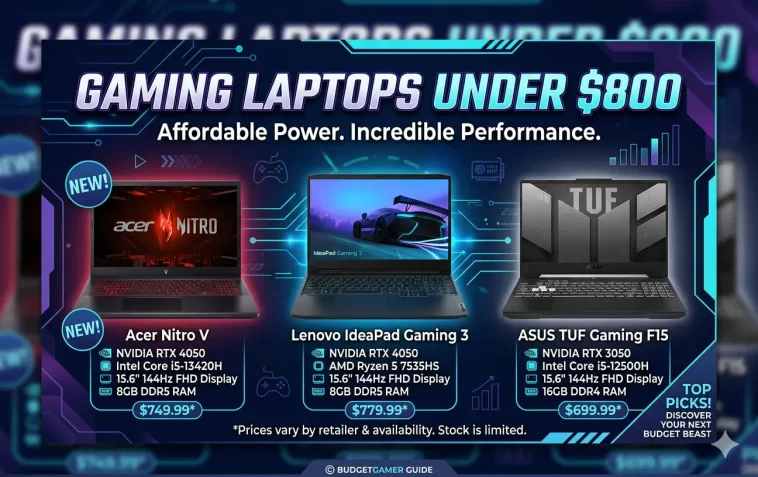
If you want the best budget gaming laptops under $800, you’ve landed in the right place. Not long ago, spending under $800 on a gaming laptop meant making serious sacrifices — weak GPUs, bad displays, and cheap builds that fell apart after a year. That’s no longer the case.
In 2026, the sub-$800 market is genuinely competitive. You can get a dedicated NVIDIA RTX 40-series GPU, a 144Hz display, 16GB of RAM, and a solid build — all without breaking the bank. This guide breaks down the best options by use case, so you can pick the one that actually fits how you play.
What to Expect from a Gaming Laptop Under $800 in 2026
Before diving into the picks, here’s a realistic picture of what this budget gets you:
- GPU: NVIDIA GeForce RTX 4050 or RTX 3050 (RTX 4050 is the clear choice if available)
- CPU: Intel Core i5/i7 or AMD Ryzen 5/7
- RAM: 16GB DDR5 (avoid anything with 8GB — it will bottleneck you)
- Display: 15.6-inch Full HD 144Hz IPS panel
- Storage: 512GB SSD (expandable on most models)
- Battery: Expect 6–10 hours on light tasks; much less during gaming
You won’t be maxing out ray tracing in AAA titles at 4K. But at 1080p on medium to high settings, these machines deliver a genuinely enjoyable experience across most popular games.
Best Budget Gaming Laptops Under $800
🏆 Best Overall: HP Victus 15 (RTX 4050)
The HP Victus 15 is the most well-rounded budget gaming laptop you can buy right now. It packs an NVIDIA GeForce RTX 4050, an Intel Core i5-13420H processor, 16GB of RAM, and a 144Hz Full HD display — all in a clean, non-flashy design that works just as well in a coffee shop as it does at a gaming desk.
What sets it apart from the competition is the combination of GPU power, reliable brand support, and a design that doesn’t scream “gamer” at every angle. If you want something that doubles as a daily work machine, this is the one.
Key specs:
- 15.6-inch FHD 144Hz IPS display
- Intel Core i5-13420H
- NVIDIA GeForce RTX 4050 6GB GDDR6
- 16GB DDR5 RAM, 512GB SSD
- Wi-Fi 6, USB-C, HDMI
- Windows 11
Price: ~$649–$750 (frequently on sale)
Best for: First-time gaming laptop buyers, students who game, anyone wanting a clean everyday design.
🥇 Best AMD Option: Lenovo LOQ 15 (RTX 4050)
The Lenovo LOQ is one of the most underrated gaming laptops in this price range. It comes with an AMD Ryzen 7 processor, an RTX 4050 at a higher power limit than some competitors, a 144Hz display, and 16GB of DDR5 RAM.
The higher TGP (Total Graphics Power) on the RTX 4050 in the LOQ means it actually performs better in GPU-heavy games compared to some RTX 4050 laptops running at lower wattage. The display covers close to 100% sRGB, which also makes it a solid pick for content creators.
Key specs:
- 15.6-inch FHD 144Hz IPS display
- AMD Ryzen 7 7735HS
- NVIDIA GeForce RTX 4050 6GB (higher TGP)
- 16GB DDR5 RAM, 512GB SSD
- 100% sRGB color coverage
- Windows 11
Price: ~$749–$799
Best for: Gamers who also edit video or work with color-sensitive content, AMD CPU fans.
🔨 Best Build Quality: ASUS TUF Gaming A15
The ASUS TUF A15 has been one of the most trusted names in budget gaming for years — and the current version continues that reputation. The chassis is MIL-SPEC certified, meaning it’s been tested to handle drops, dust, humidity, and temperature extremes. It’s the laptop you buy if you’re hard on your gear.
It comes with an AMD Ryzen 7 7435HS, 16GB of DDR5 RAM, and either an RTX 3050 or RTX 4050 depending on the configuration you pick. The 144Hz display is sharp and responsive, and the overall build feels far more premium than the price suggests.
Key specs:
- 15.6-inch FHD 144Hz display
- AMD Ryzen 7 7435HS
- NVIDIA GeForce RTX 4050 (select configs)
- 16GB DDR5 RAM, 512GB–1TB SSD
- MIL-SPEC durability certification
- Windows 11
Price: ~$699–$799
Best for: Students, frequent travelers, anyone who needs a gaming laptop that can take a beating.
🎯 Best for Esports: MSI GF63 Thin
The MSI GF63 Thin is the right pick when portability matters as much as performance. At just 1.86 kg, it’s noticeably lighter than most gaming laptops at this price, and the aluminum lid gives it a more mature, professional look than typical budget gaming designs.
It ships with 16GB of dual-channel RAM, Wi-Fi 6, and three USB-A 3.2 ports. In esports titles — Valorant, CS2, League of Legends, Apex Legends — it consistently hits 100+ fps, which is exactly what competitive players need. It’s not built for heavy AAA gaming, but for fast-paced multiplayer, it punches well above its weight.
Key specs:
- 15.6-inch FHD 144Hz display
- Intel Core i5 / AMD Ryzen 5 options
- NVIDIA GeForce RTX 3050 / 4050
- 16GB dual-channel RAM, 512GB SSD
- 1.86 kg aluminum chassis
- Wi-Fi 6
Price: ~$599–$699
Best for: Esports players, college students, anyone wanting a lightweight gaming machine.
🖥️ Best Display: Acer Nitro 5 (RTX 4050)
The Acer Nitro 5 has a long history in the budget gaming space, and the current model earns its spot on this list primarily because of its display. The 165Hz IPS panel is one of the best screens you’ll find on any gaming laptop under $800 — most competitors top out at 144Hz.
The RTX 4050 handles 1080p gaming well across most titles, and the Intel Core i5-13420H keeps up without creating CPU bottlenecks. It runs warm under load, so a cooling pad is a worthwhile $20–$30 investment if you plan long gaming sessions.
Key specs:
- 15.6-inch FHD 165Hz IPS display
- Intel Core i5-13420H
- NVIDIA GeForce RTX 4050 6GB
- 8–16GB DDR5 RAM, 512GB SSD
- Ethernet port (RJ-45) included
- Windows 11
Price: ~$649–$799
Best for: Gamers who prioritize display smoothness, competitive FPS players.
💰 Best Value Under $700: ASUS TUF Gaming F16
The ASUS TUF Gaming F16 is a slightly newer entry in the TUF lineup, offering a 16-inch screen and RTX 4050 at a price that frequently dips under $700. The larger screen is a genuine advantage for gaming, making it feel more immersive without the weight penalty you’d expect.
It’s backed by ASUS’s TUF durability standards and comes with solid thermal performance that keeps it from throttling during extended gaming sessions.
Key specs:
- 16-inch FHD 144Hz IPS display
- Intel Core 5 210H
- NVIDIA GeForce RTX 4050
- 8GB DDR5 RAM (upgradeable to 16GB)
- 512GB SSD
- Windows 11
Price: ~$649–$699
Best for: Budget buyers who want a larger screen, great value hunters.
Budget Gaming Laptop Comparison Table
| Laptop | GPU | CPU | RAM | Price | Best For |
|---|---|---|---|---|---|
| HP Victus 15 | RTX 4050 | Intel i5-13420H | 16GB | ~$649–$750 | Overall best pick |
| Lenovo LOQ 15 | RTX 4050 | AMD Ryzen 7 | 16GB | ~$749–$799 | AMD + color work |
| ASUS TUF A15 | RTX 4050 | AMD Ryzen 7 | 16GB | ~$699–$799 | Durability |
| MSI GF63 Thin | RTX 3050/4050 | Intel i5 / Ryzen 5 | 16GB | ~$599–$699 | Esports / Portable |
| Acer Nitro 5 | RTX 4050 | Intel i5-13420H | 8–16GB | ~$649–$799 | Best display |
| ASUS TUF F16 | RTX 4050 | Intel Core 5 | 8GB | ~$649–$699 | Large screen value |
What Games Can You Play on a Budget Gaming Laptop?
A laptop with an RTX 4050 is not a budget GPU in disguise — it’s a legitimately capable card for 1080p gaming. Here’s a realistic breakdown:
Runs great at high settings:
- Valorant, CS2, League of Legends, Apex Legends
- Minecraft (with mods), Fortnite, Rocket League
- Older AAA titles (GTA V, Red Dead Redemption 2 at medium-high)
Playable at medium settings:
- Cyberpunk 2077 (with DLSS on)
- Hogwarts Legacy, Elden Ring
- The Witcher 3
DLSS makes a big difference: Many RTX 4050 laptops support NVIDIA DLSS 3, which boosts frame rates significantly in supported titles. If you play games that support DLSS, performance improves noticeably without sacrificing much visual quality.
Tips Before You Buy
1. Always check the TGP (Total Graphics Power) Not all RTX 4050 laptops are equal. The same GPU running at 60W performs very differently from one running at 115W. Check manufacturer specs before purchasing.
2. 16GB RAM is non-negotiable If the configuration only includes 8GB, either upgrade it yourself (if the slots are user-accessible) or spend a little more for a 16GB configuration. Modern games eat RAM fast.
3. SSD-only is fine — HDDs are done Every laptop on this list uses an SSD. Avoid any budget machine that still ships with a spinning hard drive.
4. Battery life during gaming will disappoint Under load, expect 1.5–3 hours. That’s normal for gaming laptops at any price. On light tasks (web browsing, watching videos), these machines deliver 6–10 hours.
5. Check for student discounts Brands like ASUS, Lenovo, and HP all offer education pricing. A 10–15% discount on a $799 laptop is real money.
FAQ: Budget Gaming Laptops Under $800
Q: Is it worth buying a gaming laptop under $800 in 2026? Yes, absolutely. The RTX 4050 generation brought serious performance to the budget segment. You can play most popular games at 1080p on medium to high settings without spending over $800.
Q: Which is better for gaming under $800 — Intel or AMD? Both are capable at this price. AMD Ryzen processors generally handle heavy multitasking and content creation slightly better, while Intel offers strong single-core performance for gaming. Either choice works well.
Q: Can I upgrade RAM and storage later? On most of the laptops listed here, yes. The Lenovo LOQ and ASUS TUF A15 both have accessible slots for RAM and SSD upgrades. Always check before buying if upgradeability matters to you.
Q: Is RTX 4050 better than RTX 3060 in budget laptops? It depends on the power limit. An RTX 4050 at 115W outperforms an RTX 3060 at 60W. Always compare the actual TGP rather than just the model number.
Q: Do budget gaming laptops overheat? Under heavy gaming loads, they run warm — typically 85–95°C on the CPU. That’s within safe limits but can cause thermal throttling. A cooling pad and occasional dust cleaning help significantly.
Q: Can these laptops handle streaming while gaming? Yes, with the RTX 4050 and a Ryzen 7 or i5 processor, you can stream to Twitch or YouTube at 1080p/60fps in less demanding games. Heavier titles may require dropping graphics settings slightly.
Q: What’s the best budget gaming laptop under $800 right now? The HP Victus 15 with RTX 4050 is the best all-rounder. For pure gaming performance and color accuracy, the Lenovo LOQ 15 is slightly better. For durability, go with the ASUS TUF A15.
Final Thoughts
The budget gaming laptop market in 2026 is in a genuinely good place. For under $800, you can get a machine with a real dedicated GPU, a smooth 144Hz display, and enough processing power to handle both gaming and everyday work without compromise.
If you’re unsure where to start, go with the HP Victus 15 (RTX 4050). It hits the right balance of performance, price, and reliability. Step up to the Lenovo LOQ 15 if you want slightly better GPU performance and a more color-accurate display.
Whatever you choose, you don’t need to spend $1,200 to have fun gaming in 2026.
