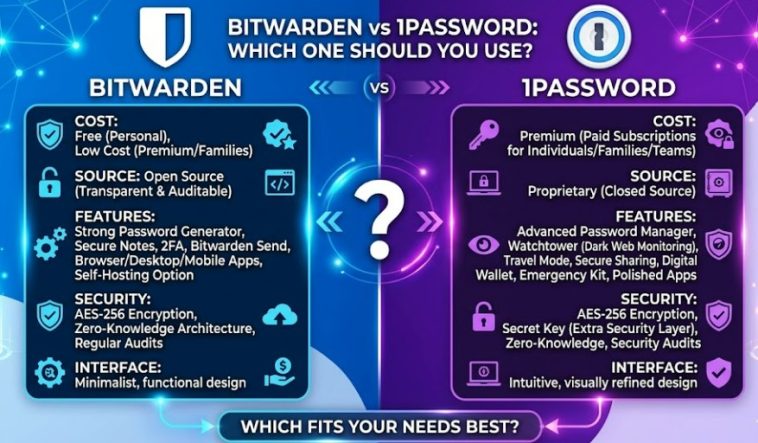
Bitwarden vs 1Password is a comparison I’ve actually had to make for real, not just for a blog post — I run a handful of sites and accounts that need decent password hygiene, and at some point “I’ll just remember them” stops being a strategy. Both are solid. Neither is a scam pick. But the gap between them is bigger than a quick glance at the pricing pages would suggest.
Quick Answer
- Bitwarden is open-source, costs $10/year for Premium, and includes a genuinely usable free tier across unlimited devices
- 1Password costs $47.88/year for an individual plan after its March 2026 price increase, and leans on UX polish, Travel Mode, and deeper integrations
- Both use AES-256 encryption with zero-knowledge architecture, and neither has had a known breach
- Bitwarden offers self-hosting and has gone through multiple independent Cure53 security audits
- For families, Bitwarden Families runs $40/year for 6 users vs 1Password Families, which costs more for one fewer seat
Where They Actually Differ
So the security baseline between these two is closer than the marketing on either side would have you believe. Both use AES-256 encryption. Both are zero-knowledge, meaning the company itself can’t read your vault even if it wanted to. Neither has ever disclosed a breach, which matters more than people give it credit for — LastPass had a real one in 2022, and that’s the kind of thing that should make anyone nervous about a password manager’s track record.
Where they split is philosophy, not core security math.
Bitwarden is open-source. Anyone can inspect the code. That’s not just a nice slogan — it means the encryption claims aren’t something you have to take on faith, because security researchers (and frankly, anyone curious enough) can go check. Bitwarden has also been through four Cure53 audits and carries a FIPS 140-3 certified cryptographic module, which matters specifically if you’re in a regulated industry or just want documented proof rather than a marketing page.
1Password is closed-source but adds proprietary layers. Its Secret Key system combines your master password with a separate, locally-stored key, so even a leaked database alone wouldn’t be enough to brute-force your vault. It’s a genuinely good design. It’s just not something you can independently verify the way you can with open-source code — you’re trusting 1Password’s word on how it’s implemented.
Self-hosting is a Bitwarden-only option. If keeping your vault entirely off someone else’s servers matters to you — which, for a lot of small business owners and IT-conscious users, it does — Bitwarden lets you run your own instance. 1Password has no equivalent. None. If that’s a hard requirement for you, this alone settles the comparison.
Pricing Comparison
| Plan | Bitwarden | 1Password | Notes |
|---|---|---|---|
| Individual | $10/year (Premium) | $47.88/year | 1Password’s free trial is 14 days only, no permanent free tier |
| Free tier | Yes, unlimited devices | No | This is a real gap, not a footnote |
| Family (5–6 users) | $40/year, 6 users | Higher cost, 5 users | Bitwarden gets you more seats for less |
| Small team | ~$4/user/month | $19.95/month flat (up to 10 users) | 1Password is actually competitive here at low headcount |
| Self-hosting | Available | Not available | Enterprise/privacy-focused differentiator |
That free tier line matters more than the table makes it look. Bitwarden’s free plan isn’t a stripped-down trial — it covers unlimited devices and the core vault functionality most people actually need day to day. 1Password doesn’t offer a permanent free option at all anymore, just a trial window.
Feature Differences That Actually Matter
Travel Mode (1Password only). This lets you hide specific vaults entirely from the app when crossing a border, then restore them once you’re somewhere you trust again. If you travel internationally with sensitive accounts regularly, there’s no real Bitwarden equivalent — this is a genuine, specific advantage for 1Password, not just marketing fluff.
Watchtower (1Password). A built-in dashboard that flags weak, reused, or breached passwords across your vault. Bitwarden has similar breach-monitoring functionality, but 1Password’s version is more polished and proactive about surfacing it without you having to dig.
Desktop app architecture. And here’s something that doesn’t show up on a features chart but affects daily use: 1Password moved its Mac desktop app to an Electron-based build rather than a native macOS app. That’s a real trade-off — heavier resource use, and a noticeably different feel from the native app it used to be. Bitwarden’s apps are lighter across the board, though “lighter” doesn’t always mean “more polished,” and 1Password’s UI is still the more refined of the two in day-to-day use.
Browser extension and autofill. From what I’ve used personally, 1Password’s autofill is marginally smoother across more obscure sites. Bitwarden has closed a lot of that gap in recent updates, but it’s not entirely caught up — your mileage may vary depending on which sites you’re logging into regularly.
Who Should Actually Pick Which
If you’re a solo user watching your budget, Bitwarden is the easy call. The free tier alone covers what most people need, and $10/year for Premium is barely a rounding error if you do want the extra features like encrypted file storage and emergency access.
If you’re setting up a family plan, Bitwarden Families gets you more seats for noticeably less money. The sharing experience is a little less refined than 1Password’s, but it works, and saving real money every year on something a family doesn’t use constantly isn’t a small thing.
If you’re running a small team without heavy compliance requirements, Bitwarden Teams is the financially rational pick, and it scales that advantage as headcount grows — one comparison found Bitwarden saving roughly $4,800 a year at 200+ users versus 1Password, with comparable feature coverage.
If you specifically need Travel Mode, want the most polished day-to-day UX, or you’re a business that needs Extended Access Management and deep SaaS integrations, 1Password earns its premium. It’s not that Bitwarden is “worse” here — 1Password has genuinely built a lead in specific enterprise-adjacent areas that Bitwarden hasn’t fully matched yet.
FAQ
Is Bitwarden actually as secure as 1Password? Yes, by every measurable standard — AES-256, zero-knowledge, independent audits on both sides. The security baseline is essentially equal.
Why did 1Password get so much more expensive in 2026? The company cited investment in new features like phishing protection, passkey support, and payment detail capture. Whether that justifies the increase is a fair thing to be skeptical about, especially given the price gap is now closer to 4x Bitwarden’s individual price than the smaller gap it used to be.
Can I import my passwords from one to the other? Yes, both support standard import/export formats, so switching later isn’t a major commitment if you start with one and change your mind.
Does Bitwarden being open-source actually matter for regular users, or is it just a developer thing? It matters more than it sounds like on paper. Open-source means independent researchers can verify the encryption claims instead of just trusting a company’s word — that’s a real, practical difference, not just an ideological one.
Is 1Password worth it just for the better-looking interface? Depends entirely on how much that matters to you day to day. If you’re price-sensitive at all, probably not. If a smoother experience genuinely improves how often you actually use a password manager (which, let’s be honest, matters for adoption), it might be worth it.
Editor’s Opinion
honestly i went into this expecting to lean 1password just because it’s the more “premium” name, but the price jump this year is hard to ignore, and bitwarden’s free tier alone covers most of what a regular person actually needs. if you want the polish and travel mode, fine, pay for 1password. but for most people reading this, bitwarden is just the more rational pick and i don’t think that’s controversial to say at this point.
