I get asked some version of “shared hosting vs VPS vs dedicated server, which one do I actually need” more than almost any other hosting question, usually from someone who just got quoted three wildly different prices for what sounds like the same thing. The honest answer depends entirely on your traffic, your budget, and how much server management you’re willing to deal with yourself.
This guide breaks down the real differences, not just the marketing definitions, so you can pick the right one the first time instead of switching twice like a lot of people end up doing.
Quick Answer
- Shared hosting — cheapest option, fine for low-traffic sites, blogs, and portfolios
- VPS hosting — dedicated resources on a shared physical server, good for growing sites and small apps
- Dedicated server — an entire physical machine to yourself, built for large, high-traffic operations
- Most small business sites never actually need to go past shared or entry-level VPS
- The wrong choice usually isn’t “too small,” it’s overbuying capacity you don’t need yet
What Each Option Actually Means
Shared Hosting
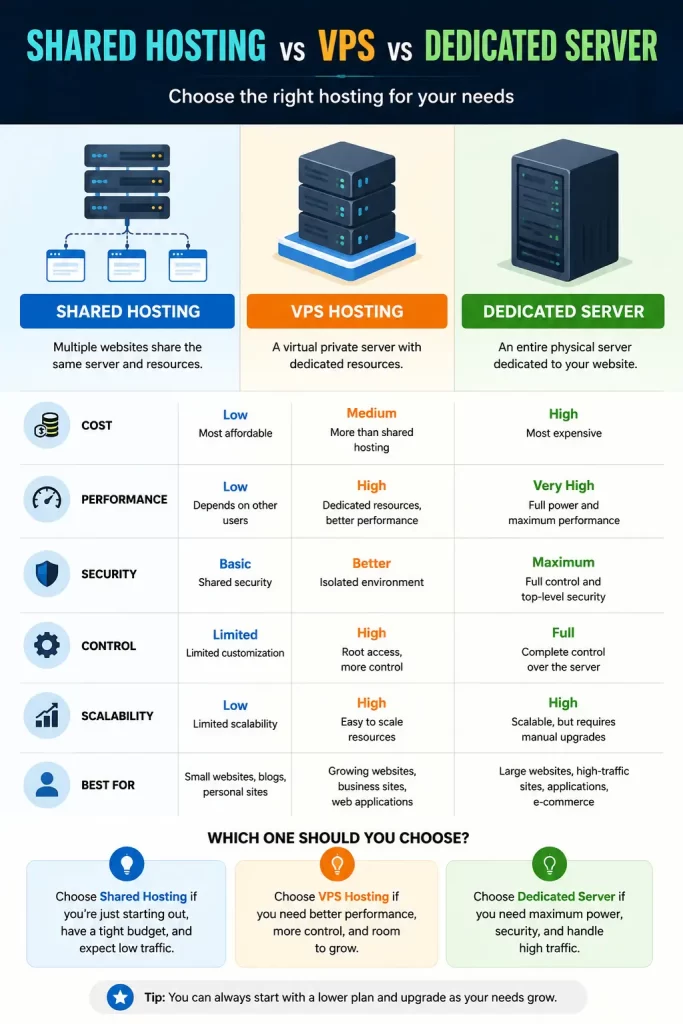
Shared hosting puts your website on the same physical server as dozens, sometimes hundreds, of other sites. You’re all splitting the same CPU, RAM, and storage resources.
That sounds worse than it usually is in practice. For a low-traffic site, you’ll likely never notice the sharing at all. The tradeoff shows up during traffic spikes, when a neighboring site’s surge can occasionally slow things down for everyone on that server.
VPS Hosting
A VPS still lives on a shared physical machine, but it’s partitioned so you get dedicated resources that other accounts can’t touch. You also typically get root access, meaning more control over your software stack.
This is the middle ground that suits sites that have outgrown shared hosting’s limitations but don’t need — or can’t justify the cost of — a full dedicated server.
Dedicated Server
A dedicated server means the entire physical machine is yours. No sharing, no neighboring accounts affecting your performance, full control over the hardware and configuration.
It’s also the most expensive option by a wide margin, and it usually requires more technical know-how to manage properly, unless you’re paying extra for a fully managed plan.
Why the Choice Actually Matters
Picking the wrong tier in either direction causes real problems. Underbuying means slow load times and potential downtime during traffic spikes. Overbuying means paying for capacity that sits unused, which is money that could go toward marketing, inventory, or literally anything else your business needs.
There are a few specific reasons people end up on the wrong tier:
- Traffic estimation is usually wrong in one direction or the other — new site owners tend to overestimate future traffic, while growing ecommerce sites tend to underestimate spikes around sales events
- Plugin and app bloat on shared hosting — a WordPress site loaded with heavy plugins can hit shared hosting’s limits well before traffic alone would justify an upgrade
- Confusing “unlimited” marketing claims — shared hosting plans advertising unlimited storage or bandwidth almost always have fair-use limits buried in the terms
Comparison Table
| Factor | Shared Hosting | VPS Hosting | Dedicated Server |
|---|---|---|---|
| Typical Cost | $1-$8/month | $15-$60/month | $80-$300+/month |
| Resource Sharing | Full sharing | Partitioned, dedicated slice | None |
| Root Access | Rarely | Usually yes | Full control |
| Setup Complexity | Very low | Moderate | High (unless managed) |
| Best For | Blogs, portfolios, small sites | Growing sites, small apps, SaaS | High-traffic sites, large platforms |
| Management Required | None | Some, unless managed | Significant, unless managed |
How to Actually Decide
Step 1: Look at your current traffic, not your hoped-for traffic. If you’re getting under a few thousand visits a month, shared hosting is very likely enough right now.
Step 2: Check how resource-heavy your site actually is. An ecommerce site with dozens of plugins and real-time inventory syncing needs more resources than a simple brochure site, even at similar traffic levels.
Step 3: Be honest about your technical comfort level. VPS and dedicated servers both benefit from someone who’s comfortable in a terminal, or a managed plan that handles that layer for you at extra cost.
Step 4: Factor in growth, but don’t overcorrect. It’s fine to plan one tier ahead. Jumping straight to a dedicated server “just in case” for a brand-new site is rarely a good use of budget.
Step 5: Ask your host directly what upgrade paths look like. A good provider makes it easy to move from shared to VPS to dedicated without a painful migration. If they can’t explain that clearly, that’s worth noting before you commit.
Common Mistakes People Make
- Choosing dedicated hosting before actually needing the resources it provides
- Staying on shared hosting long after a site has clearly outgrown it, just to avoid switching
- Assuming VPS automatically means better performance without checking the actual allocated resources
- Ignoring management requirements and ending up with a dedicated server nobody on the team can actually maintain
Which One Should You Actually Choose?
If you’re running a personal blog, portfolio, or a small business site with modest traffic, shared hosting is the sensible starting point. There’s no reason to pay more for resources you’re not using yet.
If your site has grown past occasional slowdowns, or you’re running something more complex like a SaaS product or a busier ecommerce store, VPS hosting is usually the right next step. It gives you room to grow without jumping straight to dedicated-server pricing.
Dedicated servers make sense once you’re dealing with serious, consistent high traffic, or specific compliance and security requirements that demand full hardware isolation. For most small and mid-sized businesses, that point arrives later than people expect, if it arrives at all.
Frequently Asked Questions
Can I upgrade from shared hosting to VPS later without losing my site?
Yes, most hosts offer migration assistance for this exact move. Expect a short window of setup time, but it’s a standard upgrade path.
Is VPS hosting overkill for a small business website?
Not necessarily. If your site handles regular traffic spikes or runs resource-heavy plugins, VPS can be worth it even at moderate traffic levels.
Does a dedicated server guarantee better performance than VPS?
Only if you’re actually using the extra resources. A poorly optimized site on a dedicated server can still run slowly, since raw hardware isn’t the only factor in performance.
How do I know if my shared hosting plan is maxed out?
Slow load times during normal traffic, frequent resource limit warnings from your host, or a support rep telling you directly are the clearest signs.
Is managed VPS worth the extra cost over unmanaged?
For anyone without server administration experience, yes. The extra cost usually pays for itself in avoided downtime and saved troubleshooting time.
What’s the biggest hidden cost difference between these three options?
Management time. Shared hosting requires almost none. VPS and dedicated servers both require either your own technical time or a paid managed plan, and that cost is easy to underestimate upfront.
Editor’s Opinion
most people way overthink this decision honestly, if your just starting out shared hosting is fine and you can allways upgrade later when you actually need to. dont let a sales page talk you into a dedicated server for a site that gets barely any visitors, thats just wasting money. vps is the sweet spot for alot of growing sites imo, enough power without the full dedicated server price tag.
