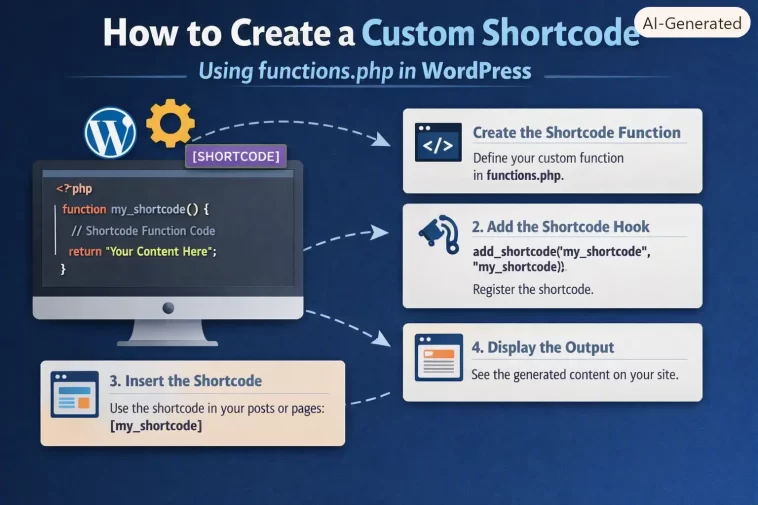
I still remember staring at a page that just printed the literal text [my_box] instead of rendering anything, wondering what I’d done wrong. Turned out I’d typed the shortcode tag with a hyphen instead of an underscore, and WordPress silently treated it as plain text. If you’re trying to create a custom shortcode using functions.php, this covers the working version plus the small mistakes that cause exactly that kind of silent failure.
Quick Answer
- Register a shortcode with
add_shortcode( 'tag_name', 'your_function' )insidefunctions.php - Your function must return its output, never
echoit directly - Use
shortcode_atts()to handle optional attributes with sensible defaults - Shortcode tags should use lowercase letters and underscores only — no hyphens, no uppercase
- Works in the block editor’s Shortcode block, in Classic Editor content, and inside widgets that support shortcodes
Why Shortcodes Break (Even When the Code Looks Right)
The most common failure isn’t a fatal error — it’s a shortcode that just displays as literal bracketed text on the page, which throws people off because there’s no error to search for.
Using echo instead of return. This is probably the single most common shortcode bug. WordPress expects the shortcode function to return a string. If you echo it instead, the output tends to appear in the wrong place on the page — often above the content, sometimes not at all depending on when the shortcode gets processed relative to the rest of the page render.
Hyphens in the shortcode tag. WordPress shortcode tags should stick to lowercase letters and underscores. A hyphen doesn’t always break things outright, but it’s inconsistent enough across setups that it’s just not worth the risk.
The shortcode isn’t actually registered before it’s used. So if add_shortcode() runs inside a function that’s hooked too late, or inside a conditional that doesn’t fire on that particular page, WordPress has no idea the tag exists yet and just prints it as-is.
Editing the wrong functions.php file. If you’re not on a child theme, editing your active theme’s functions.php directly means the whole thing gets wiped out on the next theme update. This isn’t a shortcode-specific issue, but it’s exactly the kind of thing that makes a shortcode “disappear” a few weeks later and nobody remembers why.
Step-by-Step: Creating Your Shortcode
Step 1: Open functions.php (the right one)
If you’re using a child theme, edit that theme’s functions.php. If you’re not on a child theme, honestly, consider creating one first — editing a parent theme’s functions.php directly means losing every change on the next update. Not strictly required for this tutorial to work, but worth mentioning before you invest time in something an update could erase.
Step 2: Write the shortcode function
Start with something simple — a basic message box.
php
function mfp_notice_box() {
    return '<div class="mfp-notice">Heads up: this is a custom notice box.</div>';
}
add_shortcode( 'notice_box', 'mfp_notice_box' );
Notice the return, not echo. Also notice the function name has a prefix (mfp_) — this matters more once you’re running multiple plugins or snippets that might otherwise collide on function names.
Step 3: Add attributes so users can customize it
Static text is fine for a demo, but most real shortcodes need to accept parameters. Here’s the same notice box, now accepting a type and a custom message:
php
function mfp_notice_box( $atts ) {
    $atts = shortcode_atts(
        array(
            'type'    => 'info',
            'message' => 'Heads up: this is a custom notice box.',
        ),
        $atts,
        'notice_box'
    );

    return '<div class="mfp-notice mfp-notice-' . esc_attr( $atts['type'] ) . '">' . esc_html( $atts['message'] ) . '</div>';
}
add_shortcode( 'notice_box', 'mfp_notice_box' );
Now [notice_box type="warning" message="Backups are running tonight."] outputs a different class and message, while [notice_box] on its own still falls back to the defaults. That’s the whole point of shortcode_atts() — it merges what the user typed with your defaults so nothing breaks when someone leaves an attribute out.
Step 4: Handle enclosed content (optional)
Some shortcodes wrap around content, like [highlight]this text[/highlight]. That requires a second parameter:
php
function mfp_highlight_shortcode( $atts, $content = null ) {
    return '<span class="mfp-highlight">' . do_shortcode( $content ) . '</span>';
}
add_shortcode( 'highlight', 'mfp_highlight_shortcode' );
Wrapping $content in do_shortcode() matters if you want nested shortcodes inside it to also process — without that, anything nested inside just prints as plain text.
Step 5: Test it
Drop the shortcode tag into a post using the Shortcode block in the block editor, or directly into a Classic Editor content area. Preview the page. If it prints literally as brackets and text, something in Steps 1–3 didn’t register correctly — check for typos in the tag name first, that’s the usual offender.
Where functions.php Shortcodes Actually Work (And Where They Don’t)
| Location | Renders shortcode? | Notes |
|---|---|---|
| Post/page content (block or classic editor) | Yes | Native support, no extra code needed |
| Text widgets | Yes, in most modern versions | Older widget setups sometimes needed a filter added manually |
| Theme template files (e.g. page.php) | Only with do_shortcode() wrapped around it | Shortcodes aren’t auto-processed in PHP templates |
| Some page builder text modules | Varies | Depends on the builder — test directly, don’t assume |
If you want a shortcode to render inside a theme template file directly, you can’t just drop the bracket tag into the PHP — you need echo do_shortcode('[notice_box]'); since template files don’t run through the content filter that normally processes shortcodes automatically.
What Actually Worked For Me
The hyphen thing I mentioned at the start actually took me a while to catch, longer than it should have. I’d named a shortcode [member-card] because that’s just how I’d name a CSS class, out of habit. It worked fine in testing, or at least I thought it did — turned out it was rendering correctly on that particular install because of how a caching plugin was handling the output, not because the shortcode itself was solid.
When I moved the same code to a different site without that caching setup, the bracket tag just printed as plain text. I spent a while checking add_shortcode() placement, checking whether the function was hooked correctly, even checked if the theme’s functions.php was loading at all — none of that was the problem. A comment on a WordPress support forum, from someone dealing with a completely unrelated shortcode, mentioned in passing that hyphens are asking for trouble in tag names. Swapped it to member_card, and it worked everywhere immediately. Small fix, but I wouldn’t have found it just by reading my own code over and over.
Advanced Fixes and Edge Cases
Shortcodes not rendering inside widgets. Depending on your WordPress version and theme, text widgets sometimes need shortcode support added explicitly with add_filter( 'widget_text', 'do_shortcode' );. Most modern setups handle this out of the box, but if a shortcode works in post content and not in a widget, this filter is the first thing to check.
Conflicting shortcode names between plugins. WordPress only allows one registered callback per shortcode tag — if two plugins (or a plugin and your functions.php) both register 
Escaping output properly. Any attribute value coming from $atts should go through esc_attr() if it’s landing inside an HTML attribute, and esc_html() if it’s landing in visible text. Skipping this isn’t just a style preference — it’s how a shortcode ends up vulnerable to stored XSS if someone with content-editing access (or a compromised account) passes malicious input through an attribute.
Debugging with error logging. If a shortcode silently does nothing rather than erroring, temporarily add error_log() calls inside the function to confirm it’s even being called. Sounds basic, but it’s often the fastest way to tell “not registered” apart from “registered but logic is wrong.”
Prevention Tips
- Always use a unique prefix on shortcode function names to avoid collisions with plugins
- Stick to lowercase and underscores for shortcode tags — never hyphens, never uppercase
- Use a child theme (or a small custom plugin) instead of editing a parent theme’s functions.php directly
- Escape all dynamic output — don’t assume attribute values are safe just because they came from your own site’s editor
FAQ
Can I use a shortcode inside another shortcode? Yes, but only if the outer shortcode’s function explicitly runs the content through do_shortcode(). It doesn’t happen automatically.
Why does my shortcode print the raw text on some pages but not others? Usually a content filter issue — some custom page templates or page builder text areas don’t run the standard the_content filter that normally processes shortcodes.
Should I use a shortcode or a Gutenberg block for new functionality? For anything block-editor-native going forward, a custom block is generally the more modern approach. Shortcodes still make sense for backward compatibility, widgets, and quick utility functions.
Is it bad practice to keep adding shortcodes to functions.php? Not inherently, but once you’ve got more than a handful, moving them into a small dedicated plugin (or a separate included file) keeps functions.php from turning into an unmanageable wall of unrelated code.
Do shortcodes slow down a site? Not meaningfully on their own. A shortcode that queries the database inefficiently inside its callback can slow things down, but that’s a coding issue, not a shortcode issue specifically.
Editor’s Opinion
shortcodes get treated like a legacy feature now that blocks exist, but for quick, reusable snippets they’re still genuinely useful and way less overhead than building a full block. the hyphen-vs-underscore thing is such a small detail to trip on but it’s exactly the kind of thing that eats an afternoon if you don’t know to check for it. just return your string, escape your attributes, and don’t overthink the rest.
