Getting your WordPress site to rank on Google isn’t a mystery anymore — it’s more like plumbing. There are specific things that need to work, in a specific order, and when they don’t, your content just sits there no matter how good it is. I’ve spent enough time in Search Console and PageSpeed Insights to know that most ranking problems trace back to a handful of fixable issues.
Start Here: Get Your Technical Foundation Right
Before content, before keywords, before anything — your technical setup either supports rankings or undermines them. This is the part most people skip because it’s less exciting than writing.
Hosting Is Not a Budget Decision
Cheap shared hosting is the silent killer of WordPress SEO. Your server response time directly affects Time to First Byte (TTFB), which affects LCP, which affects Core Web Vitals, which are a confirmed Google ranking signal. You can optimize everything else perfectly and still lose rankings to a competitor on better hosting.
The gap between a $3/month shared host and a mid-tier managed WordPress host is significant. On quality managed hosting, sites pass Core Web Vitals at roughly two to three times the rate of budget shared hosts. That’s not a marketing claim — it shows up in the field data that Google actually uses for ranking.
If your server response time in PageSpeed Insights is above 600ms, the hosting is the problem. No plugin fixes that.
Permalinks, Indexing, and the Obvious Stuff
A few WordPress-specific settings trip people up repeatedly:
- Reading Settings → make sure “Discourage search engines from indexing this site” is unchecked. It happens. Usually when someone set up a staging environment and the setting followed the site to production.
- Permalinks should be set to Post Name (
/%postname%/). The default?p=123format gives Google no useful information about page content. - XML Sitemap — Rank Math generates one automatically. Submit it to Google Search Console once, and keep Search Console open as a dashboard for ongoing monitoring.
And verify your robots.txt isn’t blocking anything important. This is another “it happens more than you’d think” situation.
Core Web Vitals: The Three Metrics That Actually Matter
Google replaced First Input Delay (FID) with Interaction to Next Paint (INP) in March 2024. If you’re reading an older guide that still mentions FID, it’s out of date. The three current metrics are:
| Metric | What It Measures | Target |
|---|---|---|
| LCP (Largest Contentful Paint) | How fast the main content loads | Under 2.5 seconds |
| INP (Interaction to Next Paint) | How fast the page responds to any click or input | Under 200ms |
| CLS (Cumulative Layout Shift) | How much the layout shifts while loading | Under 0.1 |
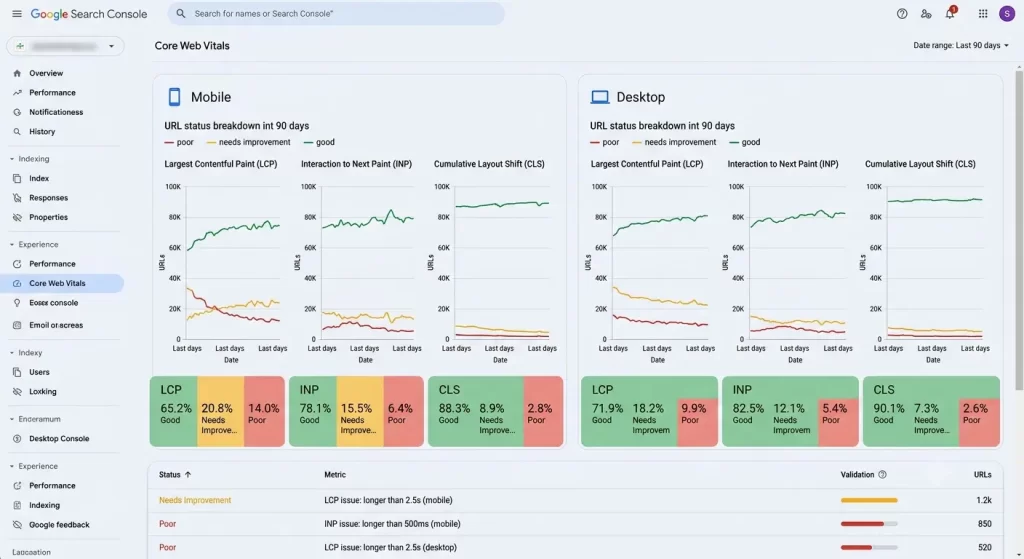
All three need to be in the “Good” range for at least 75% of real-user visits. Passing two out of three doesn’t get you a passing grade — Google looks at all three together.
INP is the one most sites are failing right now. The issue is usually JavaScript — heavy page builders, too many scripts loading synchronously, third-party embeds blocking the main thread.
The practical fix sequence:
- Hero image — Convert it to WebP or AVIF, compress it under 100KB, and add
fetchpriority="high"to the<img>tag. This is usually the single highest-impact change for LCP. - Image dimensions — Every image on the page needs explicit
widthandheightattributes. No exceptions. This is what causes CLS. - JavaScript audit — Identify and defer scripts that don’t need to load at page start. WP Rocket and LiteSpeed Cache both handle this reasonably well through their JS delay/defer settings.
- Caching — Enable full-page caching. WP Rocket, LiteSpeed Cache, or WP Fastest Cache. Pick one and configure it properly.
- CDN — Cloudflare’s free tier is enough for most sites. It moves static assets closer to users and takes load off your origin server.
Check your actual field data in Search Console’s Core Web Vitals report, not just PageSpeed Insights lab scores. Google ranks based on real-user data (Chrome UX Report), not synthetic scores. A site can show 90+ in PageSpeed and still fail field data — that’s not rare.
Image: Google Search Console Core Web Vitals report showing LCP, INP, and CLS status split by mobile and desktop
Content Strategy: Topical Authority Over Scattered Posts
This is where most WordPress sites are leaving rankings on the table, and it’s also the part that takes the most patience.
Google’s algorithm in 2026 isn’t just evaluating individual pages — it’s evaluating your site’s overall authority on a topic. A site that has fifty loosely connected posts across different niches will generally rank worse than a site with twenty tightly connected posts that all reinforce each other on one topic cluster.
The model that works:
Pillar page → one broad, thorough page covering a topic at a high level (e.g., “WordPress Security Guide”)
Cluster posts → individual posts that go deep on specific subtopics (e.g., “How to Set Up Two-Factor Authentication in WordPress,” “Best WordPress Security Plugins,” “How to Limit Login Attempts in WordPress”)
Every cluster post links back to the pillar. The pillar links to every cluster post. This bi-directional internal linking structure tells Google that these pages form a coherent body of work — and it concentrates authority on the pillar page.
From what I’ve seen, sites that rebuild their architecture around topic clusters tend to see older, mediocre-performing posts start ranking better almost as a side effect, because the internal linking structure is distributing authority to pages that were previously isolated.
Pages buried more than three clicks from the homepage face materially higher risk of infrequent crawling. Google treats click depth as a proxy for importance — if your site treats a page as hard to reach, Google will too.
Keyword Research: Search Intent First, Then Volume
Chasing high-volume keywords without understanding search intent is one of the most common reasons well-written content doesn’t rank. Google’s job is to match queries to the most satisfying result — and “satisfying” is defined by intent, not just topical relevance.
A few intent categories that shape how you should write:
- Informational — “How to install WordPress” → the user wants a tutorial. A product page won’t rank here.
- Commercial — “Best WordPress hosting” → the user wants comparisons. A technical how-to won’t rank here either.
- Navigational — “WordPress login page” → the user wants to get somewhere specific.
- Transactional — “Buy WP Rocket plugin” → the user is ready to act.
The tell-tale sign that intent mismatch is your problem: you’re targeting a keyword, your content is good, but you’re stuck on page two or three no matter what you do. Check what’s actually ranking on page one. If it’s all listicles and you wrote a tutorial, you’ve misread the intent. Reformat or write a new piece that matches the format Google is already rewarding for that query.
One focus keyword per post. Two or three secondary related terms. Targeting more than that doesn’t give you more ranking opportunities — it just muddies what the page is actually about.
On-Page Optimization: The Rank Math Checklist
Rank Math makes most of this mechanical, which is the point. But running through it manually once clarifies what you’re actually doing and why.
Title tag — Focus keyword as close to the start as possible. Under 60 characters. Make it readable first, keyword-optimized second.
Meta description — This doesn’t directly affect ranking, but it affects click-through rate, which matters. Under 160 characters, includes the focus keyword, and actually describes why someone should click.
H1 — One per page, contains the focus keyword.
H2/H3 structure — Use them to organize content logically. Rank Math will flag if you’re missing keyword-related subheadings, but don’t stuff them unnaturally.
URL slug — Short, keyword-containing, no stop words. /wordpress-seo-tips/ beats /how-to-improve-your-wordpress-seo-for-google-in-2026/.
Images — Descriptive file names before uploading (wordpress-seo-checklist.webp, not IMG_4891.jpg). Alt text that describes what’s in the image, with keyword where it fits naturally.
Content length — Longer isn’t automatically better. Thorough beats shallow every time. Match the depth to what the top-ranking pages are doing for that query — some queries reward 800-word answers, others reward 3000-word guides. Don’t pad.
Internal Linking: The Underrated Ranking Lever
Internal links are how Google discovers pages, understands relationships between content, and infers which pages on your site are important. And yet most WordPress sites have inconsistent, random internal linking that leaves a lot of performance unrealized.
The anchor text you use for internal links matters. Descriptive, keyword-relevant anchor text (“how to fix WordPress 404 errors”) tells Google what the linked page is about. Generic text (“click here,” “read more”) wastes the opportunity.
A new post that gets internal links from established, high-authority pages on your site starts accumulating PageRank immediately — before any external links. This is why publishing a new article and then spending five minutes adding contextual internal links to it from existing posts is one of the fastest ways to get it indexed and ranking.
From what I’ve seen, this step gets skipped constantly because it requires going back into old posts, and that’s less exciting than publishing new content. But it’s also one of the highest-leverage actions you can take without writing anything new.
Schema Markup: Tell Google Exactly What Your Content Is
Schema markup is structured data you add to your pages that helps Google understand what type of content it’s looking at. Rank Math handles the most important types automatically — Article, FAQ, HowTo, Breadcrumb — but it’s worth knowing what each does.
FAQ schema is the one worth paying specific attention to. When Google picks it up, your result in the search page can expand to show question-and-answer pairs directly, taking up more real estate on the results page. This doesn’t always happen, but when it does, it noticeably improves click-through rate.
In Rank Math, go to the Schema tab for any post and select FAQ, then map your FAQ section questions to the schema fields. It takes about two minutes per post and is worth doing on any page where you want more SERP visibility.
What Actually Worked For Me
A site I was working on had decent content — well-researched, properly structured, using Rank Math — but organic traffic had been flat for months. Rankings were there on page two and three for most target terms, but nothing was moving up.
I ran through the obvious suspects first. Core Web Vitals were fine. Sitemap was submitted. No indexing issues in Search Console.
Then I looked at the internal linking. The posts were there, but they were essentially orphaned — nothing was pointing to them from existing content, and they weren’t pointing to each other in any coherent way. No topic cluster structure. Just individual posts.
So, well, sort of — it’s actually more accurate to say the site had a cluster structure in theory (the topics were related) but not in practice (the links weren’t there). I spent a few hours mapping out which posts belonged to which topic clusters and then adding contextual internal links, both pillar-to-cluster and cluster-to-pillar.
Within about six weeks, several posts that had been stuck on page two moved onto page one. I can’t say with certainty that internal linking was the only factor — there’s never a clean single-variable test in SEO — but the timing was pretty clear.
Advanced: Things Most WordPress Sites Don’t Do
Author authority — Google’s E-E-A-T framework (Experience, Expertise, Authoritativeness, Trustworthiness) increasingly factors in who is writing the content. An author bio page with real credentials, links to other bylines, and a professional photo adds signals that the content comes from a real person with relevant experience. This matters more on YMYL (Your Money or Your Life) topics — health, finance, legal — but it’s good practice across the board.
Updating old content — Publishing new content is necessary, but refreshing older posts that are ranking on page two can be a faster path to more traffic. Update statistics, improve internal links, expand thin sections, re-optimize for current keyword intent. Google’s “freshness” signals favor recently updated content.
Search Console opportunities — Go to Performance → Search Results and look for queries where you’re getting impressions but low click-through rate. These are pages that are showing in results but not getting clicks — often fixable with a better title or meta description. Also look for queries where you’re ranking 8–15 and just need a push: those are your best candidates for content improvement.
Page speed on mobile specifically — Google uses mobile-first indexing. Your desktop performance is largely irrelevant. Test on mobile, fix on mobile, track mobile separately in Search Console.
Prevention: What to Maintain Ongoing
- Monthly Search Console check — Look for new coverage errors, crawl issues, and Core Web Vitals regressions. Takes fifteen minutes and catches problems before they compound.
- Content audit every quarter — Find your lowest-performing posts. Update, merge with similar thin content, or noindex the genuinely hopeless ones. A smaller site with tighter, stronger content outperforms a bloated site with lots of mediocre pages.
- Monitor Core Web Vitals in the field — Lab scores can look fine while real-user data is failing. The Search Console report updates regularly and shows actual user experience data.
- Don’t install plugins you don’t need — Every plugin is potential JavaScript, potential database queries, potential conflicts. Keep the install list tight.
FAQ
How long does it take for WordPress SEO changes to show results?
Depends on what you changed. A technical fix (indexing error, sitemap submission) can reflect in days. Content improvements typically take four to twelve weeks to show ranking movement. Internal linking changes tend to show results within four to eight weeks based on crawl frequency.
Does Rank Math or Yoast actually matter for rankings?
Neither plugin “gives” you rankings — they help you implement on-page signals correctly. The difference between them is mostly UI and workflow. Rank Math’s free version covers everything most sites need. Don’t switch SEO plugins unless you have a real reason; the migration risks usually aren’t worth it.
Is it true that Google doesn’t read meta descriptions for rankings?
Correct — meta descriptions aren’t a ranking factor. But they influence click-through rate, which does affect how your page performs in search. Write them for humans, include the keyword so it bolds in search results, and keep them under 160 characters.
Why is my WordPress site slow on mobile but fast on desktop?
Usually images — specifically large images that haven’t been properly sized for mobile viewports — or JavaScript that blocks rendering on lower-powered mobile CPUs. Test with PageSpeed Insights specifically on Mobile mode and look at the specific failing elements.
How many internal links should each post have?
No magic number. A rough guideline is three to ten contextual internal links per 1,000 words, depending on content depth. More important than quantity is relevance — link to pages that are genuinely related to what the reader is looking at.
What’s the fastest single change to improve Google rankings?
If your Core Web Vitals are failing, fixing those tends to have the most immediate measurable impact. If they’re fine, the fastest improvement I’ve seen consistently come from improving titles and meta descriptions on pages stuck between position eight and fifteen — clicks go up, and rankings tend to follow.
Does publishing frequency matter for SEO?
Somewhat, but not in the way most people think. Consistent publishing matters because it gives Google more to index and signals an active site. But publishing low-quality content frequently is worse than publishing excellent content less often. Quality and topical focus beat raw frequency.
Editor’s Opinion
honestly most of the “WordPress SEO” advice out there is people repackaging the same basic checklist — install Yoast, add keywords, get backlinks. and yeah that stuff matters but the real gaps I keep seeing are hosting that’s too slow to pass Core Web Vitals, and internal linking that’s basically nonexistent. fix those two things before you worry about anything fancy. also check your mobile performance specifically. desktop scores mean almost nothing anymore.
