If your Shield TV Pro chugs and stutters specifically on 4K HDR content in Plex — while regular 1080p or even 4K SDR plays fine — you’re dealing with a narrower problem than general “Plex is buggy” complaints suggest. The Shield TV Pro 4K HDR stuttering issue almost always traces back to either network throughput, a transcode getting triggered when it shouldn’t be, or an HDR handshake problem between the Shield and your TV/receiver. I went through a stretch of this myself after adding a receiver into the chain, and it took longer than I’d like to admit to figure out the actual cause.
So let’s go through the real causes instead of just “restart it and see.”
Quick Answer
- Most common cause: Wi-Fi bandwidth insufficient for 4K HDR bitrate, especially on 5GHz with interference or distance from the router.
- Second most common: Plex Media Server silently transcoding instead of direct playing, often due to audio track or subtitle mismatch, not the video itself.
- Third: HDR handshake failure through an AV receiver or HDMI switch that isn’t fully HDMI 2.0a/2.1 compliant.
- Fastest fix that works most often: switch to a wired ethernet connection, even temporarily, to rule out Wi-Fi entirely.
- If wired doesn’t fix it, check the Plex dashboard during playback for a transcode indicator — that’s usually the real smoking gun.
Why It Fails
4K HDR content sits at a genuinely different bitrate tier than most people’s home network setup was built around — a well-encoded 4K HDR file can run 60-100+ Mbps for high-bitrate remuxes, and that’s before accounting for Wi-Fi’s real-world throughput being well below its advertised number once you factor in distance, walls, and interference from neighboring networks. Stuttering under those conditions isn’t really a Shield hardware problem; it’s a straightforward case of the data not arriving fast enough.
From what I’ve seen, there are four causes that account for most reports:
Insufficient network bandwidth, usually over Wi-Fi. The Shield TV Pro’s Wi-Fi 5 (or Wi-Fi 6 on the newer revision) can technically handle high bitrates in ideal conditions, but “ideal conditions” is doing a lot of work in that sentence. Multiple devices on the same 5GHz band, distance from the router, or even a neighbor’s network on an overlapping channel can quietly cut your real throughput well below what a high-bitrate 4K HDR file needs, and the stutter is essentially buffering that doesn’t look like buffering because the file’s still technically “playing,” just dropping frames to keep up.
An unnecessary transcode getting triggered. This is the one that trips people up the most, because they assume “direct play” is happening when it isn’t. Plex will transcode — not just the video, sometimes audio-only transcodes still tax the pipeline — if there’s a subtitle burn-in requirement, an audio codec the client claims not to support, or a container mismatch Plex decides needs remuxing on the fly. A transcode of a 4K HDR source is a heavy CPU/GPU task on the server side, and if your Plex server (especially if it’s a lower-power NAS rather than a dedicated PC) can’t keep up, that’s your stutter — not a Shield problem at all.
HDR handshake instability through a receiver or HDMI switch. If the Shield’s HDMI output runs through an AV receiver before reaching the TV, and that receiver isn’t fully HDMI 2.0a-or-later compliant (or has buggy HDCP 2.2/2.3 handling), you can get intermittent HDR renegotiation during playback — the chain briefly drops and re-establishes the HDR signal, which shows up as a stutter or brief black flash rather than a clean playback issue.
Chroma subsampling or refresh-rate mismatch causing perceived stutter that isn’t really buffering at all. If your Shield is outputting at a fixed refresh rate (say, locked to 60Hz) while the content is natively 23.976fps, judder from that mismatch can look and feel like stuttering even though there’s no actual buffering happening. This is a genuinely different problem from the network/transcode causes above and needs a different fix — matching refresh rate, not fixing bandwidth.
An overlooked cause worth checking: USB or network-attached storage read speed, if your media library sits on an external drive or a NAS rather than the Shield’s internal storage. A high-bitrate 4K HDR remux can exceed what a budget USB 2.0 external drive or an underpowered NAS can sustain, especially if multiple files or thumbnails are being read simultaneously.
Common Scenarios
- Wi-Fi setups with the Shield more than one room from the router, especially through drywall or floors.
- Plex servers running on a NAS with a weak CPU (older Synology/QNAP models without hardware transcoding support), attempting to transcode 4K HDR on the fly.
- Home theater setups with an older AV receiver in the signal chain between Shield and TV.
- Large media libraries on external USB drives, particularly ones formatted exFAT with fragmented large files.
Technical Comparison Table
| Symptom | Likely cause | Fix reliability |
|---|---|---|
| Stutter only over Wi-Fi, fine on ethernet | Wi-Fi bandwidth/interference | High |
| Plex dashboard shows “Transcode” during playback | Server-side transcode triggered | High, needs settings fix |
| Brief black flash or signal drop during stutter | HDR handshake through receiver | Medium — bypass or update receiver |
| Smooth-looking but rhythmic judder, no true stutter | Refresh rate mismatch | High, fix via display settings |
Step-by-Step Fixes
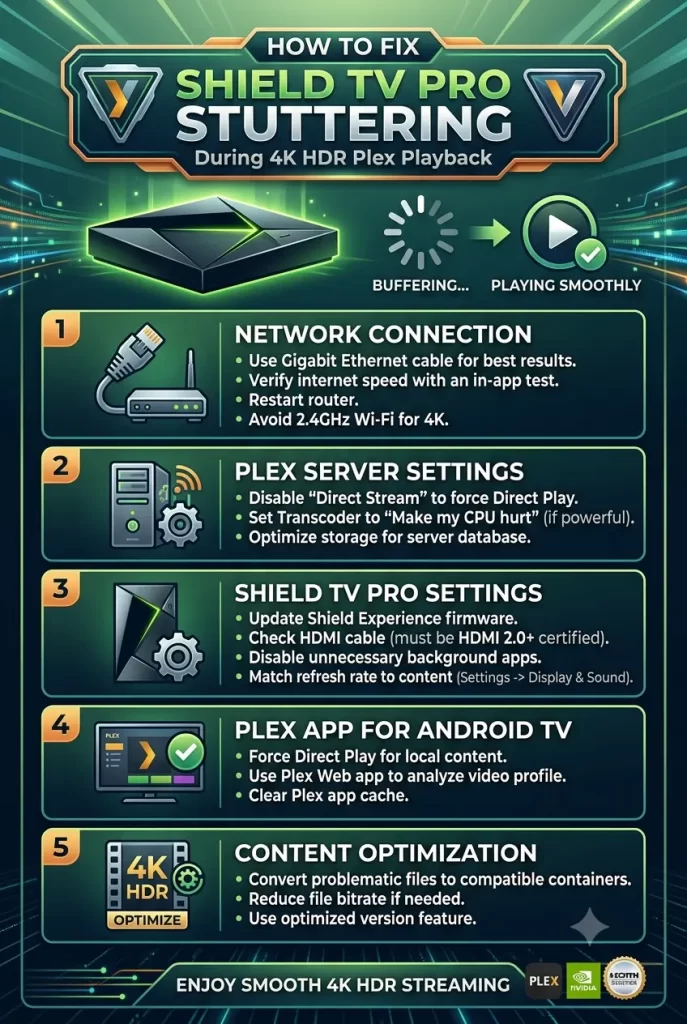
Step 1: Go wired, even temporarily, to isolate network as the cause
Plug an ethernet cable directly into the Shield (using a USB-to-ethernet adapter if your Shield model doesn’t have a built-in port) and test the same content. If it plays clean over wired but stutters over Wi-Fi, you’ve confirmed the cause and can decide between staying wired permanently or working on your Wi-Fi setup specifically — a wired connection this reliable is honestly hard to beat for a stationary device like a Shield anyway.
Step 2: Check the Plex dashboard during playback
On a computer, go to your Plex server’s web dashboard, look at the “Now Playing” panel while the stutter is happening. It’ll show either “Direct Play,” “Direct Stream,” or “Transcode” for both video and audio separately. If it says Transcode when you expect direct play, that’s your actual problem — not the Shield, not the network, the server’s CPU trying to keep up with a task it’s not suited for.
Step 3: Fix the transcode trigger, if that’s what’s happening
Common causes of an unwanted transcode:
- Subtitles set to “burn in” rather than passthrough in Plex client settings — switch to embedded/passthrough subtitles where the format supports it.
- Audio codec the client reports as unsupported — check Plex client audio settings on the Shield and make sure passthrough is enabled for formats like DTS-HD MA or TrueHD if your receiver supports them.
- “Prefer higher quality” or bitrate limit settings on the Shield’s Plex app set lower than the source file’s actual bitrate, forcing a downscale transcode unnecessarily.
Step 4: Bypass the receiver temporarily to rule out HDR handshake issues
Run the Shield’s HDMI output directly into the TV, skipping the receiver, and test playback. If it’s smooth direct but stutters through the receiver, check for a firmware update on the receiver, or consider whether it’s genuinely rated for HDMI 2.0a+/HDCP 2.2 4K HDR passthrough — some older “4K-labeled” receivers only support 4K SDR properly, not full HDR metadata passthrough.
Step 5: Match refresh rate to content instead of running a fixed rate
Under Settings > Device Preferences > Display & Sound > Match content frame rate, set this to On or Match both, hybrid. This lets the Shield switch refresh rates to match the source content’s native frame rate rather than forcing everything through a fixed 60Hz output, which is where a lot of judder-that-looks-like-stutter actually comes from.
Step 6: Check storage read speed if your library’s on external or network storage
If you’re on a USB drive, confirm it’s USB 3.0 and formatted with a filesystem that handles large files cleanly (NTFS or exFAT, not FAT32, which caps individual file size well below what a 4K HDR remux needs anyway). If you’re on a NAS, check the NAS’s own CPU usage during playback — if it’s maxed out just serving the file, that’s a NAS bottleneck, separate from any Plex transcoding issue.
What Actually Worked For Me
Mine started right after adding a new AV receiver to the setup — Shield had been running clean for months before that, direct into the TV. First assumption, reasonably, was the new receiver. Spent a while digging through its settings looking for an HDR passthrough toggle I might’ve missed.
That wasn’t actually the fix though — checked the Plex dashboard almost as an afterthought, and it turned out the file was transcoding, not direct playing, because of a subtitle setting I’d changed weeks earlier for a completely different show and forgotten about. The receiver was a red herring; the timing just happened to line up with when I’d also started watching more 4K HDR content in general, which made it look receiver-related when it wasn’t.
So — genuinely lucky I checked the dashboard at all, since I almost didn’t bother, having already convinced myself it was a hardware chain issue. Switched the subtitle setting back to passthrough and it direct-played cleanly from then on, no receiver changes needed at all.
Advanced Fixes and Edge Cases
Check for Dolby Vision profile mismatches specifically. Dolby Vision Profile 7 (dual-layer, common on UHD Blu-ray remuxes) isn’t supported the same way as Profile 5 or 8.1 across all TVs and receivers. If your stuttering or HDR flashing happens specifically on Dolby Vision content but not standard HDR10, that’s a strong signal this is a DV profile compatibility issue rather than a bandwidth or transcode problem.
Use iperf3 or a similar tool to actually measure real throughput to the Shield, rather than trusting the Wi-Fi settings menu’s signal strength indicator, which doesn’t reflect actual sustained throughput under load. A quick throughput test between a laptop and the Shield on the same network gives you a real number to compare against your content’s bitrate.
Check Shield system logs via Developer Options if the issue is genuinely intermittent and hard to reproduce. Enabling Developer Options and checking for dropped frame counters or thermal throttling flags can reveal whether the Shield itself is hitting a limit, separate from network or server-side causes — rare, but the Shield TV Pro can throttle under sustained heavy decode load in poorly ventilated media cabinets.
Rule out DNS or general network congestion unrelated to Plex specifically. If other high-bandwidth activity is happening on the same network during playback (a large download, another 4K stream elsewhere in the house), that’s worth checking before assuming the Shield or Plex setup itself is at fault — it’s an easy thing to overlook when everything else about the setup seems unchanged.
Prevention Tips
- Run ethernet to the Shield if it’s a stationary living-room device — Wi-Fi is convenient but genuinely less reliable for sustained high-bitrate 4K HDR content.
- Periodically check the Plex dashboard during a few random playback sessions just to confirm direct play is actually happening, rather than assuming it always is.
- Keep AV receiver and TV firmware updated, since HDR/HDCP compatibility fixes do get patched over time.
- If your Plex server’s on a NAS, check its hardware transcoding capability before relying on it for 4K HDR libraries — not all NAS models handle this well even with Plex Pass.
- Avoid changing subtitle or audio passthrough settings without checking their downstream effect on direct play status, since a small setting changed for one show can quietly affect everything afterward.
FAQ
Does upgrading to Wi-Fi 6 fix this if my Shield supports it? It can help meaningfully if bandwidth is genuinely the bottleneck, but it won’t fix a transcode-triggering setting or an HDR handshake issue through a receiver — worth confirming the actual cause first before spending on a router upgrade.
Is this a known bug in a specific Shield software version? There have been a few Shield software updates over time with reported HDR passthrough regressions, so if the stuttering started right after an update notification, checking NVIDIA’s Shield forums for that specific build is worth doing before assuming it’s your network or server.
Should I disable HDR entirely as a workaround? It’s a valid temporary workaround to confirm HDR handshake is the cause, but not something you’d want as a permanent fix if you actually want HDR picture quality — better to identify and fix the actual handshake issue in the chain.
Does Plex Pass fix hardware transcoding issues automatically? No, Plex Pass unlocks hardware transcoding as a capability on the server, but the server still needs hardware (like a compatible Intel Quick Sync CPU) that actually supports it — Plex Pass alone doesn’t add horsepower to underpowered hardware.
Why does 4K SDR play fine but 4K HDR stutters on the exact same network? HDR adds metadata handshake overhead and often correlates with higher-bitrate encodes in typical media libraries, so it’s frequently hitting bandwidth or handshake limits that SDR content at a lower typical bitrate doesn’t reach.
Editor’s Opinion
Check the Plex dashboard before touching cables or settings — it tells you in about ten seconds whether you’re even chasing the right problem. A lot of “Shield is stuttering” reports turn out to be a transcode nobody meant to trigger, not a Shield or network issue at all. If dashboard shows direct play and it’s still stuttering, then go wired and work through the receiver next.
