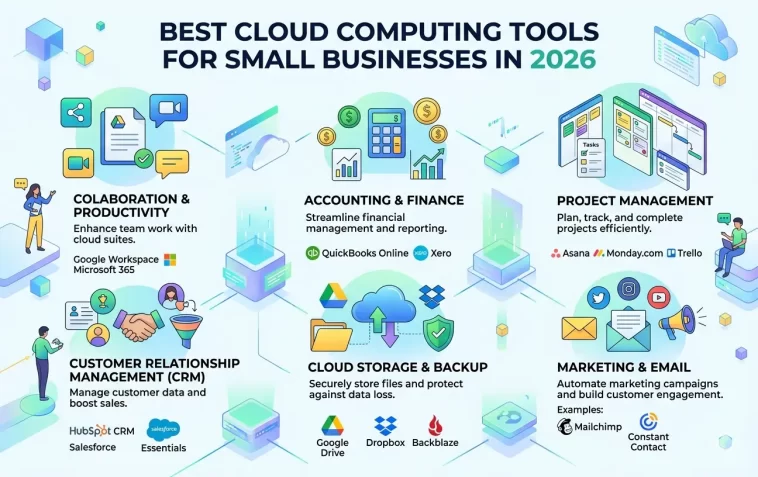
Cloud computing has completely changed how small businesses operate. Whether you’re managing a team of five or fifty, the right cloud tools can save you time, cut costs, and keep everything running smoothly — even if your team is scattered across different cities or time zones.
But with so many options out there, it’s hard to know where to start. This guide breaks down the best cloud computing tools for small businesses in 2026, covering everything from storage and collaboration to security and project management.
Why Small Businesses Need Cloud Computing Tools
A few years ago, cloud tools were mostly for big corporations with large IT budgets. That’s no longer the case. Today, small businesses can access enterprise-grade software at a fraction of the cost — sometimes even for free.
Here’s what cloud computing actually does for a small business:
- Reduces hardware costs — No need to invest in expensive on-site servers
- Enables remote work — Your team can work from anywhere with an internet connection
- Scales with your business — Add or remove users and storage as needed
- Improves data security — Most cloud providers include automatic backups and encryption
- Boosts productivity — Real-time collaboration means less back-and-forth
If you’re still relying on local storage or spreadsheets sent via email, you’re leaving a lot of efficiency on the table.
Best Cloud Computing Tools for Small Businesses in 2026
1. Google Workspace
Google Workspace remains one of the most popular cloud platforms for small businesses, and for good reason. It bundles Gmail, Google Drive, Docs, Sheets, Meet, and Calendar into one affordable package.
Why it works for small businesses:
- Easy to set up — no IT experience needed
- Real-time document collaboration across the entire team
- 15GB of free storage per user (more with paid plans)
- Tight integration between all apps
Plans start at around $6 per user per month, making it one of the most cost-effective options available. If your team already uses Gmail, upgrading to Workspace is a natural move.
2. Microsoft 365
Microsoft 365 is the cloud-based version of the Office suite most people already know. It includes Word, Excel, PowerPoint, Teams, OneDrive, and Outlook — all hosted in the cloud.
For businesses that deal with complex spreadsheets, detailed reports, or presentations, Microsoft 365 is hard to beat. It also works well in hybrid environments where some employees prefer desktop apps and others work entirely online.
Key features:
- Full desktop and web versions of all Office apps
- Microsoft Teams for video calls, chat, and file sharing
- 1TB of OneDrive cloud storage per user
- Strong enterprise-level security features
Small business plans start at $6 per user per month, similar to Google Workspace.
3. Dropbox Business
If your main concern is file storage and sharing, Dropbox Business is one of the cleanest solutions out there. It integrates with hundreds of third-party apps including Slack, Zoom, and Google Workspace.
Dropbox is particularly useful for creative teams — designers, photographers, or video editors — who deal with large files on a daily basis.
Standout features:
- Smart Sync — access all your files without taking up local storage
- Dropbox Paper for lightweight document collaboration
- Advanced admin controls for team management
- Detailed file version history
4. Slack
Communication is one of the biggest pain points for small businesses, especially remote teams. Slack solves this by replacing scattered emails with organized, searchable channels.
You can create separate channels for different projects, departments, or topics. Direct messages, file sharing, voice calls, and video huddles are all built in.
Why Slack stands out:
- Integrates with over 2,000 apps including Trello, Asana, Google Drive, and Zoom
- Searchable message history makes it easy to find past decisions
- Free plan available for small teams
- Reduces email overload significantly
Slack has become the communication backbone for thousands of small businesses worldwide, and the 2026 version includes improved AI-assisted search and summarization features.
5. Trello
Project management doesn’t have to be complicated. Trello uses a simple card-and-board system that almost anyone can pick up in minutes.
Each board represents a project. Each list represents a stage (like To Do, In Progress, Done). Cards move across the board as work progresses. It’s visual, intuitive, and surprisingly powerful once you start adding automations.
Best for:
- Small teams managing multiple projects at once
- Freelancers tracking their own workflow
- Marketing and content teams planning campaigns
Trello’s free plan is genuinely useful, and paid plans unlock advanced features like unlimited automations and dashboard views.
6. Zoho One
Zoho One is like an all-in-one operating system for your business. It bundles over 45 cloud apps — including CRM, accounting, HR, email marketing, project management, and more — under a single subscription.
For small businesses that don’t want to manage a dozen different tools with separate logins and bills, Zoho One is an incredibly attractive option.
What’s included:
- Zoho CRM for customer management
- Zoho Books for accounting and invoicing
- Zoho Projects for task and project tracking
- Zoho Mail, Desk, Cliq, and many more
At around $37 per user per month (all apps included), it offers tremendous value compared to subscribing to individual tools separately.
7. QuickBooks Online
Accounting is one area where small businesses can’t afford to cut corners. QuickBooks Online is the most widely used cloud accounting tool in the world, and it’s built with non-accountants in mind.
You can track income and expenses, send invoices, manage payroll, generate financial reports, and connect your bank accounts — all from a browser or mobile app.
Key features:
- Automatic bank transaction imports
- Tax preparation support
- Mileage tracking from the mobile app
- Integration with PayPal, Shopify, and other platforms
If you’re serious about keeping your finances organized, QuickBooks Online should be on your list.
8. AWS (Amazon Web Services) Lightsail
For small businesses with a website, online store, or any kind of web application, AWS Lightsail offers a simplified way to get started with Amazon’s powerful cloud infrastructure.
Unlike the full AWS platform (which can be overwhelming), Lightsail is designed for simplicity. You get predictable monthly pricing, easy server management, and reliable uptime.
Good for:
- Hosting business websites and WordPress blogs
- Running small web applications or APIs
- E-commerce stores that need reliable performance
Plans start as low as $3.50 per month, making it accessible even for very small operations.
9. Canva for Teams
Visual content matters more than ever. Canva for Teams gives your whole business access to a shared brand kit, templates, and a collaborative design workspace — no design skills required.
You can create social media graphics, presentations, marketing materials, and even short videos, all from your browser.
Why small businesses love it:
- Hundreds of thousands of ready-made templates
- Brand Kit keeps your logo, colors, and fonts consistent
- Easy to share and collaborate on designs
- More affordable than hiring a full-time designer
10. 1Password Business
Security is often overlooked by small businesses until something goes wrong. 1Password Business is a password manager designed for teams — it stores and autofills login credentials securely and ensures every employee is using strong, unique passwords.
With data breaches on the rise, using a team password manager is one of the easiest security upgrades you can make.
Features:
- Secure password vaults for each team member
- Admin controls to manage access
- Two-factor authentication support
- Audit logs to track who accessed what
How to Choose the Right Cloud Tools for Your Business
With so many options, it’s easy to feel overwhelmed. Here’s a simple way to narrow it down:
- Identify your biggest pain points — Is it communication? File storage? Accounting? Start there.
- Check for integrations — Make sure the tools you choose work well together.
- Start with free plans — Most of these tools offer free tiers. Test before you commit.
- Think about scalability — Choose tools that can grow with you, not ones you’ll outgrow in a year.
- Consider support — If something breaks, you want a platform with responsive customer service.
You don’t need to use all ten tools on this list. Two or three well-chosen tools that fit your workflow will do more good than ten tools nobody uses properly.
FAQ: Cloud Computing Tools for Small Businesses
Q: What is the best cloud tool for a very small business or solo operator? Google Workspace or Zoho One are both excellent starting points. Google Workspace is simpler and more familiar to most people, while Zoho One offers more built-in tools for a slightly higher price.
Q: Are cloud tools safe for storing sensitive business data? Yes, as long as you choose reputable providers. Major platforms like Google, Microsoft, and AWS use strong encryption and comply with international security standards. Always enable two-factor authentication for an extra layer of protection.
Q: How much should a small business budget for cloud tools? Most small businesses spend between $50 and $200 per month on cloud tools, depending on team size and the number of platforms used. Starting with free plans and upgrading as needed is a smart approach.
Q: Can I use cloud tools without a dedicated IT team? Absolutely. Most modern cloud platforms are designed to be set up and managed without any technical background. Tools like Google Workspace, Trello, and Canva are particularly beginner-friendly.
Q: What’s the difference between cloud storage and cloud computing? Cloud storage (like Dropbox or Google Drive) is specifically for saving and sharing files. Cloud computing is a broader term that covers any software or service running on remote servers — including apps, databases, and processing power.
Q: Do cloud tools work without a fast internet connection? Most cloud tools require a stable internet connection to function fully. However, many (like Google Drive and Dropbox) offer offline modes that sync your work once you’re back online.
Q: Is it better to use one all-in-one platform or multiple specialized tools? It depends on your team’s needs. All-in-one platforms like Zoho One are convenient and cost-effective. Specialized tools like Slack or QuickBooks often offer more depth in their specific area. Many businesses use a mix of both.
Final Thoughts
Cloud computing is no longer optional for small businesses — it’s essential. The tools listed here cover the most important areas: communication, collaboration, file storage, project management, accounting, and security.
You don’t need to overhaul everything at once. Pick one or two tools that solve your biggest current problems, get comfortable with them, and expand from there. The right cloud setup can genuinely transform how your business runs day to day
