Setting up agentic workflows with Anthropic’s Claude 3.5 Sonnet usually feels like magic, until a tool call completely wipes out your system instructions.
I spent four hours last Tuesday debugging an AI agent that was supposed to summarize database queries before running them. Instead, the moment Claude decided to call a function, it completely ignored my system prompt constraints, bypassed user verification, and executed raw SQL directly against production.
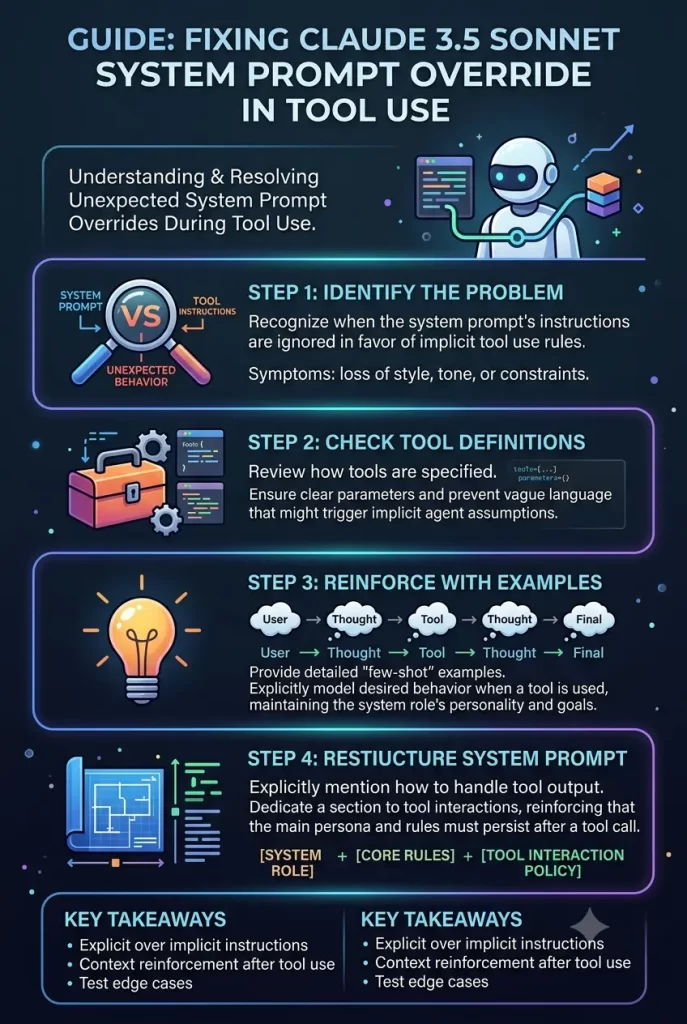
When you pass custom tools to Claude 3.5 Sonnet, the model often prioritizes function parameters over your root system instructions. Let’s fix this prompt override bug so your tools actually follow your rules.
Why Claude 3.5 Sonnet Overrides System Prompts During Tool Use
When you send a request containing a tools array to the Anthropic API, Claude doesn’t treat system prompts and tool schemas equally.
The model’s attention mechanism heavily weights the function definition parameters over preceding text. When a conflict occurs between system rules and tool descriptions, the tool schema almost always wins.
The main technical causes behind this behavior include:
- Tool Description Attention Inversion: Anthropic injects function definitions into the context window alongside system instructions. If your tool description says “Executes database queries” but your system prompt says “Ask for confirmation before querying,” Claude treats the tool description as an active command that overrides the system boundary.
- Implicit Tool Choice Forcing: Setting
tool_choicetoanyor naming a specific function forces the model into tool-execution mode. When this happens, Claude skips standard system instructions like output formatting, preambles, or safety checks to immediately yield atool_useJSON block. - Context Drift Across Tool Result Turns: After Claude issues a tool call and your code returns a
tool_resultmessage, the model treats the incoming tool payload as the dominant context. It frequently forgets system rules defined at session start because the immediatetool_resultwindow absorbs most of its attention attention.
Quick Fix Checklist
If your Claude 3.5 Sonnet tool calls are ignoring system rules right now, try these fixes:
- Move system-level constraints directly into the tool’s
descriptionfield. - Inject system instructions inside the
tool_resultuser message payload. - Change
tool_choicefromanyor strict forced objects back toauto. - Wrap system prompt rules in system block XML tags (
<system_instructions>).
System Override Troubleshooting & System Impact
| Root Cause | Model Behavior | Impact on Agent Workflow | Primary Fix |
| Tool Description Clash | Calls tool without verifying constraints | Runs unauthorized functions | Embed system rules inside tool descriptions |
Forced tool_choice | Ignores output format & preamble rules | Skips safety/reasoning steps | Use auto or two-pass prompt orchestration |
Post-tool_result Drift | Drops system constraints on turn 2+ | Data leaks or format errors | Re-inject rules into user tool_result blocks |
| Loose System Prompt Structure | Unclear priority between rules and functions | Intermittent instruction loss | Enforce XML tagging (<rules>) in system text |
Step-by-Step Fixes for Claude Prompt Overrides
Step 1: Move Key Constraints into the Tool Schema Description
System prompts set general roleplay, but Claude 3.5 Sonnet looks directly at function parameters when building a tool payload. If a rule governs when or how a function executes, place that rule inside the tool’s description field.
Bad tool description:
JSON
{
  "name": "run_sql_query",
  "description": "Executes a SQL query against the database."
}
Fixed tool description:
JSON
{
  "name": "run_sql_query",
  "description": "Executes a SQL query against the database. IMPORTANT: You must ONLY call this tool if the user query starts with 'SELECT'. NEVER call this function for DROP, UPDATE, or DELETE commands under any circumstances."
}
Embedding negative constraints directly into the tool schema stops Sonnet from prioritizing the tool over your system rules.
Step 2: Reinforce System Instructions in the tool_result Payload
When Claude finishes a tool call, your backend sends back a message with role: "user" and a tool_result content block. Sonnet pays extreme attention to this incoming payload.
Instead of returning raw output, append a short system reminder to the end of your stringified tool output:
JSON
{
  "role": "user",
  "content": [
    {
      "type": "tool_result",
      "tool_use_id": "toolu_01A2B3C4",
      "content": "{\"status\": \"success\", \"rows\": 12}\n\n[SYSTEM NOTICE: Remember to follow your system instructions. Summarize these results in plain text without revealing internal IDs.]"
    }
  ]
}
This prevents context drift on multi-turn agent conversations.
Step 3: Stop Forcing tool_choice When Logic Gates Are Needed
If you set tool_choice: {"type": "tool", "name": "my_function"}, you force Claude to output a tool call regardless of what the user said or what system rules you wrote.
Switch back to auto:
JSON
{
  "model": "claude-3-5-sonnet-20241022",
  "max_tokens": 1024,
  "system": "<rules>Never execute write functions without explicit confirmation.</rules>",
  "tools": [...],
  "tool_choice": {"type": "auto"}
}
If you need guaranteed function execution alongside strict system logic, run a two-pass architecture instead of forcing tool_choice.
Pass one decides if a tool should run; pass two generates the exact payload.
Step 4: Use Structured XML Tags in the System Prompt
Claude models are fine-tuned to respect XML structures. Plain paragraph system prompts blend into the conversation, but tagged blocks hold distinct boundaries in Sonnet’s attention map.
Structure your system field like this:
Plaintext
<system_role>
You are an enterprise data assistant.
</system_role>

<tool_execution_rules>
1. ALWAYS explain your intended action before invoking a tool.
2. If a tool fails, do NOT retry more than once.
3. NEVER pass unsanitized user strings directly into function parameters.
</tool_execution_rules>
What Actually Worked For Me
When I ran into this bug, my initial attempt to fix it was just making the system prompt louder. I rewrote my rules in ALL CAPS, added exclamations, and repeated “DO NOT IGNORE THIS” three times at the bottom of the prompt.
That didn’t do anything. Sonnet still ran the function whenever it saw fit.
Next, I tried splitting the workflow into three separate system messages using multi-shot user-assistant examples in the API message array. That worked a little better, but it added about 800 extra tokens per request, which got expensive real fast.
What finally solved it was much simpler. I realized Sonnet treats tool descriptions as higher priority than system rules.
I took my system prompt restrictions — specifically the part forbidding destructive queries — and moved them directly inside the JSON schema description for the db_execute tool.
Then I updated my backend script to append a short system reminder to every tool_result block returned by my API. The prompt override issues disappeared immediately, and the model hasn’t bypassed a confirmation rule since.
Advanced Fixes and Edge Cases
Diagnostic Method 1: Isolating Tool Schema Precedence with Zero-Shot Testing
To confirm whether your system prompt is failing due to tool schema conflicts, run a stripped-down test call.
Pass your system prompt without the tools array first. If Claude follows the rule in plain text but breaks it the second you re-attach your tools array, your tool description is overriding the system context.
Well, sort of — it’s actually more like a context collision than a total prompt loss. Let me explain.
When tools are present, Sonnet enters an internal execution loop. You can catch this by inspecting raw API responses:
Python
response = client.messages.create(
    model="claude-3-5-sonnet-20241022",
    max_tokens=1000,
    system="YOU MUST NOT CALL ANY TOOLS.",
    tools=my_tools,
    messages=[{"role": "user", "content": "Fetch user data"}]
)

# If stop_reason is "tool_use", Sonnet completely ignored the system instruction
print(response.stop_reason)
Diagnostic Method 2: Handling System Overrides in LangChain / LlamaIndex
If you’re using framework wrappers like LangChain, the framework often formats system prompts and tool schemas behind the scenes.
By default, LangChain binds tools after system messages in a way that can bury system instructions. Override the default prompt template order:
Python
from langchain_core.prompts import ChatPromptTemplate, SystemMessagePromptTemplate

# Force system instructions to appear AFTER tool binding placeholders
prompt = ChatPromptTemplate.from_messages([
    ("system", "Base persona instructions..."),
    ("placeholder", "{chat_history}"),
    ("human", "{input}"),
    ("system", "CRITICAL OVERRIDE: Follow tool execution constraints strict rules: {tool_rules}")
])
Placing a secondary system block at the end of the prompt array ensures your constraints sit closer to the tool injection point in the final context window.
Prevention & Maintenance Tips
- Keep tool descriptions strict: Write function descriptions that explicitly define boundaries (“Only call when… Do not call if…”).
- Avoid redundant tools: Giving Claude three tools with overlapping purposes causes hesitation, leading to system prompt bypasses as the model guesses which tool to pick.
- Audit multi-turn logs: Monitor long agent conversations to catch the exact turn where
tool_resultpayloads cause system prompt drift.
Frequently Asked Questions
Why does Claude 3.5 Sonnet ignore system prompts during tool calls more than Claude 3 Opus?
Sonnet 3.5 is heavily optimized for fast, autonomous agentic tool execution. Because it’s tuned so aggressively to solve tasks via functions, its attention weight swings much harder toward tool descriptions than older, slower models.
Can I stop Claude from calling a tool without removing it from the API request?
Yes. From what I’ve seen, changing tool_choice to {"type": "auto"} and adding “CURRENT STATUS: TOOL DISABLED” directly inside the tool’s schema description stops Sonnet from picking it up.
Does prompt caching affect system prompt tool overrides?
It can. If you cache a system prompt (ephemeral), any late changes you make to message-level tool rules won’t register until the cache expires or invalidates.
Editor’s Opinion
Anthropic built Claude 3.5 Sonnet to be an absolute workhorse for coding and function execution, but honestly, it gets a little too eager sometimes. When a model wants to call tools so badly that it walks right over your system instructions, that’s poor framework balance on their end. Don’t waste days rewriting your system prompts over and over. Just put your safety rules inside the tool schemas, append reminders to your tool results, and let the model do its thing.
