I noticed my points total frozen at the same number for two days straight even though the dashboard kept showing checkmarks next to my completed searches. Turned out to be three different things stacked on top of each other, not one clean bug. So here’s what actually causes this and what’s worth trying before you file a support ticket and wait a week for a canned response.
Quick Answer
- Check you’re signed into the same Microsoft account across Bing, Edge, mobile app, and the Rewards dashboard — mismatches are the most common cause
- Confirm you haven’t hit your daily search cap, since the dashboard sometimes still shows a higher “possible” total after you’re capped out
- Look for an “unusual search activity” flag, which pauses point crediting temporarily even with normal search behavior
- Check if Give Mode is turned on, which redirects points to donations instead of your visible balance
- If none of that explains it, submit a ticket through the official Rewards support page with the exact date it started
Why Microsoft Rewards Points Stop Updating
This isn’t usually one bug. It’s more like four or five separate systems that can each independently break your point crediting, and they all show the same symptom on the surface — the number just doesn’t go up.
Account mismatch across devices is probably the single most common cause. If you’re signed into Bing on your desktop with one Microsoft account but the Rewards dashboard or mobile app is tied to a different one, searches will complete and even feel like they’re being tracked, but the points land somewhere you’re not looking. This gets worse if you’ve got a work account and a personal account both active in the same browser profile.
The 2026 tier restructure changed the math entirely. Microsoft’s been rolling out a new Member, Silver, and Gold tier system to replace the old Level 1/Level 2 structure region by region. If you’re on the new tiers, the point caps are different — noticeably lower in some cases — and your dashboard might still be showing numbers based on the old system’s expectations. So the points genuinely aren’t missing, the ceiling for how many you can earn just moved without much announcement.
Unusual activity detection pauses crediting even for legitimate searching. Microsoft’s fraud system looks for patterns that resemble bot behavior — rapid consecutive searches, identical timing, repetitive queries — and can trigger a temporary cooldown. From what I’ve seen in support threads, this catches plenty of people doing completely normal searches, just because their timing happened to look automated to the algorithm.
There’s a fourth cause that’s easy to miss entirely: Give Mode. If it’s toggled on, some or all of your points get redirected to donations instead of adding to your visible personal balance. It’s a setting, not a bug, but it produces the exact same “why aren’t my points going up” confusion.
Where This Shows Up Most
Mobile app users often see a gap between what the app shows and what the desktop dashboard shows, especially right after switching phones or reinstalling the app, since re-authentication can sometimes land on a different signed-in account than expected.
Heavy daily searchers hit caps faster than they realize. Level 2 accounts (or Gold, under the new system) have specific daily limits on PC and mobile searches separately, and once you’re capped, additional searches simply don’t register — even though nothing on screen tells you clearly that you’ve hit the wall.
Long-time streak holders seem to get flagged for unusual activity more than newer accounts, based on forum reports, possibly because established habits like “read the news every morning in the same ten minutes” pattern-match closer to automated behavior than more randomized behavior would.
Fix Comparison Table
| Cause | Fix | Fixes It Immediately? |
|---|---|---|
| Account mismatch across devices | Sign out everywhere, sign back in with one account | Usually yes |
| Daily search cap reached | Wait until next day’s reset | Not immediate, but expected |
| Unusual activity flag | Slow down search pace, wait for cooldown to lift | No — usually 15-30 min to days |
| Give Mode enabled | Toggle it off in Rewards settings | Yes |
| Account-specific posting error | Submit a support ticket | No — needs manual review |
Step-by-Step Fixes
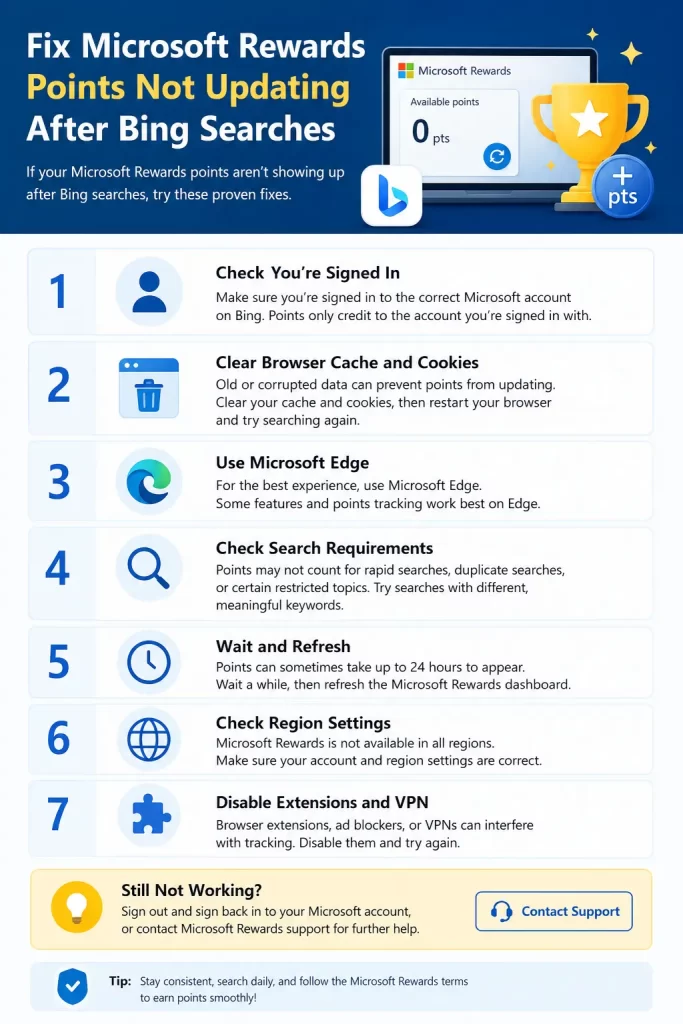
Step 1: Confirm you’re signed into one consistent account everywhere. Check Bing (both browser and mobile app), Edge if you use it, and the Rewards dashboard at rewards.bing.com. If any of these show a different account than the others, sign out of all of them and sign back in with just the one you want to earn on.
Step 2: Check your daily cap status before assuming something’s broken. Open the Rewards dashboard and look at your daily set and search progress bar. A checkmark instead of a rising point count usually just means you’ve already hit today’s limit, not that anything’s malfunctioning.
Step 3: Look for an unusual activity message. Sometimes it’s tucked under “Refer and earn” or shown as a small banner rather than a blocking popup, so it’s easy to miss. If you find it, the only real fix is slowing your search pace and waiting — there’s no way to force it to clear faster.
Step 4: Check Give Mode status. If you ever turned this on, or someone else used your account and enabled it, your points might be routing to a donation pool instead of your visible total. Toggle it off if that’s not what you want.
Step 5: Clear cookies for Microsoft and Bing domains, then retry. Blocking or clearing the wrong cookies can actually break point crediting rather than fix it, since Rewards relies on cookies to confirm you’re signed in consistently across searches. Make sure Microsoft, Bing, and Rewards domains are allowed, not blocked.
Step 6: Try Microsoft Edge specifically for a session. Bing searches should count from other browsers as long as you’re signed in, but Edge gets a small additional bonus quota that other browsers don’t, and it tends to be the most reliably tracked option if you’re troubleshooting.
Step 7: If nothing above explains it, submit a support ticket. Go to the official Microsoft Rewards support page, sign in with the affected account, and describe the issue with a specific start date and which activities are affected. Vague tickets get vague canned responses — specifics get you an actual account review.
What Actually Worked For Me
My first guess was that I’d hit an unusual activity flag, since I’d read that was common. I slowed my searches down for two full days and nothing changed, so that clearly wasn’t it. What actually turned out to be the problem was dumber — I’d signed into Edge with a work Microsoft account months earlier for an unrelated reason and forgotten about it, and some of my searches were quietly counting toward that account’s Rewards balance instead of my personal one.
I only found this by accident, checking the account switcher in Edge’s top-right corner out of pure frustration rather than as a deliberate diagnostic step. Once I signed out of the wrong account entirely, my personal account’s points started updating normally within the same day. I want to say I found that systematically, but honestly it was closer to lucky troubleshooting than a clean process.
Advanced Fixes and Edge Cases
Region and tier migration timing can desync your expectations from reality. If your account has been moved to the new Member/Silver/Gold system but articles or your own memory are still based on the old Level 1/Level 2 caps, you might think points are “missing” when the ceiling actually just changed. Check your current tier status directly on the Rewards dashboard rather than assuming your old numbers still apply.
VPN use can silently break region-based point tracking. Microsoft Rewards is region-specific, and running a VPN — including Edge’s built-in VPN feature — during search activity can prevent points from crediting properly or even risk a policy flag, even if you’re not intentionally trying to spoof your location.
The STAR Bonus tracks separately from regular search points and updates on its own schedule. If you’re specifically missing this monthly bonus rather than daily search points, it’s calculated based on consistent activity across the whole month and gets credited at the start of the next month — a stuck STAR Bonus doesn’t necessarily mean your regular searches aren’t counting.
Prevention Tips
Stick to one Microsoft account for Rewards activity across every device, and check your account switcher occasionally if you use shared computers or multiple work/personal profiles. Spread searches naturally throughout the day instead of doing them all in a rapid burst, since burst patterns are exactly what trips the unusual activity detection. And check your tier status on the dashboard directly every so often rather than relying on remembered point caps, since Microsoft’s been changing these without much advance notice through 2026.
FAQ
Why does my Rewards dashboard show a higher point total than what I’m actually earning from searches? That’s usually the daily cap — the dashboard sometimes displays the theoretical maximum for the day rather than reflecting that you’ve already hit your limit.
Does clearing my browser history help with points not updating? Not directly, but clearing cookies can help if a stale session is causing an account mismatch. Clearing history alone rarely fixes anything.
Will I lose my streak if points stop updating for a few days? Not automatically, and Streak Protection can be enabled in the Rewards settings menu to guard against this. If it does break due to a system issue, it can sometimes be reinstated by contacting support.
Why did my daily point total suddenly drop compared to last month? This has been a widely reported pattern through 2026 tied to the ongoing tier restructure — some regions have seen their daily caps lowered as Level 1/Level 2 gets replaced by the new tier system.
Editor’s Opinion
honestly the account mismatch thing feels like it should be an easy fix on microsoft’s end, like just tell people clearly which account is active instead of making us go digging. the unusual activity flagging is also rough because it seems to punish people with consistent routines, which is like… the opposite of bot behavior if you think about it. anyway check your signed in accounts first, that solved it for me and probably will for a lot of people reading this.
