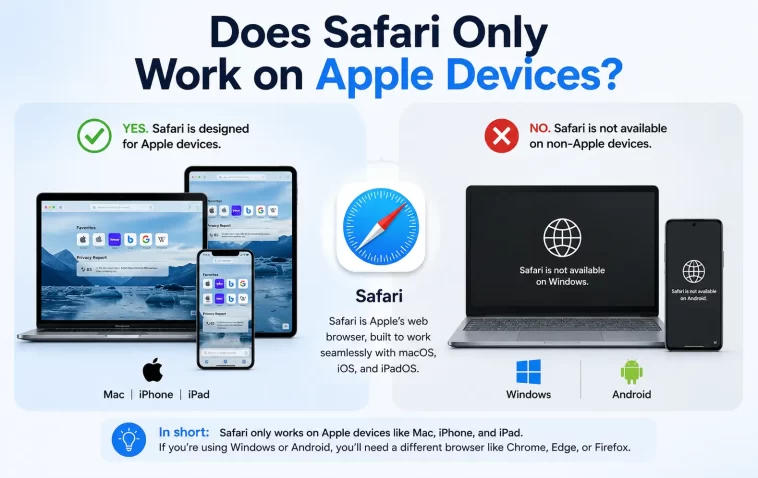
Safari only works on Apple devices — that’s what most people believe. And honestly, it makes sense why. Safari comes pre-installed on every iPhone, iPad, and Mac, and Apple has never officially released a version for Windows, Android, or Linux.
But is that the complete story? Not quite.
In this article, we’ll break down exactly where Safari works, where it doesn’t, and what your options are if you’re not on an Apple device.
What Is Safari and Who Makes It?
Safari is Apple’s official web browser, built on the WebKit rendering engine. Apple first released it in 2003, originally for macOS. A few years later, it came to iOS when the iPhone launched in 2007.
Today, Safari is the default browser on:
- iPhone (iOS)
- iPad (iPadOS)
- Mac (macOS)
- Apple Vision Pro (visionOS)
It’s deeply integrated into Apple’s ecosystem — syncing bookmarks, passwords, and open tabs across all your Apple devices via iCloud.
Does Safari Work on Windows or PC?
The short answer: no, not anymore.
Apple did release Safari for Windows back in 2007. It was available as a free download and worked reasonably well. But Apple quietly discontinued it in 2012 with version 5.1.7. Since then, there have been no official updates or new releases for Windows.
If you find a site claiming to offer “Safari for Windows” today, be careful. Those are either outdated versions with serious security vulnerabilities or unofficial third-party packages you shouldn’t trust.
Bottom line: If you’re on a Windows PC, there is no safe, supported way to run Safari natively.
Does Safari Work on Android?
No. Apple has never released Safari for Android, and there’s no sign they plan to.
Android is Google’s platform, and Apple has little incentive to bring its browser there. If you’re on Android, you’ll need to use Chrome, Firefox, Edge, Brave, or another browser.
Does Safari Work on Linux?
No official support here either. Linux users are fully outside Apple’s target ecosystem.
There are some community-maintained workarounds using compatibility layers like Wine, but these are unreliable, outdated, and not recommended for everyday use.
Can You Access Safari Features Without an Apple Device?
Here’s where it gets interesting.
If you want to test a website in Safari but you don’t own a Mac or iPhone, you have a few legitimate options:
1. BrowserStack or LambdaTest
These are cloud-based browser testing platforms. They let you run a real Safari session on a virtual macOS or iOS environment. Developers use these tools all the time.
2. Sauce Labs
Similar to BrowserStack — you can access Safari remotely for testing purposes.
3. Rent a Mac in the Cloud (MacStadium, MacInCloud)
If you need full macOS access, not just a browser, these services let you rent a Mac remotely. You can then use Safari like you normally would on a physical Mac.
These options are mainly useful for web developers and testers, not casual users.
Why Is Safari Exclusive to Apple Devices?
Apple’s strategy has always been to control the full experience — hardware, software, and services together.
Keeping Safari Apple-only serves a few purposes:
- Tight integration with iCloud — Handoff, Continuity, and cross-device syncing work seamlessly.
- Performance optimization — Safari is tuned specifically for Apple Silicon and iOS hardware.
- Privacy and security — Apple can maintain strict control over the browser’s security standards.
- Ecosystem lock-in — If you love Safari, you stay on Apple devices.
It’s a deliberate business and design choice, not a technical limitation.
Safari vs. Other Browsers: Key Differences
If you’re wondering what makes Safari special compared to Chrome, Firefox, or Edge, here’s a quick breakdown:
| Feature | Safari | Chrome | Firefox |
|---|---|---|---|
| Platform | Apple only | All platforms | All platforms |
| Engine | WebKit | Blink | Gecko |
| Battery efficiency | Excellent on Apple | Moderate | Moderate |
| Privacy tools | Strong (ITP) | Moderate | Strong |
| Extension library | Limited | Vast | Good |
| iCloud sync | Yes | No | No |
Safari consistently ranks among the most battery-efficient browsers on Mac laptops — a real advantage for Apple users.
What Happens to Safari Links on Non-Apple Devices?
If someone sends you a Safari link — like a shared tab from iCloud — and you’re on a non-Apple device, you simply can’t open it in Safari. The link won’t work the same way.
However, the actual web page the link points to will open fine in any other browser. It’s the Safari-specific sharing feature that won’t carry over.
Is There a Safari App on iPhone That Isn’t the Default?
Here’s a nuance worth knowing: on iPhone and iPad, all third-party browsers (Chrome, Firefox, Edge, etc.) are actually required by Apple to use the WebKit rendering engine under the hood.
This means that Chrome on iPhone technically renders pages using the same engine as Safari. The visual experience and feature set differ, but the core rendering is WebKit-based.
This rule exists because Apple’s App Store guidelines mandate it for iOS apps. It’s a subject of ongoing debate and regulatory scrutiny, particularly in the European Union, where Apple has been pushed to allow alternative browser engines.
Should You Use Safari if You Have an Apple Device?
If you’re already on an iPhone or Mac, Safari is worth using — at least as your primary browser. Here’s why:
- It’s fast. Apple optimizes Safari deeply for its own hardware.
- Battery life. Safari uses significantly less power than Chrome on a Mac.
- Privacy. Intelligent Tracking Prevention (ITP) blocks cross-site tracking by default.
- iCloud Keychain. Password management across all your Apple devices is seamless.
That said, Chrome or Firefox might be better if you need specific extensions, work heavily with Google services, or switch between Apple and non-Apple devices often.
FAQ: Safari and Device Compatibility
Can I install Safari on my Android phone?
No. Apple has never released Safari for Android, and there is no official way to install it on an Android device.
Is there a way to use Safari on Windows in 2024?
No safe, supported method exists. The last official Safari for Windows was version 5.1.7, released in 2012 and now long outdated and insecure.
Does Safari work on Chromebook?
No. ChromeOS is a Google platform, and Apple does not support it. You can use Chrome, which comes built in.
Why did Apple stop making Safari for Windows?
Apple discontinued Windows Safari in 2012 without a detailed public explanation. It’s widely believed they shifted focus entirely to their own ecosystem.
Is Safari available on smart TVs or gaming consoles?
No. Safari is not available on any smart TV platform, PlayStation, Xbox, or gaming device.
Can web developers test Safari without a Mac?
Yes. Tools like BrowserStack, LambdaTest, and Sauce Labs let developers access real Safari environments in the cloud without owning Apple hardware.
Does using Safari on iPhone mean using a different engine than Chrome on iPhone?
Not really — both use WebKit on iOS, as required by Apple’s App Store rules. The user interface and features differ, but the rendering engine is the same.
Final Thoughts
Safari only works on Apple devices — and that’s Apple’s deliberate choice, not an accident. It’s a core part of their ecosystem strategy.
If you’re on iPhone, iPad, or Mac, Safari is a genuinely great browser worth using. If you’re on Windows, Android, or Linux, you’ll need to look elsewhere. Chrome, Firefox, Edge, and Brave are all solid alternatives.
And if you’re a developer who needs to test in Safari without Apple hardware, cloud-based browser testing tools have you covered.
