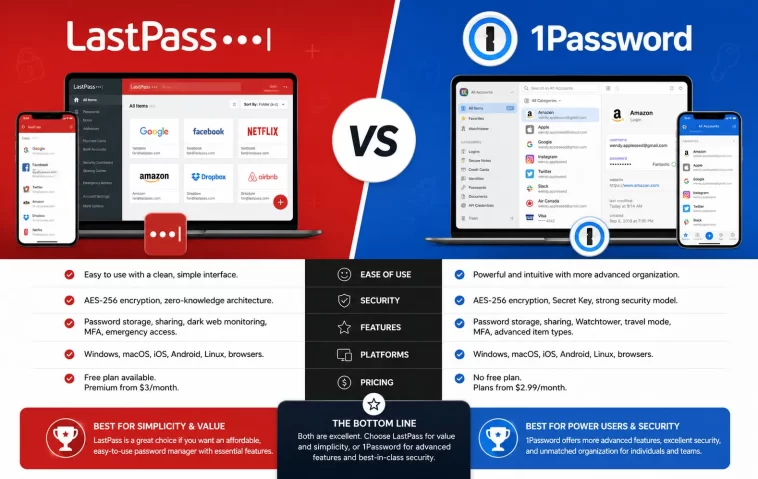
I remember the exact moment I started taking password managers seriously. I had the same password — slightly tweaked — on about a dozen different sites. Then one of those sites got breached. Suddenly, I had to scramble through every account I owned, changing passwords one by one, hoping nothing important got hit.
That’s when I sat down and really compared LastPass vs 1Password. Both had been sitting in my browser toolbar for years, and I’d never thought hard about the differences. After testing both tools thoroughly and digging into their security histories, I came away with a clear opinion — and some strong feelings about which one deserves your trust in 2026.
This guide gives you everything you need to make the right call.
What Are LastPass and 1Password?
Both LastPass and 1Password are password managers — tools that store, generate, and autofill your login credentials across devices and browsers.
At a glance, they look nearly identical:
- Store unlimited passwords
- Autofill credentials in browsers and apps
- Generate strong, random passwords
- Sync across multiple devices
- Support two-factor authentication (2FA)
But once you look past the surface, the differences become significant — especially when it comes to security.
LastPass vs 1Password: Security Comparison
This is the part that matters most, and honestly, it’s not even a close contest.
1Password’s Security Architecture
1Password uses what’s called a dual-layer security model. You get a master password plus a unique Secret Key — a 128-bit cryptographic key that’s generated on your device and never transmitted to 1Password’s servers.
What that means in plain English: even if someone breaks into 1Password’s servers and steals your encrypted vault, they still can’t crack it without your Secret Key, which only lives on your own devices.
1Password also uses AES-256 encryption, supports hardware security keys, and publishes results from regular third-party security audits. Since the company launched in 2005, it has never suffered a data breach that exposed user vault data. That’s a clean two-decade record.
LastPass’s Troubled Security History
LastPass has been breached multiple times — in 2011, 2015, and most seriously, in 2022.
The 2022 breach was a serious one. Attackers accessed encrypted vault backups along with unencrypted metadata including website URLs, names, email addresses, and billing information. Because LastPass relied only on a master password to protect vaults, anyone with a weak or reused master password became an easy target for brute-force cracking.
The real-world consequences have continued unfolding:
- $150 million in cryptocurrency was stolen, with federal investigators tracing the funds directly to cracked LastPass vault data
- The UK’s Information Commissioner’s Office fined LastPass £1.2 million in November 2025 for failing to implement adequate security measures
- Security researchers confirmed that Russian cybercriminal groups were still successfully accessing wallets in 2025 and 2026 using data tied to the original breach
LastPass has since raised its PBKDF2 iteration count to 600,000 rounds, which makes cracking slower. But it still doesn’t match 1Password’s dual-layer architecture.
Winner: 1Password — by a wide margin.
Features Comparison
1Password Standout Features
You get a lot more with 1Password when it comes to premium extras:
- Travel Mode — Hide sensitive vaults when crossing borders. You decide what appears on your device, so a customs officer can’t demand access to vaults you’ve temporarily removed.
- Watchtower — Monitors for weak, reused, or compromised passwords and sends you alerts when a site you use appears in a known breach.
- Privacy Cards — Virtual payment cards for safer online shopping (US users).
- Item History — View previous versions of any saved item.
- Multiple Vaults — Organize credentials by category (work, personal, travel) with separate sharing controls.
LastPass Standout Features
LastPass isn’t without its strengths, especially for casual users:
- Free Plan — LastPass offers a genuinely usable free tier. The catch? It’s limited to one device type (mobile or desktop, not both).
- Emergency Access — Grant trusted contacts access to your vault in an emergency.
- Dark Web Monitoring — Available on premium plans.
- Country Restrictions — Block logins from specific countries.
Feature Summary Table
| Feature | 1Password | LastPass |
|---|---|---|
| Free Plan | ✗ | ✓ (1 device type) |
| Secret Key Protection | ✓ | ✗ |
| Travel Mode | ✓ | ✗ |
| Watchtower | ✓ | ✗ |
| Dark Web Monitoring | ✓ | ✓ |
| Family Plan | ✓ (5 users) | ✓ (5 users) |
| Security Breaches | None | 2011, 2015, 2022 |
Pricing Comparison
Neither tool is expensive, and the difference between them is almost negligible at the personal level.
Personal Plans
- 1Password Individual: ~$2.99/month (billed annually)
- LastPass Premium: ~$3.00/month (billed annually)
That’s essentially the same price.
Family Plans
- 1Password Families: ~$4.99/month for up to 5 users
- LastPass Families: ~$4.00/month for up to 5 users
LastPass is slightly cheaper on family plans. 1Password adds admin controls that LastPass doesn’t include.
Business Plans
- 1Password Business: $7.99/user/month
- LastPass Business: $7.00/user/month
Business pricing is close, but 1Password’s business plan includes Watchtower, advanced app integrations, and detailed activity logs.
Winner: Tie for personal plans. LastPass has a free tier; 1Password has better value overall.
Ease of Use
1Password
You’ll find 1Password has a polished, consistent experience across all platforms — Windows, macOS, Linux, iOS, and Android. The apps feel native and well-designed, especially on Mac.
Setup takes a bit more time because you have to save your Secret Key during onboarding. It sounds minor, but you must keep that key somewhere safe — if you lose both your master password and Secret Key, you’re locked out permanently.
LastPass
LastPass leans heavily on the browser extension. Most of the experience happens through the web dashboard and browser plugin, which works well if you’re primarily a desktop user.
The interface is simpler to get started with — no Secret Key to manage, no setup ceremony. For beginners who just want something that works quickly, LastPass’s approach is more approachable.
Winner: Depends on your preference. Beginners may prefer LastPass’s simplicity; power users will appreciate 1Password’s polish.
Platform and Device Support
Both support all major platforms:
- Browsers: Chrome, Firefox, Safari, Edge, Brave
- Mobile: iOS and Android
- Desktop: Windows, macOS, Linux (1Password has a full native Linux app; LastPass has a web-based experience)
One important distinction: with the free LastPass plan, you’re locked to one device type — either mobile or desktop, not both. 1Password requires a paid plan to use at all, but gives you unlimited devices from day one.
Who Should Use Which?
Choose 1Password if:
- Security is your top priority
- You want advanced features like Travel Mode and Watchtower
- You manage passwords for a family or small team
- You work on macOS or Linux and want a polished native app
- You’re switching away from LastPass after the 2022 breach
Choose LastPass if:
- You need a free option and only use one type of device
- You’re a beginner and want the simplest possible setup
- You’re not storing high-value data like cryptocurrency or sensitive financial accounts
- You want slightly cheaper family or business pricing
How to Switch from LastPass to 1Password
If you’ve already decided to make the move, here’s how you do it:
- Log in to LastPass and go to your vault settings.
- Export your passwords as a CSV file (Advanced Options > Export).
- Create a 1Password account and complete the setup, including saving your Secret Key.
- Import the CSV file into 1Password using the import tool in your vault settings.
- Review all imported items to make sure nothing is missing or mislabeled.
- Enable 2FA on your 1Password account for an extra layer of protection.
- Delete your LastPass account once you’ve confirmed everything transferred correctly.
The whole process takes about 10–15 minutes. Attachments and custom fields may need manual migration.
FAQ
Is 1Password safer than LastPass?
Yes. 1Password has never experienced a breach exposing user vault data. LastPass suffered a significant breach in 2022 that led to stolen encrypted vaults and ongoing cryptocurrency thefts. 1Password also uses a dual-layer Secret Key architecture that LastPass doesn’t have, making it considerably harder to crack even if vault data is ever stolen.
Does LastPass still have a free plan?
Yes, LastPass still offers a free plan in 2026. However, it’s limited to one device type — either mobile or desktop, not both. If you switch devices frequently, you’ll need a paid plan. 1Password does not offer a free tier but provides a 14-day free trial.
Is LastPass still safe to use after the 2022 breach?
LastPass has made improvements since the breach, including raising its PBKDF2 iteration count. That said, users with weak master passwords at the time of the breach remain vulnerable, and crypto thefts linked to the 2022 incident were still being reported in 2025 and 2026. For high-value accounts, switching to 1Password is the safer choice.
Can I switch from LastPass to 1Password easily?
Absolutely. You can export your LastPass vault as a CSV file and import it directly into 1Password. The process takes about 10–15 minutes. Most entries transfer cleanly, though attachments may need to be moved manually.
What is 1Password’s Secret Key?
The Secret Key is a 128-bit cryptographic key generated during your 1Password account setup. It never leaves your devices and is never stored on 1Password’s servers. To decrypt your vault, an attacker would need both your master password and your Secret Key — making your vault far more resistant to brute-force attacks.
Does 1Password have a family plan?
Yes. 1Password Families costs around $4.99 per month and covers up to 5 users. It includes admin controls, shared vaults, and the ability to recover a family member’s account. LastPass offers a similar family plan at $4.00 per month, though without the admin management features.
Which password manager is better for businesses?
1Password Business is the stronger option for most teams. It includes Watchtower, advanced app integrations, activity logs, and better admin controls. LastPass Business is slightly cheaper at $7.00/user/month versus $7.99, but 1Password delivers more value for the small price difference.
Final Verdict
Both LastPass and 1Password are capable tools. But when you weigh everything — security history, architecture, features, and long-term trust — 1Password is the clear winner.
The price difference is negligible. The feature advantage goes to 1Password. And the security gap is significant enough that it genuinely changes the calculus, especially if you’re storing anything sensitive.
LastPass isn’t a bad product. If you need a free option and you’re storing low-stakes passwords, it still does the job. But if you take your digital security seriously — and in 2026, you should — 1Password is where your passwords belong.
