I had a client migration where a Route 53 record change just wouldn’t show up for some users, and I mean well past the “give it 48 hours” window everyone quotes. If you’re past that point and still seeing old records, the propagation clock isn’t actually your problem anymore — something specific is broken, and “just wait longer” stops being useful advice around hour 24.
Quick Answer
- Query Route 53’s authoritative name servers directly with
dig— if they show the new value, propagation isn’t the issue, caching downstream is - Check for a duplicate hosted zone for the same domain; this is the single most common cause of “changes that never apply”
- Verify your registrar’s nameservers exactly match the NS records Route 53 assigned to your hosted zone
- Check the TTL of the old record — if it was set to something like 86400 (24 hours) before your change, some resolvers will hold onto it well past 48 hours
- If DNSSEC is enabled and misconfigured, you can get NXDOMAIN or SERVFAIL responses that look like propagation failure but aren’t
Why It Fails
The 48-hour figure everyone repeats is really an upper bound on caching behavior, not a Route 53 processing delay. So when it’s genuinely still broken past that window, it’s one of these:
- A duplicate or leftover hosted zone. If you created a new hosted zone after registering the domain, or migrated providers and left an old zone active, Route 53 can end up authoritative for a zone that isn’t the one you’re editing. You change records in zone A, but your registrar still points at zone B’s nameservers.
- Registrar nameservers don’t match the hosted zone’s delegation set. Route 53 assigns four unique nameservers per hosted zone. If even one of the four at your registrar doesn’t match, resolution can behave inconsistently — some queries hit the right zone, some don’t, depending on which nameserver answers.
- A high TTL set before the change. If your A record had a TTL of 86400 seconds and you changed the record 10 minutes before that TTL was about to expire on some resolver’s cache, that resolver won’t ask again for up to 24 hours from its last fetch — not from your change.
- DNSSEC misconfiguration. If DNSSEC was enabled and the DS record at the registrar doesn’t match what Route 53 is currently signing with, some validating resolvers will refuse to serve the domain at all, which looks exactly like a propagation failure from the outside.
- Less commonly, you’re editing the wrong hosted zone entirely because you have multiple zones with similar names in the same account, or across accounts.
Step-by-Step Fixes
Step 1: Confirm the Change Actually Took Effect in Route 53
Before assuming this is a propagation problem, check that the record is correct at the source:
aws route53 list-resource-record-sets \
  --hosted-zone-id Z1234567890 \
  --query "ResourceRecordSets[?Name=='app.example.com.']"
If the record shown here is wrong, this isn’t a propagation issue at all — you’re editing a record that doesn’t match what you think you changed, or you’re in the wrong hosted zone.
Step 2: Query Route 53’s Authoritative Servers Directly
Get the hosted zone’s nameservers, then query one directly, bypassing every cache in between:
aws route53 get-hosted-zone --id Z1234567890 --query 'DelegationSet.NameServers'
dig @ns-123.awsdns-45.com app.example.com
If this returns the correct new value, propagation from Route 53’s side is done. Anyone still seeing the old value is hitting a caching resolver somewhere between them and Route 53 — which is a completely different problem than what most people assume.
Step 3: Check for a Nameserver Mismatch at the Registrar
Compare the four nameservers listed at your domain registrar against the delegation set from Step 2, character for character. This sounds tedious but it catches a genuinely common mistake — people update the NS records inside the Route 53 hosted zone itself instead of updating them at the registrar, which does nothing, since the registrar’s glue records are what the rest of the internet actually follows.
Step 4: Check for Duplicate Hosted Zones
In the Route 53 console, search for your domain name across all hosted zones in the account. If you see more than one zone for the same domain, that’s very likely your issue. Confirm which one the registrar’s nameservers actually point to, and make your edits there — or delete the unused zone if it’s not serving any purpose.
Step 5: Inspect and Lower TTLs
Check the TTL on the record before your change was made. If it was something long, and your change happened shortly before that TTL window would’ve reset anyway, some resolvers are just doing exactly what they’re supposed to do — holding a stale answer until their local cache legitimately expires. Lower the TTL to something like 300 seconds going forward so future changes propagate faster, but understand this doesn’t retroactively fix a cache that already grabbed the old value at a high TTL.
Step 6: Check DNSSEC Status
If DNSSEC is enabled on the hosted zone, verify that the DS record published at your registrar matches what Route 53 is currently signing. A mismatch here causes validating resolvers to reject the whole zone rather than just serve stale data — which is a meaningfully different failure mode and one that TTL patience will never fix.
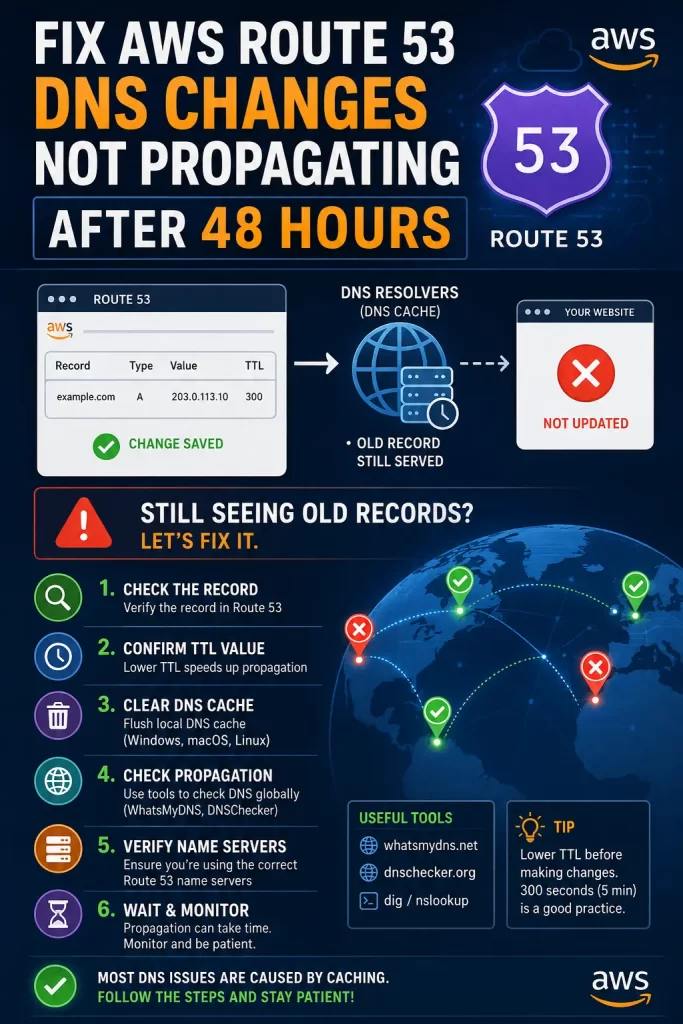
What Actually Worked For Me
My first move was the obvious one — checked the TTL, lowered it, waited another few hours. Nothing changed for the affected users, which was frustrating since that’s the fix everyone online points to first.
So I went and queried the authoritative nameservers directly, and they were returning the correct value. That told me Route 53 itself wasn’t the problem, which meant I’d been staring in the wrong place for an hour. Turned out there were two hosted zones for the same domain in the account — one created automatically when the domain was registered through Route 53, and a second one someone had manually created months earlier during an earlier migration attempt that never got cleaned up. The registrar was still pointed at the old one. I hadn’t even thought to check for a duplicate zone because it genuinely hadn’t occurred to me that anyone would have two active zones for the same domain sitting around — but from what I’ve seen since, it happens more than you’d expect, especially on accounts that have been through a provider migration at some point.
Advanced Fixes and Edge Cases
- Use
dig +traceto walk the full resolution path from the root servers down, which shows you exactly where delegation breaks if it’s breaking anywhere in the chain rather than just at your resolver. - Check Route 53 health checks if you’re using failover or weighted routing — a health check reporting unhealthy can cause Route 53 to serve a different record than the one you think is active, which looks like a propagation bug but is actually routing policy doing exactly what it’s configured to do.
- Watch for alias record edge cases. Alias records to CloudFront, ALBs, or S3 buckets resolve differently than standard A records and don’t use a TTL the same way — if you’re troubleshooting an alias record specifically, the mental model from standard DNS TTL caching doesn’t fully apply.
- Check the AWS Service Health Dashboard for Route 53, though this is rarely the actual cause — worth a quick glance to rule it out before spending more time elsewhere.
Prevention Tips
Lower TTLs to something like 300 seconds a few days before any planned DNS change, especially domain transfers or major record updates, so you’re not stuck waiting out a 24-hour cache window later. Keep only one hosted zone per domain per account unless you have a specific, documented reason for more, and clean up unused zones the moment a migration is done rather than “later.” If DNSSEC is in the picture, deactivate it before major changes and reactivate afterward rather than trying to update signed records live.
FAQ
Is 48 hours a hard rule for DNS propagation? No, it’s an upper bound based on worst-case resolver caching. Most changes are visible within minutes to a few hours; 48 hours accounts for stubborn or misconfigured resolvers.
Can I force propagation to happen faster? Not directly. You can lower the TTL ahead of a planned change to reduce future caching windows, but there’s no way to force every resolver on the internet to drop a cached answer early.
Why do some locations show the new record and others don’t? Different resolvers cache independently and refresh on different schedules based on when they last queried and what TTL they got at that time.
Does this only apply to newly registered domains? No. It’s more common during migrations and provider transfers, but it happens on domains that have been active on Route 53 for years too, usually after a records change.
Should I just delete the hosted zone and start over? Only as a last resort, and only after confirming there isn’t a duplicate zone or nameserver mismatch first — recreating a zone changes its nameservers, which means you’d need to update the registrar again anyway.
Editor’s Opinion
past the 48 hour mark this basically stops being a “wait it out” problem and turns into an actual misconfiguration somewhere, most often a duplicate hosted zone or a nameserver that doesnt match whats at the registrar. query the authoritative servers directly before doing anything else — it tells you immediately whether youre chasing a real bug or just an unlucky resolver cache, and that distinction changes everything about where you look next.
