Windows laptops vs MacBook — it’s one of the most common questions people ask before buying a new computer. And honestly, it’s not a simple answer. Both platforms have real strengths, and the wrong choice can leave you frustrated for years.
This guide breaks down everything that actually matters: performance, price, battery life, software, and long-term value. By the end, you’ll know exactly which one fits your situation — no guesswork needed.
Why This Decision Still Matters in 2026
You’d think after all these years, the debate would be settled. It isn’t.
Apple’s M-series chips have completely changed what people expect from laptops. Meanwhile, Windows machines have fought back hard — with better battery life, AI features baked into Windows 11, and a wider range of price points than ever.
Both platforms are genuinely great in 2026. The question isn’t which one is objectively better. It’s which one is better for you.
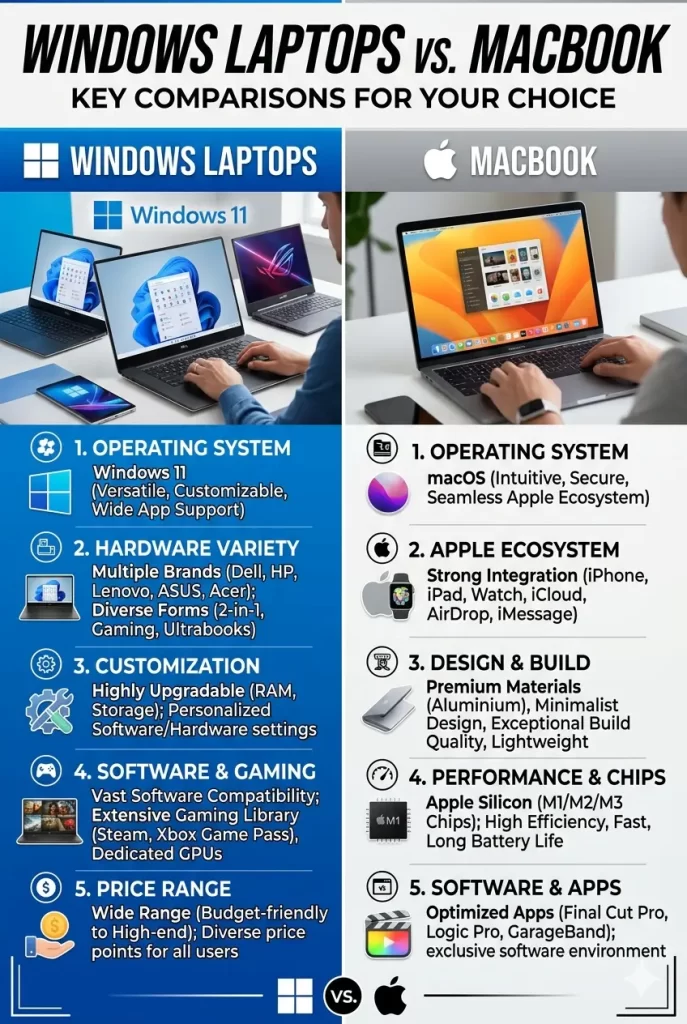
The Core Differences at a Glance
Before diving deep, here’s the honest summary:
| Feature | Windows Laptops | MacBook |
|---|---|---|
| Price range | $400 – $3,000+ | $999 – $3,499+ |
| OS | Windows 11 | macOS Sequoia |
| Hardware variety | Hundreds of models | MacBook Air & MacBook Pro |
| Best battery life | 10–14 hours (top models) | 15–20 hours |
| Gaming | Strong | Limited |
| Creative work | Good | Excellent |
| Business software | Excellent | Good |
| Repair & upgrades | Varies by model | Limited |
| Touchscreen | Yes (many models) | No |
Performance: How Do They Actually Compare?
Apple Silicon vs Intel and AMD
Apple’s M4 chip (and M4 Pro/Max variants) is genuinely fast. It handles video editing, music production, and heavy creative workloads with efficiency that Intel and AMD are still chasing.
The key difference is how Apple integrates the chip with the rest of the system. Memory, GPU, and CPU all share the same architecture. That means less bottleneck and lower power draw — which is why MacBooks run cool and quiet even under load.
Windows laptops with Intel Core Ultra and AMD Ryzen AI processors have closed the gap significantly, especially for everyday tasks. For raw CPU performance in specific workloads, some Windows machines now match or beat Apple silicon.
Verdict: MacBook edges ahead for sustained performance under creative workloads. Windows laptops win for gaming and workloads that rely on discrete GPUs.
RAM and Storage
Here’s a common misconception: you don’t need as much RAM in a MacBook as you do in a Windows laptop. Apple’s unified memory architecture is simply more efficient.
A MacBook with 16GB of unified memory often outperforms a Windows laptop with 16GB of standard RAM. That said, 16GB remains the sweet spot for both platforms in 2026.
Storage speeds on top MacBooks are among the fastest available. High-end Windows laptops with NVMe SSDs aren’t far behind, though.
Battery Life: MacBook Wins Here
Let’s be direct: MacBooks have better battery life than almost any Windows laptop.
The MacBook Air M4 regularly delivers 16–18 hours in real-world use. The MacBook Pro M4 Pro hits 18–20 hours on a charge. These numbers are rare on Windows.
The best Windows laptops — like the Microsoft Surface Laptop 6 and Snapdragon X Elite models — can hit 13–14 hours. That’s solid, but it’s not MacBook territory.
If you’re a student who spends long days away from outlets, or a traveler who hates hunting for power sockets, this is a meaningful difference.
Verdict: MacBook wins, and it’s not particularly close.
Software and Compatibility
Windows Has the Wider App Library
Windows runs more software than macOS — full stop. That includes:
- Enterprise and business tools (SAP, many ERP systems, industry-specific apps)
- PC games (Steam library, AAA titles, anything with an .exe)
- Legacy applications that were never ported to macOS
- Some educational software that IT departments only support on Windows
If your job or school requires specific software, check compatibility before buying. Assuming everything runs on Mac is a mistake some people make and regret.
macOS Has Better Creative and Developer Tools
macOS has long been the preferred platform for designers, video editors, musicians, and developers. Apps like Final Cut Pro, Logic Pro, and the Mac-native version of Adobe Creative Cloud are optimized in ways that Windows versions simply aren’t.
For developers, the Unix-based terminal in macOS makes working with servers, containers, and command-line tools more natural. Many developers strongly prefer it.
Verdict: Windows for business and gaming. macOS for creative work and development.
Price: Windows Gives You More Options
MacBooks start at $999 for the MacBook Air M4. There’s no MacBook under that price — Apple doesn’t compete in the budget segment.
Windows laptops start from around $399 and scale all the way up past $3,000. You can find a solid student laptop for $599, or spend $1,500 on a business machine that rivals MacBook Pro in build quality.
That said, price-to-value isn’t always what it seems. A $999 MacBook Air M4 lasts 5–7 years without much slowdown. A $599 Windows laptop may feel sluggish in 3 years if specs aren’t strong enough.
Here’s a rough breakdown of what each platform offers by budget:
Under $800:
- Windows: Many solid options (Acer Aspire 5, Lenovo IdeaPad, HP Laptop 15)
- MacBook: Nothing available
$800 – $1,200:
- Windows: Excellent options (ASUS Zenbook 14 OLED, Surface Laptop 6 base model)
- MacBook: MacBook Air M4 13-inch (starts $999)
$1,200 – $1,600:
- Windows: Premium models (Dell XPS 13, HP Spectre x360, ThinkPad X1 Carbon)
- MacBook: MacBook Air M4 15-inch or MacBook Pro M4 base model
$1,600+:
- Windows: Flagship workstations
- MacBook: MacBook Pro M4 Pro / Max (professional-grade power)
Verdict: Windows wins on flexibility. MacBook wins on long-term value retention.
Design and Build Quality
Both platforms have excellent build quality at the premium tier. MacBooks are made from a single block of aluminum and feel exceptionally solid. Keyboards are great, trackpads are industry-leading.
Windows laptops vary widely. The Dell XPS 13, ThinkPad X1 Carbon, and Surface Laptop 6 match MacBook’s build quality. Budget Windows laptops are typically plastic — functional, but not premium.
The MacBook trackpad deserves special mention. It’s still the best trackpad on any laptop. Windows trackpads have improved dramatically, but Apple’s implementation remains the benchmark.
One area where Windows wins: touchscreens. MacBooks don’t have them. Many Windows laptops do — and 2-in-1 models like the HP Spectre x360 offer genuine tablet functionality.
Verdict: Tied at the premium tier. Windows wins if touchscreen matters to you.
Gaming: Windows Wins Easily
If gaming is part of why you want a laptop, the answer is simple: get a Windows laptop.
MacBooks have improved for gaming — Apple Arcade, some AAA ports, and better Metal API support. But the reality is that the PC gaming library is vastly larger, and Windows laptops can be configured with dedicated NVIDIA or AMD GPUs that no MacBook offers.
Whether you’re playing casual games or pushing graphics-intensive titles, Windows gives you far more options at every price point.
Verdict: Windows, without question.
Ecosystem and Integration
MacBook Works Best with Other Apple Devices
If you use an iPhone, iPad, Apple Watch, or AirPods, a MacBook slots in seamlessly. Features like:
- Handoff — start something on your phone, continue on your Mac
- AirDrop — instant wireless file sharing
- Universal Clipboard — copy on one device, paste on another
- iPhone Mirroring — control your iPhone from your MacBook screen
These features are genuinely useful and work without setup.
Windows Integrates with Android and Microsoft Services
Windows 11 integrates with Android phones through the Phone Link app. It also connects tightly with Microsoft 365, OneDrive, Teams, and Xbox Game Pass.
For heavy Microsoft 365 users, Windows offers a more native experience. Outlook, Teams, and SharePoint all feel more at home on Windows.
Verdict: MacBook wins if you’re in the Apple ecosystem. Windows wins if you’re in the Microsoft or Google ecosystem.
Longevity and Resale Value
MacBooks hold their value unusually well. A 3-year-old MacBook Pro sells for significantly more on the used market than a comparable Windows laptop.
Apple also supports its devices with software updates for a long time — typically 7+ years. A MacBook bought today will likely receive macOS updates well into the early 2030s.
Windows laptops vary. Premium brands like Lenovo ThinkPad and Dell XPS are built to last. Budget Windows laptops may feel obsolete sooner.
Verdict: MacBook wins on resale value and long-term software support.
Who Should Buy a Windows Laptop?
A Windows laptop makes more sense if:
- You have a budget under $900 and need a capable machine
- Your work or school requires Windows-specific software
- You’re a gamer — even casually
- You want or need a touchscreen
- Your workplace is Microsoft-centric (Teams, SharePoint, Active Directory)
- You prefer more hardware choice and flexibility
- You’re already in the Android/Google ecosystem
Who Should Buy a MacBook?
A MacBook makes more sense if:
- Battery life is your top priority
- You work in design, video, music, or other creative fields
- You’re a developer who prefers Unix-based tools
- You already use an iPhone, iPad, or other Apple devices
- You want a machine that stays fast and supported for many years
- You prefer a simpler, more unified software experience
- Resale value matters to you
The Honest Bottom Line
Neither platform is universally better. The Windows vs MacBook debate in 2026 comes down to your specific situation.
If you want the best battery life, best creative tools, and seamless Apple integration — get a MacBook. Start with the MacBook Air M4. It’s one of the best laptops ever made.
If you want more flexibility, gaming capability, a touchscreen, or something at a lower price — Windows laptops have excellent options at every budget. The ASUS Zenbook 14 OLED, Surface Laptop 6, and Dell XPS 13 are all fantastic.
Don’t let anyone tell you one is simply “better.” The best laptop is the one that fits your workflow, budget, and daily life.
Frequently Asked Questions (FAQ)
Is MacBook better than Windows for college students?
It depends on the student. MacBook is excellent for students in creative fields, biology, or business who use Apple devices. Windows laptops are better for engineering, gaming, or schools that require Windows-only software. Budget is also a factor — Windows has many solid options under $700, while MacBook starts at $999.
Do MacBooks get viruses?
MacBooks are generally more resistant to malware than Windows, partly due to macOS’s architecture and partly because Windows is a bigger target. That said, no computer is immune. Mac users should still use basic security practices and be cautious about downloads.
Can I run Windows on a MacBook?
You can run Windows on a MacBook using virtualization software like Parallels Desktop. It works well for most apps. However, some Windows software doesn’t run perfectly in virtualization, and it adds cost. If you regularly need Windows software, a Windows laptop is simpler.
Which lasts longer — a MacBook or a Windows laptop?
A premium MacBook typically lasts 6–7 years with strong performance. A premium Windows laptop (ThinkPad, XPS, Surface) can also last that long. Budget Windows laptops often feel outdated in 3–4 years. For longevity, MacBook or a premium Windows machine are both good bets.
Is it hard to switch from Windows to Mac?
There’s a learning curve, but most people adjust within 1–2 weeks. The biggest adjustments are keyboard shortcuts and the different menu structure. macOS is intuitive once you get used to it. Switching from Mac to Windows is a similar experience.
Which is better for working from home?
Both are excellent for remote work. MacBook has better battery life and webcam quality (on newer models). Windows laptops offer better integration with Microsoft Teams and corporate IT environments. If your company is Microsoft-based, check with IT before buying a Mac.
Should I buy a MacBook or Windows laptop for video editing?
For video editing, MacBook is the stronger recommendation. Final Cut Pro is faster and more optimized on Mac than any Windows equivalent. Adobe Premiere runs well on both, but renders noticeably faster on MacBook Pro with Apple Silicon. If you’re on a tight budget, a Windows laptop with a dedicated GPU is a solid alternative.
