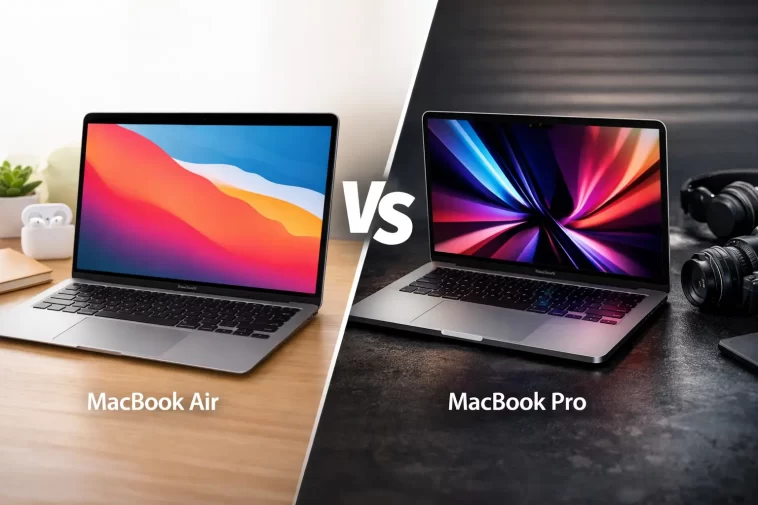
I’ve been asked this question more times than I can count: “Should I get the MacBook Air or the MacBook Pro?” Friends, colleagues, family members — everyone buying a new Mac eventually lands on this crossroads.
On the surface, the question seems simple. But when you actually dig into the specs, the displays, the cooling systems, and the price differences, the answer turns out to depend entirely on who you are and what you do.
Here’s the truth I’ve come to after testing both: the MacBook Air is the right laptop for most people. But for a specific group of users, the MacBook Pro is worth every extra dollar — and then some.
This guide walks you through every meaningful difference between the MacBook Air and MacBook Pro so you can make the right call for your situation. No fluff, no unnecessary tech jargon — just what you actually need to know.
The Short Answer: What Each MacBook Is Built For
Before diving into the details, here’s the simplest way to think about these two laptops:
MacBook Air — the ultraportable, fanless, go-anywhere machine designed for everyday users who want excellent performance, long battery life, and a light bag.
MacBook Pro — the professional workhorse built for sustained heavy workloads, with a superior display, more ports, active cooling, and significantly more raw power in the Pro and Max chip configurations.
If you browse the web, write documents, use Zoom, edit photos, or do light video editing, the MacBook Air will serve you extremely well — and save you several hundred dollars. If you work in video production, 3D rendering, software development, or music production, the MacBook Pro’s advantages become essential.
Now let’s get into the specifics.
Chip and Performance
MacBook Air: M4
The current MacBook Air (released in early 2025) comes with the Apple M4 chip — the same chip that powers the base-model MacBook Pro. It features a 10-core CPU, up to a 10-core GPU, and 16GB of unified memory as standard.
For everyday tasks — browsing, email, streaming, spreadsheets, writing, light photo editing — the M4 MacBook Air is genuinely fast. It handles these tasks effortlessly. It can even handle more intensive work like Final Cut Pro video editing for shorter timelines.
MacBook Pro: M4, M4 Pro, or M4 Max
The MacBook Pro comes in three chip configurations:
- M4 (base 14-inch model) — same chip as the Air, with two additional GPU cores
- M4 Pro — significantly more CPU and GPU cores, more memory bandwidth, supports up to 64GB RAM
- M4 Max — the most powerful chip Apple makes for laptops, designed for the most demanding professional workflows, supports up to 128GB RAM
The base M4 MacBook Pro and M4 MacBook Air perform nearly identically in everyday use — benchmark scores sit within about 5% of each other. The real gap opens up when you move to M4 Pro or M4 Max configurations, which are genuinely in a different performance class.
The verdict on chips: For standard use, there’s no meaningful difference between the M4 Air and base M4 Pro. If you need serious power, go M4 Pro or M4 Max — and that means MacBook Pro.
Cooling: Fan vs. Fanless
This is one of the most important — and least discussed — differences between the two.
MacBook Air: Completely Fanless
The MacBook Air uses passive cooling. There is no fan. Heat dissipates through a copper heat spreader and the aluminum chassis. In silence.
This makes the Air completely quiet — it will never make a sound, no matter what you’re doing. It’s a genuinely beautiful design feature for anyone who works in quiet environments or finds fan noise distracting.
The trade-off: under sustained, heavy workloads — long video exports, hour-long rendering jobs, large code compilation tasks — the MacBook Air will eventually throttle its performance to manage heat. It can burst to full speed, but it can’t sustain it indefinitely.
MacBook Pro: Active Cooling with Fans
The MacBook Pro has fans. When workloads demand it, the fans spin up and the chip runs at full performance for as long as needed — without throttling.
For short tasks, you’ll never hear the fans. But during heavy exports, renders, or machine learning work, the fans kick in and the MacBook Pro maintains its full performance ceiling for hours.
The verdict on cooling: If your work involves sustained CPU- or GPU-heavy tasks, the MacBook Pro’s active cooling is not a luxury — it’s a functional necessity.
Display
MacBook Air: Liquid Retina
The MacBook Air uses a Liquid Retina display. It’s sharp, color-accurate, and genuinely impressive for a laptop at this price. The 13.6-inch model peaks at around 500 nits of brightness, and the 15.3-inch model is slightly brighter.
It’s great for indoor use. In direct sunlight or bright outdoor environments, it can struggle.
One important limitation: the MacBook Air display does not support HDR content at full quality.
MacBook Pro: Liquid Retina XDR (Mini-LED)
The MacBook Pro uses a Liquid Retina XDR display powered by Mini-LED technology. This is a significant upgrade in every measurable way:
- 1000 nits of standard brightness (double the Air)
- 1600 nits peak brightness for HDR content
- True HDR support with deep contrast
- ProMotion adaptive refresh rate (up to 120Hz) for smoother scrolling
The MacBook Pro’s display is noticeably better — more vivid, more detailed, dramatically better in outdoor conditions. If display quality matters to your work (color grading, photo retouching, video review), this upgrade alone can justify the price difference.
The verdict on display: The Air’s screen is excellent. The Pro’s screen is exceptional. If you work with visual media professionally, the XDR panel makes a real difference.
Ports and Connectivity
MacBook Air: Simple but Limited
The MacBook Air comes with:
- MagSafe charging port
- 2× Thunderbolt / USB-C ports (both on the left side)
- 3.5mm headphone jack
That’s it. No HDMI. No SD card slot. If you need to connect to a display, import photos from a camera card, or connect multiple accessories, you’ll need a hub or dongle.
MacBook Pro: A Full Professional Port Selection
The MacBook Pro adds significantly more:
- MagSafe charging port
- 3× Thunderbolt / USB-C ports (Thunderbolt 5 on M4 Pro/Max models)
- HDMI port — connect directly to any monitor or projector
- SD card slot — import photos and video directly, no adapter needed
- 3.5mm headphone jack with high-impedance headphone support
The M4 Pro and M4 Max models also support Thunderbolt 5, enabling faster data transfer and support for more external monitors simultaneously.
The verdict on ports: The MacBook Pro’s port selection is practical and genuinely useful. If you frequently connect to external displays, cameras, or storage devices, the added ports reduce friction significantly.
Battery Life
Both MacBooks have excellent battery life — among the best in the laptop market. But they’re not equal.
| Model | Rated Battery Life |
|---|---|
| MacBook Air 13-inch (M4) | Up to 18 hours |
| MacBook Air 15-inch (M4) | Up to 15–18 hours |
| MacBook Pro 14-inch (M4) | Up to 24 hours |
| MacBook Pro 16-inch (M4) | Up to 24 hours |
The MacBook Pro’s larger battery gives it a meaningful edge for long travel days or heavy work sessions away from an outlet. In real-world use, the MacBook Air will comfortably last a full workday. The MacBook Pro will last comfortably into the next day.
The verdict on battery: The Air is impressive. The Pro is remarkable. Both are class-leading for laptops.
Audio
MacBook Air: Solid Stereo Speakers
The MacBook Air uses a stereo speaker system built into the hinge, which fires toward the display. The design is clever — the lid acts as a natural amplifier. For a laptop, the sound is genuinely good: clear and well-suited for calls, YouTube, and background music.
MacBook Pro: Six-Speaker System with Force-Canceling Woofers
The MacBook Pro packs a six-speaker sound system with force-canceling woofers that deliver deeper bass and significantly more volume. In practical terms, the MacBook Pro’s speakers rival small Bluetooth speakers in fullness and volume.
The verdict on audio: If sound quality matters — music production, film work, or just enjoying media at high volume — the MacBook Pro’s speakers are noticeably superior.
Design, Weight, and Portability
The MacBook Air is built around portability. It is:
- 0.44 inches thin (13-inch) or 0.45 inches (15-inch)
- 2.7 lbs (13-inch) or 3.3 lbs (15-inch)
- Available in 4 colors: Silver, Starlight, Sky Blue, and Midnight
The MacBook Pro is heavier and thicker — necessary to accommodate its fans, larger battery, and additional ports:
- 0.61 inches thin (14-inch) or 0.66 inches (16-inch)
- 3.5 lbs (14-inch) or 4.7 lbs (16-inch)
- Available in 2 colors: Silver and Space Black
If you carry your laptop in a bag every day, the MacBook Air’s weight advantage is something you feel. The MacBook Pro — especially the 16-inch — is not a lightweight commuter machine.
The verdict on portability: The MacBook Air is the clear winner for anyone who prioritizes carry weight and everyday portability.
Price
Here’s how the current lineup compares at baseline:
| Model | Starting Price |
|---|---|
| MacBook Air 13-inch (M4) | $999 |
| MacBook Air 15-inch (M4) | $1,199 |
| MacBook Pro 14-inch (M4) | $1,599 |
| MacBook Pro 14-inch (M4 Pro) | $1,999 |
| MacBook Pro 16-inch (M4 Pro) | $2,499 |
| MacBook Pro 16-inch (M4 Max) | $3,499+ |
The MacBook Air starts $600 below the base MacBook Pro. That’s a significant gap. And unlike the MacBook Pro, the Air’s base M4 model at $999 comes with 16GB of RAM as standard — a $200 upgrade Apple quietly bundled in for 2025.
Who Should Buy Which?
Buy the MacBook Air if you:
- Use your laptop for everyday tasks — email, browsing, documents, streaming, video calls
- Want the lightest, thinnest option to carry everywhere
- Work in meetings, coffee shops, or on the go regularly
- Are a student or someone who doesn’t need a professional-grade machine
- Value near-silent operation
- Want excellent value for money
Buy the MacBook Pro if you:
- Do sustained heavy work — 4K/8K video editing, 3D rendering, music production, machine learning
- Need more ports without dongles — especially HDMI and SD card
- Require the best possible display for color-critical work
- Work in bright environments where 1000-nit brightness matters
- Need the M4 Pro or M4 Max for maximum performance
- Want longer battery life for extended travel
Quick Comparison Table
| Feature | MacBook Air (M4) | MacBook Pro (M4) |
|---|---|---|
| Chip options | M4 only | M4, M4 Pro, M4 Max |
| Cooling | Fanless (passive) | Active fans |
| Display | Liquid Retina, 500 nits | Liquid Retina XDR, 1000 nits, HDR |
| Ports | 2× USB-C + MagSafe | 3× USB-C + HDMI + SD + MagSafe |
| Battery (rated) | Up to 18 hours | Up to 24 hours |
| Weight (13/14-inch) | 2.7 lbs | 3.5 lbs |
| Starting price | $999 | $1,599 |
| Fan noise | Completely silent | Quiet (fans under load) |
| Colors | 4 options | 2 options |
| Best for | Everyday users | Power users, professionals |
FAQ
Is the MacBook Air good enough for professional work?
For many professionals — writers, designers, marketers, teachers, developers doing everyday coding — absolutely yes. The M4 MacBook Air is a genuinely capable machine. It only falls short for sustained, computationally heavy work like long video renders or large-scale 3D modeling.
Can the MacBook Air handle video editing?
Yes, for most video editing tasks. Short timelines, 1080p and 4K footage, and basic color work are well within the Air’s capabilities. Where it struggles is sustained, long-export sessions — the fanless design means it will throttle performance over time. For professional video production, the MacBook Pro handles this without any issue.
Is the MacBook Pro’s display worth the upgrade?
If you work with color-critical content or use your laptop outdoors frequently, yes — the Liquid Retina XDR display is a meaningful upgrade. It’s twice as bright, supports HDR, and delivers noticeably better contrast and color depth. For general users, the Air’s display is excellent and the upgrade may not be worth the extra cost.
Do I need the MacBook Pro for programming?
Not necessarily. The MacBook Air handles most software development workflows — web development, mobile development, data science — without breaking a sweat. If you’re compiling very large codebases frequently or running demanding local AI/ML models, the MacBook Pro’s sustained performance and optional M4 Pro chip would be beneficial.
What’s the difference between M4, M4 Pro, and M4 Max?
The M4 is the standard chip — capable and efficient, found in both the MacBook Air and the base MacBook Pro. The M4 Pro doubles the CPU and GPU cores, supports up to 64GB of RAM, and is designed for demanding professional workflows. The M4 Max is the most powerful chip Apple makes for laptops — more GPU cores, more memory bandwidth, and up to 128GB of RAM — built for the most intensive creative and computational work.
Is the MacBook Air fanless design a problem?
For most users, no. The fanless design makes the MacBook Air completely silent — which many people love — and the M4 chip is efficient enough that it runs cool under typical workloads. The only scenario where it becomes a limitation is sustained heavy computation, where thermal throttling can reduce performance over time.
Which MacBook holds its value better?
Both MacBooks hold their value exceptionally well compared to Windows laptops. The MacBook Pro — particularly higher-end M4 Pro and M4 Max configurations — tends to hold resale value longer due to its higher performance ceiling. The MacBook Air’s value proposition makes it appealing on both new and used markets.
Final Thoughts
The MacBook Air and MacBook Pro are both outstanding laptops. The Air is thinner, quieter, lighter, more colorful, and significantly cheaper. The Pro is more powerful, has a better display, more ports, better speakers, and longer battery life.
For most people — and I mean the vast majority — the MacBook Air M4 at $999 is the smarter buy. It does everything they need, does it beautifully, and stays light in the bag all day.
For creators, engineers, and professionals whose work demands sustained performance and the very best tools: the MacBook Pro justifies its premium. The display, the cooling, the ports, and the M4 Pro/Max chips together make it a legitimate professional machine.
Know your workflow. Match the machine to what you actually do. That’s the only answer that matters.
