I still remember the moment I plugged in my first Raspberry Pi — a tiny board that felt like holding the internet in my palm. Since then, I’ve gone through several generations, tinkered with countless projects, and eventually started comparing alternatives. When I got my hands on both a Raspberry Pi 5 and an Orange Pi 5, I realized the gap between these two boards is smaller than ever — and the right choice depends entirely on what you actually want to build.
If you’re standing at that same crossroads right now, this guide is for you.
What Is the Raspberry Pi 5 vs Orange Pi Debate Really About?
The Raspberry Pi 5 vs Orange Pi comparison isn’t just a spec sheet battle. It’s a question of philosophy. One board offers raw horsepower and cutting-edge silicon; the other offers a polished, beginner-friendly experience backed by one of the largest maker communities in the world.
Both are single-board computers (SBCs). Both run Linux. Both cost under $100 for most configurations. But they make very different trade-offs — and understanding those trade-offs will save you a lot of frustration down the line.
Specs at a Glance
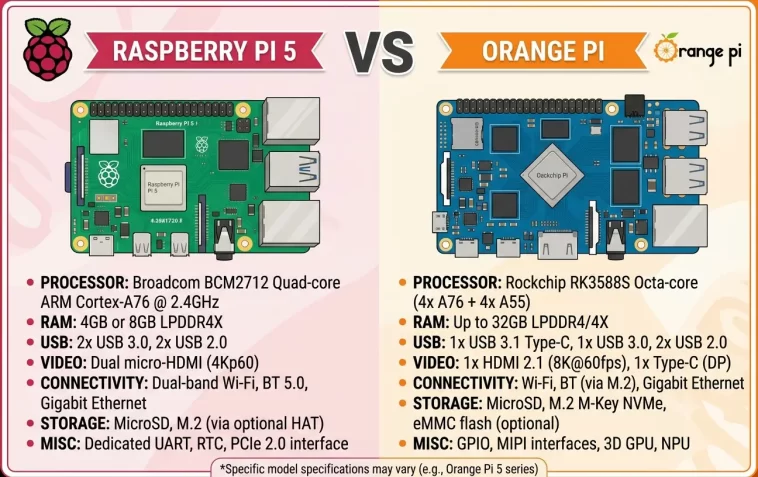
Before diving into the details, here’s a quick side-by-side comparison of the core specs:
| Feature | Raspberry Pi 5 | Orange Pi 5 |
|---|---|---|
| SoC | Broadcom BCM2712 | Rockchip RK3588S |
| CPU | Quad-core Cortex-A76 @ 2.4GHz | Quad A76 + Quad A55 @ 2.4/1.8GHz |
| GPU | VideoCore VII | Mali-G610 |
| NPU | None | 6 TOPS |
| RAM | 4GB / 8GB / 16GB LPDDR4X | 4GB / 8GB / 16GB LPDDR4/4X |
| Storage | microSD + PCIe 2.0 (via HAT) | microSD + M.2 PCIe 2.0 |
| USB | 2x USB 3.0 + 2x USB 2.0 | 1x USB 3.0 + 2x USB 2.0 |
| Display | 2x micro-HDMI (4K) | 1x HDMI 2.1 (8K capable) |
| Wi-Fi / BT | Built-in Wi-Fi 5 + BT 5.0 | Not built-in (base model) |
| GPIO | 40-pin | 26-pin |
| Price (8GB) | ~$80–100 | ~$89–110 |
CPU Performance: Cores vs. Single-Thread Speed
This is where things get interesting.
The Raspberry Pi 5 uses a quad-core Cortex-A76 running at 2.4GHz — the same performance cores you’d find in mid-range laptops from a few years ago. It’s fast in a clean, linear way. Single-threaded tasks like compiling Python scripts, running a desktop UI, or playing retro games respond snappily.
The Orange Pi 5 uses the Rockchip RK3588S, an octa-core chip with four A76 performance cores and four A55 efficiency cores. For heavy multi-threaded workloads — think large code compilations, parallel processing, or running multiple Docker containers — the eight cores give it a real edge.
If you’re running one or two tasks at a time, the Pi 5 feels equally fast. If you’re stacking services on a home server, the Orange Pi 5 pulls ahead.
GPU and Display Output
You might not think about GPU on a single-board computer, but it matters more than people expect.
The Raspberry Pi 5’s VideoCore VII has well-optimized drivers, especially for desktop Linux. Games, video playback, and lightweight 3D rendering all benefit from years of driver polish.
The Orange Pi 5’s Mali-G610 is technically more powerful in raw shader throughput. In graphics-heavy benchmarks, it can outpace the Pi 5 by over 50%. But driver maturity is a real issue — getting video acceleration to work properly on Orange Pi requires more tinkering.
On display output, the Orange Pi 5 wins on paper: it supports 8K output via HDMI 2.1, while the Pi 5 tops out at 4K. For 99% of users, this doesn’t matter. But for media playback enthusiasts, it’s a notable difference.
The NPU Advantage: AI on the Edge
This is one area where the Orange Pi 5 has no real competition from the Raspberry Pi 5.
The RK3588S includes a dedicated Neural Processing Unit (NPU) capable of 6 TOPS (tera-operations per second). This allows you to run on-device AI and machine learning inference — think object detection, voice recognition, or image classification — without eating up CPU resources.
The Raspberry Pi 5 has no built-in NPU. If you want AI acceleration on a Pi, you need an external Coral USB accelerator or a Hailo HAT add-on, which adds cost and complexity.
If your project involves edge AI — local object detection for a security camera, a voice assistant, or a robotics system — the Orange Pi 5 is the smarter hardware choice.
Storage and Expandability
You can power up storage on both boards, but the experience differs.
Raspberry Pi 5 Storage
- Starts with a microSD card slot
- PCIe 2.0 interface is exposed via a flat flex connector
- To add an NVMe SSD, you need an official M.2 HAT+ adapter (sold separately, ~$10–15)
- Once set up, NVMe speeds reach around 400 MB/s
Orange Pi 5 Storage
- Has an onboard M.2 PCIe 2.0 slot (no adapter needed)
- Plug in an NVMe SSD directly
- The Orange Pi 5 Plus steps things up with a PCIe 3.0 x4 M.2 slot, pushing sequential reads past 500 MB/s
If you want fast, hassle-free NVMe storage, the Orange Pi 5 wins. You don’t need extra accessories — just plug in a drive and go.
Connectivity: Wi-Fi, Bluetooth, and Ethernet
This is one of the Raspberry Pi 5’s clearest advantages.
The Pi 5 comes with built-in Wi-Fi 5 and Bluetooth 5.0 out of the box. You open the box, plug it in, and connect to your network wirelessly. Done.
The base Orange Pi 5 has no Wi-Fi or Bluetooth. You’ll need to either buy a USB Wi-Fi dongle or use a model that includes wireless (like the Orange Pi 5 Pro or Orange Pi 5 Ultra, which do include Wi-Fi 5/6E and Bluetooth 5.0/5.3). This is worth knowing before you order.
For wired networking, both boards offer Gigabit Ethernet on base models. The Orange Pi 5 Plus upgrades to dual 2.5 GbE ports — ideal for router or NAS builds.
Software, OS Support, and Community
This is where the Raspberry Pi 5 wins the most convincingly.
You can think of the Pi ecosystem as a massive safety net. The Raspberry Pi Foundation maintains an official OS that’s stable, well-documented, and genuinely beginner-friendly. Thousands of tutorials exist for nearly every project you can imagine. HATs (Hardware Attached on Top) accessories, camera modules, and community boards are all purpose-built for the Pi.
With Orange Pi, the situation is more fragmented:
- The official OS works, but can feel bloated or outdated
- Community Ubuntu builds (like Joshua Riek’s popular ARM builds) fill the gap, but maintenance can be inconsistent
- Mainline Linux support is improving, but hardware video acceleration and NPU access don’t always work on standard kernels
If you’re a beginner or you want to “just follow a tutorial and have it work,” the Raspberry Pi 5 is the safer and less frustrating choice. If you’re comfortable with Linux troubleshooting and want maximum performance, Orange Pi rewards the effort.
Price Comparison in 2026
Pricing has shifted upward for both boards in 2025–2026, driven by LPDDR4 supply pressure and broader component costs.
As a rough guide:
- Raspberry Pi 5 (4GB): ~$60–70
- Raspberry Pi 5 (8GB): ~$80–90
- Raspberry Pi 5 (16GB): ~$120–140
- Orange Pi 5 (4GB): ~$60–80
- Orange Pi 5 (8GB): ~$89–110
- Orange Pi 5 Plus (16GB): ~$140–170
One thing to watch: Raspberry Pi prices are consistent across authorized retailers. Orange Pi pricing varies depending on whether you buy from Amazon, AliExpress, or the official Orange Pi store — sometimes by $20 or more for the same model.
When fully kitted out (SSD, case, power supply), both boards land in the $130–160 range. At that point, the value proposition shifts toward whichever board’s software ecosystem suits your project better.
Best Use Cases: Which Board Should You Pick?
Choose the Raspberry Pi 5 if you:
- Are a beginner just getting started with SBCs
- Want to follow tutorials without troubleshooting driver issues
- Are building educational projects or STEM learning setups
- Need a stable desktop Linux environment
- Rely on Pi-specific HATs, camera modules, or GPIO accessories
- Want built-in Wi-Fi and Bluetooth without extra hardware
Choose the Orange Pi 5 if you:
- Need more multi-threaded CPU performance
- Are running AI or machine learning workloads at the edge
- Want native M.2 NVMe support without buying an adapter
- Are building a home server with multiple Docker containers
- Want 8K video output capability
- Are comfortable troubleshooting Linux and digging into driver documentation
Raspberry Pi 5 vs Orange Pi for Home Servers and Self-Hosting
If you’re building a homelab, self-hosting services like Jellyfin, Home Assistant, Nextcloud, or Pi-hole, the comparison tilts toward the Orange Pi 5 for heavier workloads.
Both boards run Docker and Docker Compose on ARM64 without major issues. But when you start stacking 10+ containers, RAM becomes the bottleneck fast. The Orange Pi 5 Plus offers up to 32GB RAM — something the Raspberry Pi 5 can’t match even at its 16GB maximum.
For a single-service setup or a beginner homelab, the Pi 5 is perfectly fine and much easier to configure. For a production-style self-hosting rig with multiple services, the Orange Pi 5 Plus pulls ahead on raw horsepower.
GPIO and Hardware Projects
Both boards include GPIO headers for hardware hacking — sensors, motors, displays, and other peripherals.
The Raspberry Pi 5 still leads here with its 40-pin GPIO header, extensive documentation, and years of community-built libraries. If your project involves robotics, a camera pipeline, or relies on a specific HAT, the Pi ecosystem is unmatched.
The Orange Pi 5 also has a GPIO header, but community libraries and hardware compatibility aren’t as deep. Existing Pi HATs may or may not work without modification.
For hardware-focused maker projects, the Raspberry Pi 5 is the smarter, safer bet.
FAQ: Raspberry Pi 5 vs Orange Pi
Is the Orange Pi 5 faster than the Raspberry Pi 5?
In multi-threaded workloads, yes. The Orange Pi 5’s eight-core CPU outperforms the Pi 5’s four-core setup for tasks like parallel processing, large compilations, and running multiple services simultaneously. For single-threaded tasks, both perform similarly.
Does the Orange Pi 5 have Wi-Fi?
The base Orange Pi 5 does not include built-in Wi-Fi or Bluetooth. Some models in the Orange Pi 5 family — like the Orange Pi 5 Pro and Orange Pi 5 Ultra — do include wireless connectivity. Always check the specific model’s specs before purchasing.
Can the Orange Pi 5 run Raspberry Pi OS?
No. Raspberry Pi OS is designed exclusively for Raspberry Pi hardware. The Orange Pi 5 runs its own Orange Pi OS, as well as Android and community-maintained Ubuntu and Debian builds.
Which board is better for beginners?
The Raspberry Pi 5 is the better choice for beginners. It has a larger community, better documentation, a more polished official OS, and thousands of beginner-friendly tutorials. The Orange Pi 5 requires more Linux knowledge to get the most out of.
Is the Orange Pi 5 a good Raspberry Pi replacement?
It depends on your use case. For raw performance, edge AI, and storage expandability, the Orange Pi 5 is an excellent alternative. For software ease-of-use, GPIO projects, and community support, the Raspberry Pi 5 remains the better choice for most users.
Which board is better for AI and machine learning projects?
The Orange Pi 5 has a clear advantage here thanks to its built-in 6 TOPS NPU, which enables on-device AI inference without external hardware. The Raspberry Pi 5 has no built-in NPU, so you’d need to add an external AI accelerator like a Coral USB device or Hailo HAT.
Which board has better NVMe support?
The Orange Pi 5 wins here — it has a native M.2 slot on the board. The Raspberry Pi 5 requires an additional M.2 HAT adapter to use NVMe storage. Both support fast SSD speeds once configured.
Final Verdict
The Raspberry Pi 5 vs Orange Pi debate doesn’t have one universal winner — and that’s actually a good thing. It means both boards have earned their place in the maker ecosystem.
If you want reliability, community support, and a smooth out-of-the-box experience, the Raspberry Pi 5 is still the king for beginners and hardware hackers. If you want raw performance, edge AI capabilities, and better storage connectivity, the Orange Pi 5 punches well above its weight.
My personal take? Start with the Raspberry Pi 5 if you’re new to SBCs. Once you hit its limits — and you’ll know when you do — the Orange Pi 5 will be waiting with more headroom to grow into.
