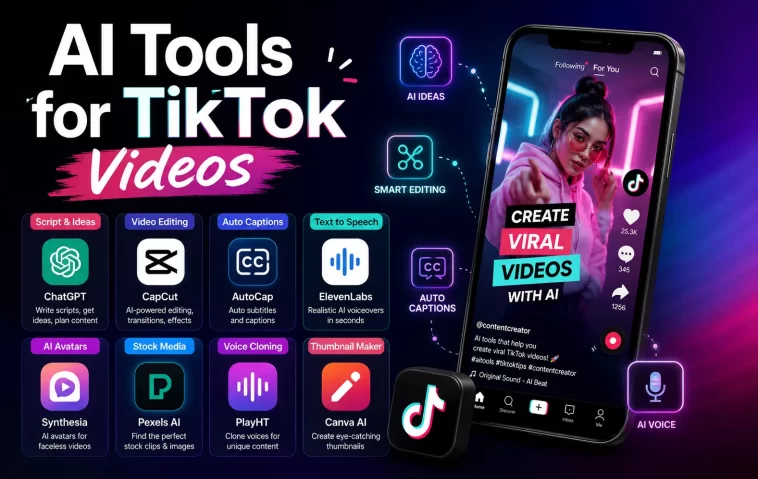
AI tools for TikTok videos completely changed how I create content, and I wish I had started using them six months earlier than I did.
I used to spend two or three hours editing a single TikTok. Cutting clips, writing captions, finding music that wasn’t already copyright-flagged, recording voiceovers I hated the sound of. By the time I posted, I had barely enough energy left to post the next one.
Then I switched my workflow to lean on AI tools for the heavy lifting. My output went from one shaky video every few days to several polished videos a week, and my engagement actually improved.
This guide walks you through exactly how to use AI tools to create viral TikTok content, step by step, plus the tools that are actually worth your time in 2026.
Here’s a focused list of AI video tools for creating viral TikTok content, grouped by what they’re actually good for:
Best for fast, original prompt-to-video
- InVideo AI – Type a topic, it writes the hook, picks footage, adds voiceover, and exports 9:16 in around 8 minutes. Huge template library (5,000+), free plan available. Strong default choice if you only pick one tool.
- Pictory – Paste a blog URL or long script and it extracts the best moments into a 1-3 minute TikTok video automatically. Good for turning existing written content into video fast.
- Mootion – Built for full AI-generated scenes rather than stock footage. Notably faster generation speed than most competitors in recent benchmarks.
Best for repurposing long-form content into clips
- OpusClip – Feeds in YouTube videos or podcasts and pulls out the most engaging moments as ready-to-post TikTok clips. Ideal if you already record longer content elsewhere.
- Submagic – Strong for adding fast, punchy captions and auto-editing to repurposed clips.
Best for AI-generated visuals (not stock footage)
- Zebracat – Stands out for AI scene generation instead of pulling from stock libraries. Pricier, but output quality is noticeably higher if visuals are your differentiator.
- Seedance – Text-to-video and image-to-video, built around TikTok-specific pacing and algorithm signals (completion rate, rewatch rate).
Best for voiceover quality and multi-language content
- Fliki – 2,000+ voices across 80+ languages. The strongest option if your audience isn’t single-language.
- HeyGen – Known for realistic AI avatars and voice, often paired with InVideo for fully “hosted” style videos.
Best for an all-in-one workflow (creation + scheduling)
- Predis.ai – Generates script, visuals, and handles scheduling in one place. Output can look a bit templated, so better for quick posts than highly produced videos.
- PostEverywhere – Less about video generation itself, more about tying your AI-made videos into a consistent scheduling and posting system.
Quick comparison:
| Tool | Best For | Output Time | Notes |
|---|---|---|---|
| InVideo AI | Original videos, fastest start | ~8 min | Best single-tool pick |
| Pictory | Blog/script → video | Fast | Great for repurposing text |
| OpusClip | Long-form → clips | Fast | Needs existing long content |
| Zebracat | AI scene visuals | Slower | Higher cost, higher quality |
| Fliki | Multi-language voiceover | Fast | 80+ languages |
| Seedance | TikTok-specific pacing | Fast | Built around algorithm signals |
Why AI Tools Matter for TikTok Growth in 2026
TikTok’s algorithm rewards consistency more than almost anything else. Posting often, with decent hooks and good pacing, beats posting rarely with perfect production value.
The problem is that no creator can realistically produce five or more polished videos a week by hand. AI tools close that gap. They handle scripting, scene generation, voiceover, captions, and editing, while you focus on the creative direction and strategy.
Used correctly, AI doesn’t replace your creativity. It just removes the repetitive, time-consuming parts so you can post more often without burning out.
What TikTok’s Algorithm Actually Rewards
Before picking any tool, it helps to know what signals actually drive virality:
- Completion rate – the percentage of viewers who watch to the end
- Rewatch rate – how often people watch the same video twice
- Share rate – content that surprises or sparks debate gets shared more
- Comment rate – questions and slightly controversial takes drive comments
- Posting frequency – consistent posting keeps the algorithm pushing your content
AI-generated visuals tend to be novelty-rich, which naturally helps with completion and rewatch rate. That’s part of why AI content performs well when it’s done thoughtfully.
Step 1: Choose the Right AI Video Tool for Your Style
You don’t need every tool on the market. You need one or two that match your content type.
- If you want fast, template-based videos with voiceover and captions built in, prompt-to-video tools work well
- If you’re repurposing long-form content like podcasts or YouTube videos, clip-extraction tools are a better fit
- If you want fully AI-generated scenes instead of stock footage, look for tools built specifically around AI scene generation
Pick based on your actual content plan, not just whatever tool is trending that week.
Step 2: Write a Strong Hook Before You Generate Anything
The first two seconds decide whether someone keeps watching or scrolls away.
- Lead with a question, a bold claim, or an unexpected visual
- Avoid slow intros, logos, or “hey guys” openers
- Type your hook directly into the AI tool’s prompt field so it shapes the opening scene
Most AI video tools let you type a topic or script, and the tool builds the hook, visuals, and pacing around it. A weak prompt produces a weak hook, no matter how good the tool is.
Step 3: Generate Your First Draft Video
Once you have your hook and rough script, let the AI tool do the heavy lifting.
- Enter your topic, script, or source URL into the tool
- Choose a template or let the AI pick scenes automatically
- Select a voice or generate a voiceover from your script
- Export in 9:16 vertical format, ready for TikTok
Most modern tools complete this in under ten minutes. Treat the first export as a draft, not a finished product.
Step 4: Edit for Pacing, Not Just Polish
AI tools handle the heavy editing, but pacing still needs a human eye.
- Trim any scene that runs longer than necessary
- Make sure captions appear in sync with the voiceover
- Cut dead air between sentences or scene transitions
- Watch the full video once before posting, with sound on
A video that looks technically perfect but drags in the middle will still lose viewers. Pacing is the one thing worth manually checking every time.
Step 5: Add Trending Sounds and Hashtags Strategically
AI tools are great at generating video, but trend research still matters.
- Use a trend-scraping feature if your tool includes one, or check TikTok’s own trending sounds tab
- Match the sound’s energy to your video’s pacing, not just its popularity
- Use three to five relevant hashtags instead of stuffing in twenty
- Mix one broad hashtag with two or three niche-specific ones
Trending audio alone won’t make a weak video go viral, but it does help discovery once the content itself is solid.
Step 6: Disclose AI-Generated Content Properly
This step is easy to skip, but it matters for staying compliant with platform rules.
TikTok requires creators to disclose synthetic media, including AI-generated faces or voices. Most platforms now include a built-in toggle or watermark option for this.
Skipping disclosure isn’t worth the risk. It’s a quick checkbox, and ignoring it can affect your account’s standing.
Step 7: Post Consistently and Track What Works
A single viral video matters less than a consistent posting habit.
- Aim for three to five videos a week if your tool stack allows it
- Track completion rate and rewatch rate, not just total views
- Note which hooks, sounds, or formats consistently outperform others
- Repeat what works instead of constantly chasing something new
Creators with large content libraries often see steady daily views from older videos alone, simply from algorithmic momentum. That compounding effect only happens with consistent volume over time.
Common Mistakes to Avoid With AI TikTok Tools
A few habits quietly limit results for creators new to AI video tools:
- Using the default template output without editing pacing
- Ignoring TikTok’s AI disclosure requirements
- Chasing every new tool instead of mastering one workflow
- Posting inconsistently and expecting algorithmic momentum anyway
- Treating AI output as finished instead of as a strong first draft
Avoiding these mistakes alone puts your content ahead of a lot of low-effort AI spam already flooding the platform.
Building a Simple AI Content Stack
You don’t need a complicated setup to get started. A simple, realistic stack looks like this:
- One prompt-to-video tool for original content
- One clip-extraction tool if you repurpose long-form content
- A basic caption or hashtag research tool
- A consistent posting schedule, even if it’s just three videos a week
Start small, get comfortable with the workflow, and add tools only when you actually need them.
FAQ
Can AI-generated TikTok videos actually go viral?
Yes. Many trending TikTok videos in 2026 are AI-generated. The algorithm rewards engagement and completion rate, not how the video was produced.
Is it against TikTok’s rules to use AI tools for videos?
No, as long as you disclose synthetic media when required, such as AI-generated faces or voices. Most platforms comply with TikTok’s current disclosure policies.
How much do AI tools for TikTok videos typically cost?
Pricing varies widely. Many tools offer a free starter plan, while a fuller stack of two or three tools usually costs somewhere between $40 and $120 per month depending on features.
Do I still need editing skills if I use AI tools?
Basic pacing and trimming skills help a lot. AI tools handle the heavy lifting, but reviewing pacing and sync before posting makes a noticeable difference.
How many videos should I post per week using AI tools?
Most creators aim for three to five videos a week. Consistency matters more than occasional high-production videos posted sporadically.
What’s the biggest factor in making an AI-generated TikTok go viral?
A strong hook in the first two seconds, combined with consistent posting frequency, matters more than visual polish alone.
Editor’s Opinion
I realy think AI tools are usefull for TikTok but people relie on them to much sometimes. The tool can make the video fast but it cant make the hook good for you, that part still need a human brain. I seen alot of AI videos that look nice but say nothing intresting in first 2 second, and they just dissapear with no views. Use the tool to save time, not to skip thinking. Thats the only way it realy works long term, in my opinion atleast.
