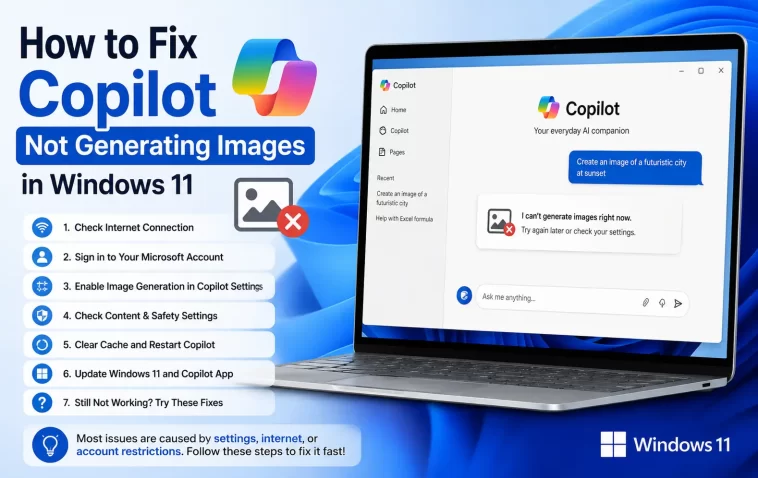
Asked Copilot for a simple image the other day, got a spinner for a solid minute, then nothing — no error, no image, just silence. Copilot not generating images in Windows 11 is one of those bugs that shows up in a few different flavors, and from what I’ve seen in forum threads, it’s been especially bad during certain stretches this year with what looks like actual server-side outages layered on top of the usual local issues.
Let’s go through what’s actually causing it and what tends to fix it.
Quick Answer
- Check if it’s a known outage first — image generation has had multi-day service incidents in 2026, and no local fix helps during those
- You may have hit your daily image generation quota, which is easy to mistake for a bug
- Disable VPN, proxy, ad blockers, or privacy extensions that interfere with the image service specifically
- Force-close Copilot completely and relaunch it rather than just closing the window
- In Word/PowerPoint, switch the Copilot mode from Editing to Chat if image generation is stuck there
Why It Fails
Server-side outages and throttling. This is bigger than most people expect. There have been stretches — one starting mid-June 2026 in particular — where image generation broke for a large number of users at once, with Microsoft blaming it on server errors and asking people to retry every 15 to 30 minutes. So if it stopped working suddenly with no changes on your end, this is genuinely the most likely explanation, not something wrong with your PC.
Daily quota limits. Copilot enforces a daily cap on image generation — commonly cited around 25 HD images on certain plans — and once you hit it, you’ll get a message that reads like a permanent block even though it’s temporary. And here’s the annoying part: several users have reported the quota resetting incorrectly or blocking them well before they’ve actually used their full allowance, which just adds to the confusion.
Interference from browser extensions or network tools. VPNs, proxies, ad blockers, and privacy-focused browser extensions can quietly block the specific endpoints Copilot uses for image generation, even while text chat keeps working fine. This is sneaky because everything else about Copilot looks normal.
Corrupted browser profile or app cache. If you’re using Copilot through Edge or another browser, a stale or corrupted profile can cause image requests to silently fail while text responses still go through.
App/mode mismatch inside Office apps. In Word and PowerPoint specifically, Copilot has different modes — Chat versus Editing — and image generation sometimes only works properly in one of them depending on the current build. This one’s a little inconsistent and not fully documented, so your mileage may vary here.
Common Scenarios
- Copilot web/app on Windows 11 — request hangs indefinitely or returns a generic error
- Copilot inside PowerPoint — text generates fine, but images fail or return an HTTP 500-style error
- Copilot inside Word — same symptom, often tied to the Editing mode toggle
- Mobile works, PC doesn’t — a specific and recurring complaint, usually pointing to a browser or network issue on the PC rather than an account problem
Step-by-Step Fixes
Step 1: Check for a known outage
Before touching settings, search “Copilot image generation down” or check if others are reporting the same issue right now. If it’s a widespread outage, retrying constantly won’t help — from what people have reported, these can drag on for days, unfortunately.
Step 2: Confirm you haven’t hit your quota
Wait an hour and try generating a single simple image. If it goes through, you were likely rate-limited rather than broken. If you’re on a paid plan and consistently hitting the cap well below what you’re supposed to get, that’s worth flagging to Microsoft directly since it looks like a quota-tracking bug rather than expected behavior.
Step 3: Force-close Copilot completely
Open Task Manager, find any Copilot process, and End Task — don’t just close the window, since it can keep running in the background. Reopen it and try again.
Step 4: Disable VPN, proxy, and browser extensions
Turn off any active VPN or proxy. Then try an InPrivate/incognito browser window with extensions disabled by default, and test image generation there. If it works, an extension or your regular VPN connection was the problem.
Step 5: Reset your browser profile (if using Copilot on the web)
In Edge, go to Settings > Reset Settings > Restore settings to their default values. This clears corrupted configurations without touching your bookmarks or saved passwords. If you’d rather not reset everything, creating a brand-new Edge profile and testing Copilot there works as a lighter alternative.
Step 6: Switch modes in Word or PowerPoint
If it’s failing specifically inside Word or PowerPoint, toggle Copilot from Editing mode to Chat mode (or vice versa depending on which one you’re currently in) and try generating the image through chat instead. You can then manually insert the result into your document.
Step 7: Update the app and browser
Check the Microsoft Store for a Copilot app update, and make sure your browser is current if you’re using the web version. Old versions occasionally break image generation specifically while leaving text chat unaffected.
What Actually Worked For Me
My first instinct was to blame my network — I’ve got a VPN running most of the time out of habit, so I turned it off, tried again, still nothing. So I figured it wasn’t that. Cleared cache, tried InPrivate, still stuck on the same generic error.
Turned out it was timing, not anything I did. I came back a couple hours later without changing a single setting and it just worked. That’s not a satisfying fix to write up, but it lines up with what a bunch of other people were reporting around the same period — a server-side issue that resolved on Microsoft’s end rather than mine. So before you go too deep into troubleshooting, it’s worth checking whether other people are hitting the exact same wall at the exact same time.
Advanced Fixes and Edge Cases
Content policy false positives. Some prompts get flagged by Copilot’s moderation system even when they’re completely benign, and the error message you get back doesn’t always explain why. If a specific prompt consistently fails but others succeed, try rewording it — sometimes a particular word or phrasing trips a filter for no obvious reason.
Previously generated images breaking, not just new ones. A less common but recurring complaint is images generated weeks or months earlier suddenly failing to load, replaced by a broken or default placeholder image. This points to a storage or CDN-side issue rather than anything about image generation itself, and there’s not much a user can do beyond regenerating the image fresh.
Checking Event Viewer for app crashes. If the Copilot app is crashing rather than just hanging on image requests, Windows Event Viewer under Application logs can confirm whether it’s actually terminating versus just stuck waiting on a response.
Prevention Tips
- Keep both the Copilot app and your browser updated regularly
- Avoid running heavy VPN or proxy setups when you specifically need image generation to work
- Don’t burn through your entire daily quota early if you know you’ll need images later in the day
- If a specific prompt fails, try rewording before assuming the whole feature is broken
FAQ
Why did Copilot suddenly stop generating images with no error message? Usually a server-side issue or an interrupted connection. Check if it’s a known outage before assuming it’s something local.
Is there an actual daily limit on Copilot image generation? Yes, and it varies by plan — commonly around 25 HD images per day on certain tiers, though the limit and its exact enforcement have been inconsistent for some users.
Why does image generation fail on my PC but work fine on my phone? That’s almost always a browser, VPN, or extension issue specific to the PC, not an account-level problem, since mobile apps use a different connection path.
Does reinstalling Copilot fix image generation issues? Sometimes, but it’s a last resort — try the lighter fixes first since a fresh install won’t help if the problem is server-side.
Editor’s Opinion
honestly a good chunk of these reports online turned out to be outages, not bugs on the user’s end, which is kind of wild given how confidently Microsoft’s own error messages talk about it being your account or your device. check if other people are stuck too before you spend an hour resetting your browser for nothing. the quota thing is real and annoying too, especially since it doesn’t always track right.
